Forum Widgets
Recent Discussions
How Do I Build a Custom Report in Jobber Without Hiring Someone or Using Spreadsheets?
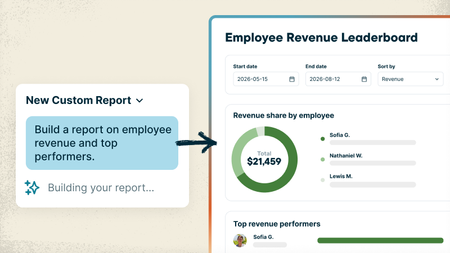
Every service business tracks things a little differently, and sometimes the answer you need is spread across different places in Jobber. Maybe you want to see which customers haven’t booked again this year, which neighborhoods bring in the most recurring revenue, or which jobs ran over their estimated hours. Getting answers that specific usually means exporting reports, digging through spreadsheets, or paying someone to build the report for you. With the new Custom Report Builder, you just type what you want to see and Jobber AI builds the report from your real numbers, with charts included if you want them. And unlike the standard reports, which only look at one area at a time, a custom report can pull data from across Jobber into one place: quotes, jobs, invoices, timesheets and more. What that looks like: Ask it like you'd ask your office manager. Something like "Show me revenue and labor hours by job type for the last 6 months" or "Which clients bring in the most revenue compared to the hours we spend on their jobs?" Need a change? Just say so. "Add a column for profit," "only show the previous 3 months." It updates and saves the report for you. Pulls from everything from across Jobber. Data from quotes, jobs, invoices, timesheets and more can live together in one report, so you can see the bigger picture without jumping from one report to the other. That's something the standard reports can't do. Save it and check back anytime. Reports live on your Custom Reports page and refresh with your latest numbers. Your team's permissions stay the same, so nobody sees what they shouldn't. Custom Reports are available on the Plus plan 🏗️ Build your first custom report 📖 Learn more 🎥 Watch it in the Jobber Now announcement What's the first report you'd build? Post your prompt below. Might give someone else a good idea!Cam2 days agoJobber Product Team76Views0likes2CommentsEffective Tagging - Who Is Doing It And What is Your Strategy?
I feel like tagging within customers might be the most forgotten about thing on our team but probably the lowest hanging fruit to keeping our information organized. Right now we are just tagging people we don't want to work with anymore and people that need to leave us a review. I''m struggling to do it in a way that's super effective. So for you tagging buffs out there, what are you doing to tag clients ad what strategy do you have? jobber - If you guys ever integrated JOB tags that would be amazing. I'm thinking we could tag jobs by category then reference them quicker. Instead of thinking of which clients we did which types of jobs for. Just putting "trim carpentry" or "doors" then seeing all the jobs we tagged with that would be clutch!HUGEHomePros4 days agoVerified Community Coach40Views1like2CommentsHow Do I Automatically Log My Expenses in Jobber?
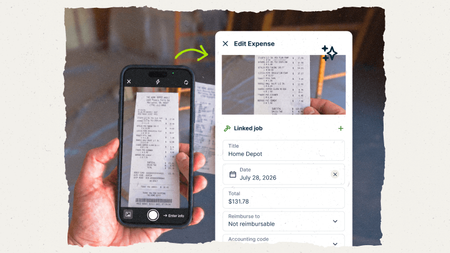
Keeping up with material costs can be a pain. Receipts get left in the truck, supplier invoices pile up in your inbox, and by the time you’re checking job costs, you’re trying to remember what went where. Jobber now gives you two ways to get those expenses in without typing everything out yourself. It pulls in the details, helps get costs onto the right job, and keeps your job costing up to date. (If you use Jobber Bookkeeping, those expenses flow into your books too!) Snap a pic of the receipt Your guys grab materials at the store, take a photo of the receipt in the Jobber app, done. Jobber reads it and creates an expense entry complete with all the details filled in for you. You or an admin give it a quick look and attach it to the job. Your most recent active jobs show up first, so it's quick to find the right one. It tracks who made the purchase, so dealing with reimbursement is easy. 📖 Learn more about Receipt Capture Add supplier invoices to Jobber You can get supplier invoices into Jobber in two ways: Upload or drag and drop them into Jobber: great for bulk uploads. If a PDF contains multiple invoices, Jobber separates them for you. Send them by email by forwarding them yourself, setting up auto-forwarding, or giving suppliers and subcontractors your unique Jobber email address Once the invoice is in Jobber, it reads the details and creates the expense for you. If it finds a matching job number, it links the cost to that job automatically. If not, you can quickly match it during review. 💡Pro tip: When you send a purchase order to a supplier, use the Jobber job number as the PO number. That PO number can carry through to the invoice, helping Jobber match the expense to the right job automatically. 📤 Upload invoices ✉️ Set up email forwarding 📖 Learn more about Supplier Invoice Scanning Receipt Capture and Supplier Invoice Scanning are available on the Plus plan 🎥 Watch it in the Jobber Now announcement How are you keeping track of material costs right now? Curious what's working for you folks!Cam5 days agoJobber Product Team9Views0likes0Comments
Would you pay $25/mo for job profit reports without upgrading your plan?
Hi all, I keep seeing the same thing in here and in reviews: owners on Core and Connect want to know which jobs and clients actually make money, what's booked for next week in dollars, and what got cancelled. Right now that means upgrading to Grow or Plus, or exporting to Excel or Power BI and cleaning the data every week. I'm a developer thinking of building a small add-on that connects to Jobber (read-only) and gives you: - Profit per job and per client (revenue minus labour, materials and expenses) - Projected revenue per day and week - A report of cancelled and unscheduled work and what it was worth - A Monday email with last week's numbers and who's overdue It would work on every plan for about $25/month. Before I build it, I want to know if it's worth it to you. If it is, add your email here: https://tally.so/r/RGXo49. The first 20 businesses get it free for 3 months in exchange for feedback. And if you'd tell me what report you'd want first, reply below. I read every one. Not affiliated with Jobber, just trying to build something useful. Ben Humphries47Views0likes2Comments
Salesperson Performance Report
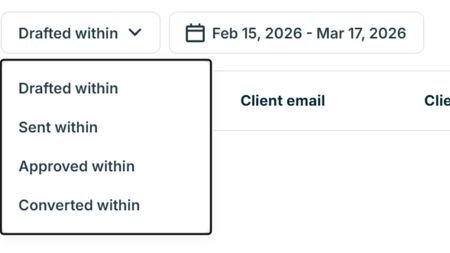
Product Enchantment...... It would be very beneficial to have a drop down similar to the Quote Report on the Salesperson Performance Report. It appears the Salesperson Performance Report is based only on when it is created, therefore, making it difficult to pay commissions on a weekly or monthly basis.Jbryan394220 days agoContributor 2131Views0likes2Comments
Pulling a report on different revenue categories
Hello, My business get revenue from 4 different areas. Sales, installations, Rentals, Service Agreements. I would like to be able to see a report that shows the total revenue for each of those categories. I have created custom fields with those categories but can't seem to figure out how to get a report on those. Currently jobber just lumps all revenue into jobs so I can't get a good idea of performance on each or what my average ticket is on each unless I do leg work and manually go in, export and parse it all out. Is there a report that does this in jobber? Thanks ErnieErnie20 days agoContributor 3261Views0likes3Comments
Forecasting in Jobber Feels Impossible — What Are Other Companies Doing?
Has anyone figured out a solid way to forecast monthly, quarterly, and yearly revenue inside Jobber? Ever since switching to Jobber, we’ve felt completely in the dark when it comes to forecasting and planning. We base a lot of our company goals around projected monthly, quarterly, and yearly revenue, but the reporting tools seem heavily focused on completed work only — not future scheduled work. We’ve tried: Pulling Visits reports (not very accurate for forecasting revenue) Separating recurring vs one-off work (also not very accurate) Looking through Insights/dashboard reports But we still can’t get a clear picture of: Forecasted revenue Upcoming scheduled revenue Total jobs scheduled for future months/quarters Number of jobs completed vs upcoming How many jobs we’re actually doing each month Ideally, we’d love to see: Revenue projections based on scheduled visits/jobs Monthly/quarterly/yearly forecasting Scheduled vs unscheduled work totals Job counts by month A future-facing reporting dashboard Right now it feels like all the reports only show historical/completed numbers, which makes planning really frustrating. What are other companies doing for forecasting inside Jobber? Are you using a workaround, exporting reports to spreadsheets, integrating with another software, or using a marketplace app? Would really appreciate hearing how others are handling this because we can’t be the only company struggling with this.daniginder20 days agoContributor 2130Views0likes1Comment
Equipment/Asset History Log
I have brought it up before to the team, but wanted to get feedback from other users on the platform. Equipment logs that could track model/serial number, work preformed, parts used etc. This would be extremely helpful in the commercial HVAC world where customers will have multiple pieces of equipment per site. We need to be able to look up the history on specific pieces of equipment when customers have questions, or for ourselves during service. I honestly don't think I can justify paying for Jobber without that feature included!EarthAIre1 month agoContributor 2389Views3likes3CommentsWhat KPIs is everyone tracking beyond the basic revenue numbers using insights?
I’m curious how creative people are getting with it. Are you tracking things like close rate by estimator, profit per job, callbacks, average ticket size, recurring vs one-time clients, drive time, or technician efficiency? Would love to hear what’s actually helping you make better decisions.roselvaggio2 months agoVerified Community Coach227Views3likes6Comments
KPI Dashboard
Does Jobber have anything in the works to show a KPI dashboard of short? Something that we can easily look at to see certain metrics important in our business. Some of these could include set goals such as booked jobs for the week, month. Some others could be close rates, total sales, etc. If not, what would be a good integration alternative?Pinestraw2 months agoContributor 22.6KViews5likes23Comments



If you have a specific question about your Jobber account, reach out to our Success Team directly:
➡️ [email protected]
➡️ 1-888-721-1115
➡️ via chat in your Jobber account
Tags
- reports18 Topics
- reporting & business insights14 Topics
- work smarter11 Topics
- cleaning6 Topics
- integrations5 Topics
- jobber home5 Topics
- lawn care4 Topics
- plumbing4 Topics
- jobber ai4 Topics
- property maintenance4 Topics