Australian customers: full subscription prices, fewer features. When will this change?
As an Australian business owner using Jobber, it increasingly feels like Australia has been abandoned when it comes to access to the full platform. We continue paying substantial subscription fees, yet important features available in other markets remain unavailable here: Two-way text messaging. Jobber’s Google review tools connected to our Google Business Profile. Access to the full Marketing Suite. Jobber Payments. These features directly affect how we communicate with clients, market our businesses, build our reputation and get paid. What makes this particularly frustrating is seeing smaller Australian CRM startups, including new “vibe-coded” platforms, offering two-way texting. If they can make it work, why are Australian Jobber customers still waiting? Homeworks explicitly supports two-way texting in Australia and offers email marketing, automation and online payment tools. That makes it difficult to understand why these gaps persist with Jobber. If there are technical, regulatory or commercial barriers, explain them clearly. From a customer’s perspective, I haven’t received an explanation that makes sense of the difference. There is also a fundamental question of value: why are Australian customers expected to pay standard subscription prices while receiving a materially smaller feature package? I recognise that some features are paid add-ons. The frustration is that we cannot even access those options here. I’ve raised these concerns with Jobber support repeatedly. In my experience, the responses have been generic acknowledgements without a meaningful explanation, clear commitment or useful timeframe. Whatever the intention, the message I’m left with is that Australian customers simply aren’t a priority. I’d like Jobber to publicly address three questions: What specifically is preventing these features from being available in Australia? Is there a committed Australian rollout plan, and what are the expected timeframes? Will Jobber offer pricing that reflects the reduced functionality available to Australian customers? I’m posting this because I want the issue acknowledged and addressed. Australian businesses invest real money and time into building their operations around Jobber. We deserve transparency about what we’re paying for and whether these gaps will actually be closed. Are other Australian users feeling the same way, and has anyone received a concrete answer beyond their feedback being passed along?
How to manage and optimize leads before they become paying customers?
I am looking to optimize leads, plan routes for the sales departments and optimize so staff is not zigzagging all over town. These are not visits as no jobs are created yet, these are leads. I want staff to hand out flyers, business cards, etc. Is there a way to manage and optimize routes from the client list, specifically for clients who have not converted from a lead to an actual yet? How are others managing this? My prospects are typically other businesses as we are a B2B operation.How to prevent or merge duplicate client records when syncing with QuickBooks?
I've been asking about this for a while and am hoping that someone has found a solution. At least once a week, when syncing with quickbooks, I get an error message saying that it can't sync CLIENT NAME because CLIENT NAME already exists. There are essentially two causes of the problem: An existing customer uses the on-line request form. The most common thing I'm seeing is that they type their address as "NJ." When we enter new clients, we use the autofill feature with the address that always fills with "New Jersey." We usually catch the error AFTER the technician has gone out and done a job, entered job notes, created and invoice and collected payment. Now we have two records in jobber, each with incomplete information, The second cause of the problem is if I or my office manager are talking to someone and create a new customer account. I can't blame anyone but myself, but it would be a nice feature for jobber to catch that. If I change a password on my bank account and I used that password a year ago, the bank notices it. If I try to open a google account and use my name when I already have a google account, google catches it. So does just about every other on-line service. So my first question is how come Quickbooks, TDBank and Google can figure it out and Jobber can't? My second question is with all the investment in artificial intelligence, how come jobber can't see that it has two records with the same name, phone number, email address and street address? This could be resolved in one of two ways: Either have jobber check if the name/address/phone number or another unique identifier is being use when a new client is entered. Have jobber allow me to merge the two client records into one. Right now, it takes half an hour for me to cut and paste between the two records to make one. The real pain in the neck is the photos we take for our customers projects. They can't be cut and pasted between two jobber accounts. They need to be downloaded from the extra client record to my PC, then uploaded to the other client record. Sorry for my venting - but this is getting to be a real time killer for me. I invested in computer hardware and software to make up for my shortcomings - not to create problems that I have to use my evenings to fix. Anyone else care about this, or am I the only one with the problem?1.3KViews3likes12Comments💡FEATURE REQUEST: Schedule Send Communications
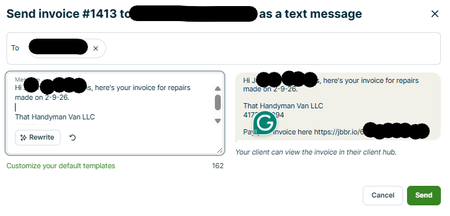
When I’m ready to send an estimate or invoice, Jobber makes it easy to send directly to the customer. The issue is timing. I often finish admin work outside normal business hours because I’m in the field during the day. When I send estimates/invoices late at night, it can feel unprofessional (or at minimum, it triggers customer replies at weird times). Current workaround: I send the estimate/invoice to myself, then schedule send it to the customer later during business hours. Phones make this easy. It works, but it’s extra steps. Feature request: Add a “Schedule Send” option when sending estimates and invoices, similar to email scheduling. Ideal behavior: At send time, give options: Send now / Schedule send For schedule: choose date + time (and time zone handling) Queue it and show status like Scheduled / Sent / Failed Allow cancel/edit of scheduled sends This would save time, reduce mistakes, and keep customer communications going out at appropriate times without requiring a workaround.
Why is Property Name missing in add/edit property? (It's visible in client edit view.)
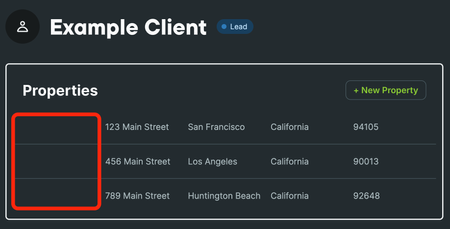
When viewing a client's properties on the Client page, I noticed that the left column is oddly empty: Clicking the + New Property button or clicking on an existing property and clicking the Edit button opens a dialog with the following fields: However, clicking on the Edit button for the client, scrolling down to the Property address section, and clicking the Add Another Address button, a dialog opens with an additional field, Property name: Adding a property name displays that info in the left column of the property list on the client's page: This seems like the intended functionality because: Assigning names to properties makes working with multiple properties much easier. The feature is already built into the product and should be fully functional. So, to fix the missing data field in this dialog: Typing ~5 lines of existing syntax 10-15 minutes of testing Minimal time for code review / QA sign-off Deploy in the next scheduled update It seems extremely unlikely I am the first to report this, yet I first raised this issue nearly five months ago and was told the feature was not implemented, even though it is clearly used elsewhere, showing it is intentional and fully functional. I followed up three and a half months ago with the exact code showing how simple the fix is. From my experience across the software production cycle, this is a simple functional omission bug: a UI regression that hides an already implemented feature and disrupts user workflow. The fix is trivial and low-risk. Realistically, from checkout to review, QA sign-off, and deployment, it requires maybe 60-90 minutes of human time. Can you confirm whether this fix is scheduled to be made, and if so, when it will be applied? Thank you.
Customer Appointment Confirmations
Let me preface with how we currently use Jobber in our daily workflow. I own an Appliance Repair Company and we currently have any new home visits setup as Requests. If we order parts the Request is then turned into a Quote so we can keep track of open orders. Once the customers part/s get checked in it is then turned into a Job and a return visit is then scheduled, upon completion the Job is then turned into an Invoice and payment collected. If we complete the home visit on the first time going to the customers home then the Request is turned into a Job and then an Invoice and payment is collected. One of the things I would like to integrate for my team would be better automation for confirming customers appointment times and the way that Jobber currently does this is not the best. What I am requesting would be a button inside the dashboard that would allow either the dispatcher or with permissions each technician to send out a batch of automated texts/emails to each customer on their schedule for the following day through the Jobber Two-Way Texting Number. It would be nice to also allow this to be automated as well (ex. every Sunday-Thursday at 6pm it would auto send for the following days Requests/Jobs). It would be fantastic to allow this to be editable to show details regarding their upcoming appointment specifically an arrival window. We cannot guarantee we can show up at an exact time as some jobs take longer then others and drive times may also vary so we book in 2 hour time slots. It would also be advantageous to include a prompt that would allow the Client to Respond Yes to Confirm and No to Reschedule. This should then be trigger an action that would then document their response into the Notes section of the said Request/Job. If they Select No a Task would then be generated and either sent to the Dispatcher or Technician, whoever sent the batch appointment confirmation. If this message goes un-responded to maybe allow it to send a reminder the following morning or notate that it is un-responded so that the appropriate person can follow up with the customer via phone call. As of this moment the only way there seems to be to do this is have someone build a custom prompt with Zapier and Twilo or other 3rd party software using webhooks and APIs. I am a huge proponent of keeping things as simple as possible and that the fewer apps that need to be used to perform a task the better as you are eliminating points of failure. I understand that not everyone has a cell phone but in todays day and age my Barber has this setup so I am unsure why it isn't possible to have this built into Jobber. If I am missing a feature in Jobber please feel free to let me know or if there is a simpler way to do this other then with Zaiper I am all ears! This is a time sink for myself as well as other service techs who have just worked a full day and then now have to call their customers for the following day. I would love to elevate that burden from them the best way possible. If someone know of a way to set this up with Zaiper and another app I am also all ears for that!
📧Email & 💬Text Templates (Not just for Quotes and Invoices)
We send repetitive texts and or emails to customers. We would ❤️Love it if Jobber offered text and email templates for any message. Maybe we could also use these templates/canned messages when responding to messages. These messages range from reminders regarding payment to "what to expect" or "what we need from you" regarding their upcoming project. It would be 💥 fantastic if we could click on a template, edit it as needed, and then send off the message! The quote templates have been amazing to use; we hope this soon follows... Thank you for considering our requests ☺️ ==> If you would benefit from this feature PLEASE 🙏 Click that 👍"Like" Button <==