Are You Pricing Jobs for Profit or Just to Win the Job?
Quoting can be one of the toughest parts of running a small business. It’s easy to lower your price to beat the competition, but that doesn’t always lead to a healthy business. A good quote should cover your time, materials, expenses, and the value you provide. The goal isn’t to get every job, it’s to get the right jobs that allow your business to grow. What’s one thing that helped you improve your quoting process?Solved255Views2likes7CommentsWhat marketing tool has given you the best return on investment?
Hi everyone! 👋 As a newer business owner, I'm trying to be intentional about where I invest my time and money. There are so many marketing tools available—from social media and Google Business Profile to vehicle wraps, yard signs, email marketing, referrals, and automation—that it can be hard to know what really works. If you could recommend just one marketing tool or strategy that has brought in the most customers for your business, what would it be and why? I'd love to hear what has worked for you and what you would recommend to someone just getting started. Thanks in advance for sharing your experience!173Views1like8Comments
Section for Vendors or Subs
Please help develop a functions to add 3rd party vendors/subs that may be used as needed or 1-time. The primary point would be contact and database of vendors with info and docs needed for our team to access if needed as well as would be nice for them to have scheduling, invoicing with pics and job tracking capabilities.82Views2likes1Comment
Suggestions for Jobber
Below is some suggestions I have for Jobber to improve use. This is reviewing the two past years of my company and the complications they have using it. Anymore? Keep it going! Create a filter in clients to separate residential and commercial. Display icon in clients for residential and commercial. Prompt you if a duplicate client is being created. Identical names especially for companies shouldn't be allowed. Option to turn off archived search results when using the search bar. Create a collect payment button for invoices instead of having to click edit invoice to collect payment. Under save invoice options add selection save invoice and mark as sent. Create an edit mode for products and services and for visits. You would click the button allowing you to change the text in the columns and toggle taxable or non taxable. when edit mode is turned off it will save any changes. You can also do a select box so you can deactivate or delete multiple at a time. For visits, dates should be an option in the edit mode. Length of visits should be an option in one off or recurring. Shouldn't just default to all day. Quotes have a bulk archive, this should be added to jobs and requests and for the quotes there should be options such as bulk archive, bulk approve. When converting quotes to a job there should be selection boxes to select which line items you want to convert. And once line items are converted and someone tries to do it again maybe a popup saying this has already been converted to job #______ are you sure you want to proceed? In Manage teams, allow you to create a password for your technician. Sometimes techs are in the field having issues and don't have time to verify and change a password. Administrators should have this option.263Views3likes3Comments
Referral Credit System Is Very Lacking
This post is feedback, and a place to allow other users to leave feedback, for the Client Referral marketing tool in Jobber. The current client referral system is very lacking for a premium paid feature. We would like to see some deep functionality changes and additions immediately, since this has been around for a while now with no improvements....here is my current thoughts on what could be added or should be changed - Credits need to show in the Clients file (maybe under account balance) Staff needs to know if a credit is available or could apply for sales purposes. Currently its restricted to owners/admins in the marketing section and you can't do anything with that info anyway from there, its pretty useless. Credits need to be usable across the whole system & in the field (mobile invoices), we better for techs in the field ('hey, i see you have credit, would you like to use it on this invoice?') Credits need to be adjustable, we want to be able to add referral credits manually if we see fit. (this is especially ideal for when staff forgets to fill out the referrer entry on a job) which happens all the time. Apply credits anyway we would like (if a client has a $100 in credit, we want to be able to apply that whole amount if they have a huge invoice(s) being paid at once) the current automatic application is not good enough. Credit Amount settings ($ / % amount) should be able to be set based on Client type/tag (if the client is a Builder Partner we want to give them 10%, instead of just the $50 we give to a regular customer per lead) Option to set the Amount of credit ($/%) given based on a range of invoice value (5% for $100-500 invoice amount / 8% for $500-1000 invoice amount / etc) Option to exclude certain Clients from the referral program (we have builder partners that are on a completely different program internally, we do not want there account to also be getting other discounts). Option in Jobber websites to add a Refer A Friend button, so we do not have to rely on the email campaigns that most people don't open. Allow the client to see credits in their portal, and apply them to invoices when making payments.How to back up job photos and files from Jobber?
Hey all, just wondering if this is something others have run into. A few of our clients have been talking about how they handle long-term storage of job photos and documents, especially when staff leave, or when they want to organize files outside of Jobber. Some mentioned wanting to move things to Google Drive or DropBox automatically, but I’m not sure how common that need really is. Just curious, have you or your team thought about this? Is keeping a backup of Jobber media files part of your process, or not really a concern? Appreciate any thoughts! Josh399Views0likes2Comments
Job Templates for repeat work
There should be an ability to create job templates for repeat types of work. Many business have some core services they offer and having to type out the titles every time and set the number of hours every time and then having to add the line items each time is a real hassle. There should be an ability to create a template where the title can be autogenerated by certain fields or criteria and times for those jobs can be preset with the default line items loaded. Then you would only need to select a client and property. Having templates like this would take a lot of the time consuming administrative burden off.717Views0likes3Comments
PLEASE add a kit function
Even the bottom of the barrel CRM that I'm currently using has a robust kit function. Create products with fully editable costs and quantities, then add those products to a kit (in this case, what a "service" should be). Once a kit is entered into a quote, individual products are hidden from the customer, but fully editable when creating the quote. As it is now, I have no idea what the difference between a "product" and a "service" are. They both have the same info (name, description, cost, etc). You should just be able to group products to form services. If i have a product of "labor" and a product of "receptacle". I should then be able to create a service of "Replace Receptacle". That service would consist of my labor product, and my receptacle product. Both with quantities and costs that I could edit when creating a quote. Since not all receptacles are the same, and my customer doesnt care whether its a duplex or a decor, being able to edit the cost of that receptacle, straight from the kit during quote creation, would be amazing.Solved442Views3likes8Comments
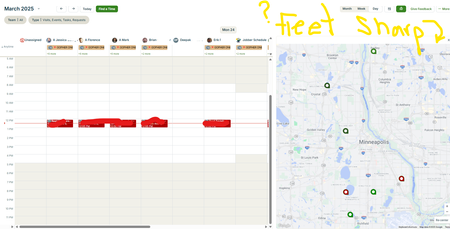
🚗Fleet Sharp and Schedule (alpha) Split Screen
Hello, Our Fleet Sharp trackers do Not populate on the schedule (Alpha) split screen. We heard about Force Fleet at the spring feature announcement, and we have seen screenshots of Force Fleet trackers visible on the schedule split screen. We are wondering (hoping 🙏) if Jobber will update the split screen to show both Force Fleet AND Fleet Sharp trackers. We are wondering if anyone has heard or knows info regarding this topic. Thank you205Views1like2Comments