Are You Pricing Jobs for Profit or Just to Win the Job?
Quoting can be one of the toughest parts of running a small business. It’s easy to lower your price to beat the competition, but that doesn’t always lead to a healthy business. A good quote should cover your time, materials, expenses, and the value you provide. The goal isn’t to get every job, it’s to get the right jobs that allow your business to grow. What’s one thing that helped you improve your quoting process?Solved348Views2likes7CommentsSell me on Jobber vs Quickbooks Time
My employees struggle to ever set up the Quickbooks Workforce app, which ask them to scan a QR code to finalize set up, but they're setting up from their phone and can't. Has anyone tried both timesheet apps? I'd love to know pros and cons.Solved76Views1like4CommentsWelcome to the Community! Hi team What’s Your Business Journey? 👋
Whether you’re brand new to Jobber, just starting your business, or have been running a successful company for years we’d love to hear your story! Introduce yourself: What type of business do you run? How long have you been in business? What’s one goal you’re working toward this year? What’s one thing you’ve learned that could help another business owner? This community is full of people at different stages, and everyone has something valuable to share. Let’s connect, learn from each other, and grow together!Solved101Views2likes3Comments
How to manage and optimize leads before they become paying customers?
I am looking to optimize leads, plan routes for the sales departments and optimize so staff is not zigzagging all over town. These are not visits as no jobs are created yet, these are leads. I want staff to hand out flyers, business cards, etc. Is there a way to manage and optimize routes from the client list, specifically for clients who have not converted from a lead to an actual yet? How are others managing this? My prospects are typically other businesses as we are a B2B operation.Home Depot Pro Referral Integration ?
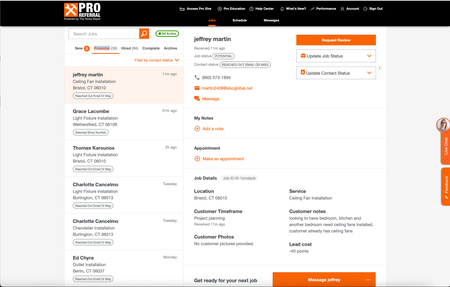
Good afternoon, I know a lot of contractors are listed for Home Depot Pro Referral - and I was wondering if Jobber has had the ability to directly integrate with them. Since using jobber, I have had my office manager transfer every contact over, one by one, because it didnt allow us to track stats/communication within home depots crm. So I was wondering what do you all use ? Or is it all manual for you too? If you want to check it out - here is the link Try Home Depot Pro286Views1like5Comments
Quo & Jobber and some other question...
I would like to speak with someone who is using both Quo and Jobber. I am coming back to Jobber from Housecall Pro and wanted to confirm a few things, I'd love if I can have an actual conversation with a pro using the system daily. Quo related questions: In my current system I am able to both text and call from the same number. It seems that I won't be able to do that with Jobber, but I am thinking that the number Jobber provides for texting I will use just for "system generated messages and marketing" and our Quo number for calling customers and texting them to discuss proposals, etc. Is anyone doing anything similar? Do calls and texts from Quo show up on Jobber? Other system questions in case someone is able to assist: We service generators and it's important for us to track service agreements as well as equipment details. How are these being handled in housecall? Most of our jobs are multi day installs with inspections and work thrown in between. Is that easy to handle in Jobber? How is the price book? Am I able to categorize items by brand or any other method? What is everyone's opinion on websites created within Jobber? Thanks!!76Views1like1Comment
Weather Widget 🌞🌧️❄️🔥
Is it possible to integrate Jobber with a weather app? On the dashboard, we were thinking a 7-day forecast could be visible. Also, I thought a small temperature reading on the monthly calendar would be visible. We also thought the weather for the day could be captured and saved as an internal note for the job.Solved477Views5likes9CommentsBusiness Phone Number - Who's Should You Use and How Should You Use it?
When it comes to phone numbers, I treat the Jobber phone number as an “automation line,” not my primary business number. I use it for all the built-in Jobber automations—invoice/receipt texts, appointment reminders, “on my way” notifications, and anything else Jobber sends out automatically. It’s great for consistent system messaging and keeping those operational texts separate from my real day-to-day communication. The reason I don’t use the Jobber number as my main public-facing number (website, trucks, yard signs, etc.) is ownership and portability. The Jobber number can’t be ported out, so if you ever switch systems or change your setup, you don’t truly “own” that number long-term. I’ve made the mistake of putting a non-portable number on marketing before, and it’s a headache when you realize it can’t follow you. Instead, I recommend your primary business number be something you control and can port—either from a carrier, Google Voice (depending on your needs), or another platform where portability is confirmed. Then use tools like Chiirp (and I haven’t personally explored GoHighLevel/Hatch deeply, but they’re in the same category) for your primary communication + higher-level automation, because those platforms typically offer much more robust automation like out-of-office replies, drip campaigns, and automated texting workflows. So my personal setup philosophy is: Jobber number = system/operations messaging only; your “real” business number = portable, owned by you, and used everywhere customer-facing. Then if you need advanced automations like out-of-office replies, I’d build those in a dedicated communication/marketing platform that’s designed for it—not inside the Jobber number.1.1KViews9likes18CommentsPersonal Phone Number Vs. Business Phone Number?
As I continue growing my cleaning business, I’ve been thinking more about whether it’s better to use my personal phone number or set up a separate business line. Right now, I handle most communication directly, which makes things simple—but I’m starting to see how it can blur boundaries between work and personal life, especially with calls and messages coming in at all hours. I’m curious how others have handled this as they’ve grown. Do you use your personal number for your business, or did you switch to a dedicated business line? If you made the switch, at what point did it feel necessary? Have you noticed a difference in professionalism or client trust with a business number? What systems or apps do you recommend for managing calls, texts, and voicemails efficiently? How do you set boundaries with clients regarding response times or after-hours communication? For those managing a team, how do you handle incoming calls—do you delegate or keep it centralized? I want to make sure I’m building systems that will grow with my business while still staying responsive and professional. Would love to hear what’s worked (and what hasn’t) for you!228Views1like4Comments