How do you manage quotes that never get accepted?
Hey everyone! I'm curious how you handle quotes that customers never respond to. Does Jobber's built-in follow-up automation do enough to bring those customers back, or do you still have to manually track unanswered quotes and chase leads? What part of the process do you find most frustrating? I'd be interested to hear what's working for you and what could be improved.81Views3likes8Comments
Australian customers: full subscription prices, fewer features. When will this change?
As an Australian business owner using Jobber, it increasingly feels like Australia has been abandoned when it comes to access to the full platform. We continue paying substantial subscription fees, yet important features available in other markets remain unavailable here: Two-way text messaging. Jobber’s Google review tools connected to our Google Business Profile. Access to the full Marketing Suite. Jobber Payments. These features directly affect how we communicate with clients, market our businesses, build our reputation and get paid. What makes this particularly frustrating is seeing smaller Australian CRM startups, including new “vibe-coded” platforms, offering two-way texting. If they can make it work, why are Australian Jobber customers still waiting? Homeworks explicitly supports two-way texting in Australia and offers email marketing, automation and online payment tools. That makes it difficult to understand why these gaps persist with Jobber. If there are technical, regulatory or commercial barriers, explain them clearly. From a customer’s perspective, I haven’t received an explanation that makes sense of the difference. There is also a fundamental question of value: why are Australian customers expected to pay standard subscription prices while receiving a materially smaller feature package? I recognise that some features are paid add-ons. The frustration is that we cannot even access those options here. I’ve raised these concerns with Jobber support repeatedly. In my experience, the responses have been generic acknowledgements without a meaningful explanation, clear commitment or useful timeframe. Whatever the intention, the message I’m left with is that Australian customers simply aren’t a priority. I’d like Jobber to publicly address three questions: What specifically is preventing these features from being available in Australia? Is there a committed Australian rollout plan, and what are the expected timeframes? Will Jobber offer pricing that reflects the reduced functionality available to Australian customers? I’m posting this because I want the issue acknowledged and addressed. Australian businesses invest real money and time into building their operations around Jobber. We deserve transparency about what we’re paying for and whether these gaps will actually be closed. Are other Australian users feeling the same way, and has anyone received a concrete answer beyond their feedback being passed along?
Would you pay $25/mo for job profit reports without upgrading your plan?
Hi all, I keep seeing the same thing in here and in reviews: owners on Core and Connect want to know which jobs and clients actually make money, what's booked for next week in dollars, and what got cancelled. Right now that means upgrading to Grow or Plus, or exporting to Excel or Power BI and cleaning the data every week. I'm a developer thinking of building a small add-on that connects to Jobber (read-only) and gives you: - Profit per job and per client (revenue minus labour, materials and expenses) - Projected revenue per day and week - A report of cancelled and unscheduled work and what it was worth - A Monday email with last week's numbers and who's overdue It would work on every plan for about $25/month. Before I build it, I want to know if it's worth it to you. If it is, add your email here: https://tally.so/r/RGXo49. The first 20 businesses get it free for 3 months in exchange for feedback. And if you'd tell me what report you'd want first, reply below. I read every one. Not affiliated with Jobber, just trying to build something useful. Ben Humphries67Views0likes2Comments
Weather Widget 🌞🌧️❄️🔥
Is it possible to integrate Jobber with a weather app? On the dashboard, we were thinking a 7-day forecast could be visible. Also, I thought a small temperature reading on the monthly calendar would be visible. We also thought the weather for the day could be captured and saved as an internal note for the job.Solved598Views5likes11CommentsAre You Pricing Jobs for Profit or Just to Win the Job?
Quoting can be one of the toughest parts of running a small business. It’s easy to lower your price to beat the competition, but that doesn’t always lead to a healthy business. A good quote should cover your time, materials, expenses, and the value you provide. The goal isn’t to get every job, it’s to get the right jobs that allow your business to grow. What’s one thing that helped you improve your quoting process?Solved446Views2likes7CommentsSell me on Jobber vs Quickbooks Time
My employees struggle to ever set up the Quickbooks Workforce app, which ask them to scan a QR code to finalize set up, but they're setting up from their phone and can't. Has anyone tried both timesheet apps? I'd love to know pros and cons.Solved131Views1like4CommentsWelcome to the Community! Hi team What’s Your Business Journey? 👋
Whether you’re brand new to Jobber, just starting your business, or have been running a successful company for years we’d love to hear your story! Introduce yourself: What type of business do you run? How long have you been in business? What’s one goal you’re working toward this year? What’s one thing you’ve learned that could help another business owner? This community is full of people at different stages, and everyone has something valuable to share. Let’s connect, learn from each other, and grow together!Solved139Views2likes3Comments
How to manage and optimize leads before they become paying customers?
I am looking to optimize leads, plan routes for the sales departments and optimize so staff is not zigzagging all over town. These are not visits as no jobs are created yet, these are leads. I want staff to hand out flyers, business cards, etc. Is there a way to manage and optimize routes from the client list, specifically for clients who have not converted from a lead to an actual yet? How are others managing this? My prospects are typically other businesses as we are a B2B operation.Home Depot Pro Referral Integration ?
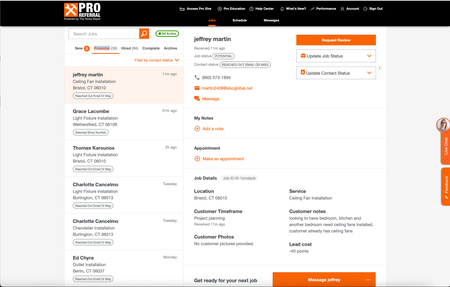
Good afternoon, I know a lot of contractors are listed for Home Depot Pro Referral - and I was wondering if Jobber has had the ability to directly integrate with them. Since using jobber, I have had my office manager transfer every contact over, one by one, because it didnt allow us to track stats/communication within home depots crm. So I was wondering what do you all use ? Or is it all manual for you too? If you want to check it out - here is the link Try Home Depot Pro355Views1like5Comments