Forum Widgets
Recent Discussions

Online Booking/Scheduling
I wish Jobber would incorporate a feature into the scheduling where one could make a schedule as follows : Every other Monday, Tuesday, Friday, Saturday, Sunday. Every other Wednesday, Thursday etc. Basically I need to create a schedule to work around my full time job schedule as we work rotating shifts. 2 on 2 off 3 on 2 off 2 on 3 off etc. I would love to setup online booking but can't because I cannot remove the days I'm unavailable due to my full-time job schedule. Can we get this feature added soon?!??bahandymanwf2 hours agoContributor 2145Views0likes2CommentsDoes Anyone Use Online Booking to Book Discovery Calls? Asking for a Friend :)
Hey guys I was listening to Marcus Sheridan and he was talking about his usual stuff about making estimators, but he also talked about how after the estimator they book themselves on a call or for someone to come to the house. I'm a little protective of my time so I don't just go to every house that wants an estimate but I was wondering, if anyone is using the online booking feature like Calendly or any of those other meeting booking websites, to put their sales calls on their jobber calendar? I'm trying to avoid having too many different software systems and I pretty much live out of my jobber calendar anyway.HUGEHomePros18 hours agoVerified Community Coach2Views0likes0CommentsAn automated email was sent to a client today that I didn't know was automated...
Sorry this is a little long-winded but I need help! I received an online request via my (Jobber) website and Jobber sent me an email as usual, I called the client and we talked about a few times for an initial assessment the following day. The job came in as a "request" and I was able to book it in as an "assessment". These terms were all provided by Jobber, so I put that assessment in my schedule at 8am the following day just so it would be at the top of my day list to move around as I needed. The customer got an email that I booked it for 8am, but we spoke about an afternoon time. She was at the location for 8am but I couldn't be there until afternoon! She wasn't upset as she said she actually needed the time to complete some tasks, but she said I should look into this to prevent someone else getting that email. I keep thinking this could have gone really bad. I don't remember clicking anything that said to notify the client or send an email, so I am wondering if this is automated? Can I turn that off? Does that email send to anyone when I move their day or time? Is it because I booked it as an assessment and not a job?PestFreeCanada2 days agoVerified Community Coach29Views0likes2CommentsJobber users how are you handling new requests that don't respond after the first contact?
Do you leave them sitting in New until they respond, archive them, or have some kind of process for keeping the request list clean? I'm curious how other service businesses are handling this, especially when you have a lot of incoming requests. What does your process look like?88Views0likes2Comments
How to charge for inspections in advance with online and AI Booking?
We have been trying to use the online booking feature as well as the AI assistant booking feature on jobber. We primarily use it to schedule inspections. The major downside, is that without speaking to the clients first, we cannot vet the quality of inspections, and we end up with lots of last minute cancelations and low quality leads. I think that charging an inspection fee or even simply collecting a card on file would help prevent these issues. What is the best way to go about this? It doesn't seem like jobber gives the option to prepay for services?129Views1like2Comments
Has anyone used the online booking forms successfully with custom confirmation pages?
We’re trying to better understand how other users are handling request form confirmations. Has anyone successfully used the “custom confirmation page” option with online booking/request forms? Specifically: Are you able to redirect customers to a separate thank-you or instruction page after form submission? Does the redirect work consistently on desktop and mobile? If not, what workflow are you using instead? We’re trying to improve customer clarity after submission and would appreciate hearing how others have configured this successfully. Thanks in advance.EnciPlumbing3 months agoContributor 296Views0likes1CommentQuestion About Jobber Request Form Confirmation Behavior and Mobile PDF Attachments
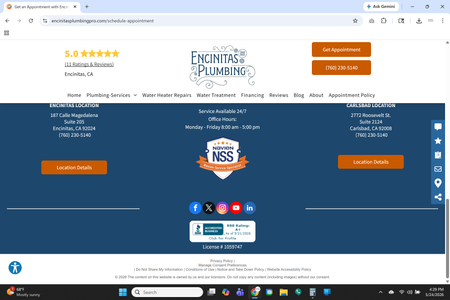
We’re trying to determine whether other Jobber users are experiencing similar behavior with request forms and estimate attachments. We’ve noticed that after a customer submits our request form, the page appears to load near the footer instead of clearly displaying the confirmation message near the top of the page. Over time, we’ve had multiple customers contact us asking whether their submission went through because they were unsure if the form had successfully submitted. We also noticed that the “custom confirmation page” option appears in settings, but we haven’t been able to get it functioning properly on our end. Separately, we’re experiencing an issue on iPhone and iPad where PDF attachments (specifically our Terms & Conditions PDF) fail to upload when attaching documents to estimates through the mobile app, even though this previously worked for us. Has anyone else experienced either of these behaviors or found a workaround? I’ve attached screenshots showing the post-submission page positioning issue for reference. What customers see after redirect. If they scroll up they can see the confirmation message, but they have to know to do this. Attachment screen error as displayed on all mobile devices.EnciPlumbing3 months agoContributor 2145Views1like1Comment
Can I add Job Forms to an Assessment?
We have an internal first time site visit checklist (PDF Doc) that we want the guys to follow. I see where I can make job forms on Jobber and then add them to jobs. But in the workflow, the site visit form is different than the job form. I can't seem to add job forms to assessments on the system. Am I missing something? If you cannot add job forms to an assessment, can I make a request to have that feature added?gdy20005 months agoContributor 2360Views0likes6Comments
Improving Jobber's Online Booking for a Cleaning Business
Hey everyone, I love using Jobber for my cleaning business, but I’m finding the online booking functionality a bit lacking. We’re losing potential clients and wasting ad spend because customers can't book instantly online. While we always respond quickly to inquiries, the inability to offer instant booking is really hurting us. We provide a range of services—End of Lease, General Home Cleaning, Airbnb Cleaning (based on the number of rooms, bathrooms, etc.)—and have optional extras like oven cleaning and linen hire. Setting all this up in Jobber's online booking system has been a nightmare! I know some of our competitors use platforms like Booking Koala or Launch27, but I really don’t want to switch. Has anyone found a good workaround within Jobber or a solution that works for similar businesses? Any advice would be greatly appreciated!HouseKept5 months agoContributor 32.1KViews6likes32Comments


If you have a specific question about your Jobber account, reach out to our Success Team directly:
➡️ [email protected]
➡️ 1-888-721-1115
➡️ via chat in your Jobber account
Tags
- requests10 Topics
- online booking10 Topics
- cleaning4 Topics
- websites3 Topics
- advertising3 Topics
- plumbing3 Topics
- landscaping1 Topic
- pressure washing1 Topic
- property maintenance1 Topic
- integrations1 Topic