How Fast Do You Pick Up a Phone Call or Call Someone Back After a Missed Call?
Curious how everyone here handles this, because a new Jobber survey of recent homebuyers turned up a stat that stuck with me: 15% had to follow up repeatedly just to get a response from a contractor 9% never heard back at all Losing potential business due to something that is not a pricing problem or a skill problem should be a wake up call. In a world where 75% of new homeowners hire a pro within their first two years of buying, being the one who calls back first might be the easiest job you win all week! So, what's your business standard? Do you answer within a certain time frame or let it go to voicemail and call back same day? Are there systems set up so nothing slips through the cracks? 👉 Recent Homebuyer Report: It's got homeowner quotes on what made them trust (or ditch) a contractor, plus a breakdown of how each generation actually finds a pro.39Views2likes3Comments
What’s holding most service businesses back
I’ve been thinking about this lately, what’s actually holding most service businesses back? Is it: • Lack of leads • Poor systems • Weak pricing • Or the owner not stepping into the business role Because I’ve seen companies busy all day… but still stuck. Curious what do you think is the real bottleneck?131Views1like4CommentsWhat Should Home Service Businesses Automate First to Save Time?
Small manual tasks start stacking up, catching up on follow-ups, re-adjusting scheduling, invoicing, review requests, the list goes on and on. Sound familiar? What’s one task you’re still doing manually that you know could be automated? What’s stopping you from setting it up?288Views0likes7CommentsHow do home service businesses fill their calendar before busy season?
When work slows down, most service businesses feel it fast: stress, cash flow pressure, and last-minute scrambling. Sound familiar? What’s the one thing you rely on most before busy season to keep your calendar full? New leads Repeat customers Referrals Deposits or upfront payments Booking weeks in advance Something else? (do tell!) Bonus: What used to stress you out about slow periods that doesn’t anymore?308Views0likes8CommentsWill AI replace jobs in home service and skilled trades?
I saw an article yesterday about all the tech jobs that are being replaced by AI and I thought about how hard that would be to know your position can be replaced by someTHING that can do it faster and cheaper than you can. Then I thought how happy I am that I decided a long time ago that I am going to work with my hands. Be handy. Solve real problems. I would be safe in saying that AI is never going to cut your lawn, remove your junk, exterminate your bed bugs, plumb in or wire your home. Am I going to regret saying this? Is AI reading thins and just started plotting to take all our jobs???237Views3likes4CommentsHow Are Home Service Businesses Preparing for AI Search Visibility?
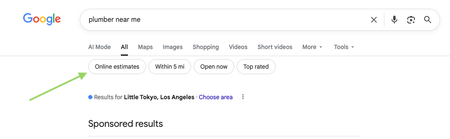
Search is changing fast. We’ve already seen Google test online estimates and AI-assisted pricing in local search. Now, AI tools are helping homeowners decide who to call, sometimes before they ever visit a website. Scorpion Marketing published a report with the following stats: 22% of homeowners are already using AI tools to research services or get recommendations 80% of business owners say they don’t know how to prepare for AI-driven search visibility We’d love to hear what you’re seeing👇 Have you noticed changes in how customers find you or ask questions? Are you doing anything intentionally today to prep for AI-driven search? If AI search on your radar but still confusing, what question do you have? This space will continue to evolve. Sharing what’s working (or not) across different trades helps everyone get ahead of it!224Views1like2CommentsNew Google Search Features: Online Estimates Filter and “Have AI Check Prices” — what does this mean for service pros?
Google has recently started rolling out new pricing-related features in local home service search, and they could impact how service businesses get discovered. Two early changes we’re seeing: “Online estimates” filter Google is beginning to surface an Online estimates filter in some home service searches. Early signs suggest businesses that provide clear, machine-readable pricing or instant estimates may be favored over generic contact forms. “Have AI check prices” or “Ask AI for Pricing” feature Google is also testing an AI feature that gathers pricing on a homeowner’s behalf by using AI to call businesses and collect price quotes. https://www.youtube.com/watch?v=illIa8LSfY0 These features are still new and evolving, but they raise big questions about pricing transparency, estimates, and local search visibility. We’re curious: Have you noticed either of these features in your area yet? Do you currently show pricing or estimate ranges online? Do changes like this make you rethink how you approach pricing and Google visibility? Would love to hear what service pros are seeing so far 👇2KViews0likes14Comments
🚨FEATURE REQUEST: Tiered Pricing on Products & Services 🚨
Hey Jobber Team and Fellow Pros, Let’s talk about a feature that could seriously boost close rates and make Jobber even more competitive for all of us who quote services, manage inventory, and work in price-sensitive markets. What we need: Tiered Pricing on Products and Services — customizable pricing where the unit cost automatically adjusts based on quantity ordered. Why this matters: We already price materials like mulch, sod, and stone this way in real life. It would speed up quoting, improve estimate accuracy, and help us win more jobs. It mirrors how customers expect to see pricing — more they buy, less they pay per unit. How it would work: Let users define pricing tiers for any product/service: 1–10 units = $10/unit 11–50 units = $8/unit 51+ units = $6/unit These price breaks should auto-calculate during estimate creation and carry through to invoicing. Why Jobber Should Care: Makes Jobber more competitive vs. other platforms offering advanced pricing features. Helps your users convert more jobs = more usage and more loyalty to Jobber. Reflects real-world pricing logic we already use outside the app. If you'd use this — drop a comment or like to help get this in front of Jobber’s dev team. Let’s get this done together!634Views7likes8Comments