Up Your Follow-Up Game & Win!
I hear a lot of business owners and leaders talking about "getting leads". Don't get me wrong, leads are important. However, what you do with those leads is more important. When you get a lead, how long does it take you to reach out and make contact? Did you know that your chances of closing that lead as a customer drop drastically if you do not make contact in the first minute or two, in many cases. Your customers are able to click and learn about your competitors very rapidly. If you are failing at "speed to lead", you are likely missing clients. How many times do you follow up? For how long? I suggest following up "until you get a solid yes or no". That lead is a client until they prove themselves otherwise. The only way you know they are not a client, is to hear that actually say "no, I am not interested". Until you get that no, they are still a potential yes. If it takes 10 follow-ups or a year, keep trying. You never know if that potential client has had a change in life condition that makes your services more or less relevant over time. Don't give up. Follow up on your leads. And don't just text ..... GET ON THE PHONE!297Views1like5CommentsAre You Pricing Jobs for Profit or Just to Win the Job?
Quoting can be one of the toughest parts of running a small business. It’s easy to lower your price to beat the competition, but that doesn’t always lead to a healthy business. A good quote should cover your time, materials, expenses, and the value you provide. The goal isn’t to get every job, it’s to get the right jobs that allow your business to grow. What’s one thing that helped you improve your quoting process?Solved354Views2likes7Comments
How to charge for inspections in advance with online and AI Booking?
We have been trying to use the online booking feature as well as the AI assistant booking feature on jobber. We primarily use it to schedule inspections. The major downside, is that without speaking to the clients first, we cannot vet the quality of inspections, and we end up with lots of last minute cancelations and low quality leads. I think that charging an inspection fee or even simply collecting a card on file would help prevent these issues. What is the best way to go about this? It doesn't seem like jobber gives the option to prepay for services?109Views1like2CommentsWhat Automated Follow-Up Campaigns Should Home Service Contractors Set Up to Get More Repeat Business?
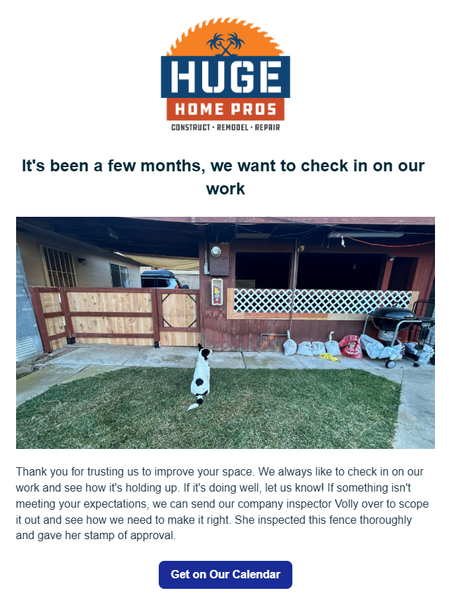
Hey guys! For those of you that have access to the marketing suite - there's a few things you can set up today, that will pay off as long you have it active. 1st - Check in on your work 2-3 months after it's done. This timeline is what I'm using for our type of projects so yours could be sooner. A lot of contractors will do a project then never reach out to the home owner again. I can't tell you how many jobs we've received just because we had this automation set up. In the settings you just set it up for XX amount of months after the invoice is paid. 2nd - Ask them for a referral. This isn't asking for a review. That's a given. But you want to be asking home owners if they have any friends that could use your services. Jobber actually has a referral tracking system integrated in it as well. I will say that people are a lot more motivation to refer when there's a benefit to them. Personally, I don't think it's valuable to just offer $$ off your own services. I think you need to give them something they can use anywhere. Just my opinion. Set this up for 1 week after your job is finished/ invoice paid. 3rd - Set up a 1-2 year sequence of emails. You could set one up for one a week. 2 a month. The main thing is you want to show up in their inbox every week. You know those brands that you are too lazy to unsubscribe to so you see them in your email? Ya, be more like them. This can take some time but start out by giving them a monthly email, then start to add to it. It can be the same nurture sequence for anyone that gets added. How do you not be annoying? Make it more about education than selling them a service. Have AI come up with something for your industry and just make some time every week to chip away at it. Over time this will pay off. And i's a set it and forget it type thing that can have a massive long term impact in your business.48Views2likes1CommentHow Often Should Home Service Businesses Market to Their Existing Customers?
I recently started a discussion asking: "What's one Jobber feature you wish you had started using sooner?" One response really stood out to me. The member mentioned that while many businesses use Jobber to manage jobs, schedules, quotes, and invoices, one feature that often gets overlooked is the Marketing Suite. The point they made was simple but powerful: Many of us do a great job serving customers, but we don't always stay connected with them after the work is done. Instead of only reaching out when it's time to sell something, sending regular educational emails and staying active on social media helps keep your business top of mind. When customers eventually need your services again, or know someone who does they're much more likely to remember you. They also shared that Jobber's upcoming Marketing Calendar will make planning emails and social posts much easier, especially for teams that collaborate on marketing. It got me thinking, How many of us already have a list of past customers but rarely communicate with them? A simple monthly email with seasonal tips, maintenance reminders, or homeowner advice could be enough to keep those relationships alive. I'm curious: How often do you market to your existing customers, and what's worked best for you? I'd love to hear what others are doing.27Views0likes0Comments
New to Jobber, Quotes including pictures worth it?
Hey guys, I wanted to hear your thoughts on jobber quotes not including pictures for estimates in the core package? We are a full service property maintenance & Landscaping company. Anybody switch from core to grow because of it? We have a small team but growing. Last crm did have this feature on their middle plan and our clients loved it. It was extempore helpful to us as well. Was wondering if this is something we should switch to that would make a huge difference?266Views0likes2CommentsWhat is your favorite feature in Jobber? Why?
I'll go first. My favorite feature in Jobber is probably the new quote templates. This makes our selling process so much easier. It's also easier to train new sales people because we don't have to teach them how to write an entire quote. We can just teach them which template is best for the job, they are bidding.286Views3likes3Comments
How Do You Bulk Edit or Consolidate Lead Sources in Jobber?
I'm changing the lead source to consolidate door to door leads from per person to just Door to Door for my reporting. Jobber Ai says to go to each one to change it - duh, but I don't want to go through all my clients and find them. I tried both search bars when I'm on the client list, but neither is working. Any other tips - I'd love toSolved245Views0likes4Comments
Customer Appointment Confirmations
Let me preface with how we currently use Jobber in our daily workflow. I own an Appliance Repair Company and we currently have any new home visits setup as Requests. If we order parts the Request is then turned into a Quote so we can keep track of open orders. Once the customers part/s get checked in it is then turned into a Job and a return visit is then scheduled, upon completion the Job is then turned into an Invoice and payment collected. If we complete the home visit on the first time going to the customers home then the Request is turned into a Job and then an Invoice and payment is collected. One of the things I would like to integrate for my team would be better automation for confirming customers appointment times and the way that Jobber currently does this is not the best. What I am requesting would be a button inside the dashboard that would allow either the dispatcher or with permissions each technician to send out a batch of automated texts/emails to each customer on their schedule for the following day through the Jobber Two-Way Texting Number. It would be nice to also allow this to be automated as well (ex. every Sunday-Thursday at 6pm it would auto send for the following days Requests/Jobs). It would be fantastic to allow this to be editable to show details regarding their upcoming appointment specifically an arrival window. We cannot guarantee we can show up at an exact time as some jobs take longer then others and drive times may also vary so we book in 2 hour time slots. It would also be advantageous to include a prompt that would allow the Client to Respond Yes to Confirm and No to Reschedule. This should then be trigger an action that would then document their response into the Notes section of the said Request/Job. If they Select No a Task would then be generated and either sent to the Dispatcher or Technician, whoever sent the batch appointment confirmation. If this message goes un-responded to maybe allow it to send a reminder the following morning or notate that it is un-responded so that the appropriate person can follow up with the customer via phone call. As of this moment the only way there seems to be to do this is have someone build a custom prompt with Zapier and Twilo or other 3rd party software using webhooks and APIs. I am a huge proponent of keeping things as simple as possible and that the fewer apps that need to be used to perform a task the better as you are eliminating points of failure. I understand that not everyone has a cell phone but in todays day and age my Barber has this setup so I am unsure why it isn't possible to have this built into Jobber. If I am missing a feature in Jobber please feel free to let me know or if there is a simpler way to do this other then with Zaiper I am all ears! This is a time sink for myself as well as other service techs who have just worked a full day and then now have to call their customers for the following day. I would love to elevate that burden from them the best way possible. If someone know of a way to set this up with Zaiper and another app I am also all ears for that!