We need a DENY button...
We have been using Jobber for a little over a year and we have made changes to help streamline receiving requests and getting those turned around into quotes. I have one major complaint and that is that there isn't a deny option in the drop down menu of the request form. I know there is an archive button which takes the request away from the clients, client hub and removes the request from our active requests. We are a smaller company and pride ourself on customer communication. At this moment in order for the potential client to know we do not want to take on their work, I have to take their email from the request form, go to my email, take the steps to write and send an email stating that we are unable to accommodate their request at this time. Then go back to jobber type an internal note that I sent an email and why I denied the request then click archive. I will preface with I can't write code, but it would be a simple addition to the current coding that would allow a Deny Request button to show up under ...More Actions. Once clicked you could select whether you would like to send the denial via text message or email. Then one of your prepopulated emails or texts would come up to send. That way a client isn't just looking for a quote and one never comes. Once the request is denied, it could go into your archived request folder and it would show you denied it instead of just archiving it.656Views5likes7CommentsCan You Duplicate a Past Request in Jobber for a New Estimate?
Is there any way to duplicate a past request in Jobber (verses having to create a new request from scratch)? If not, I would love to request that feature, as sometimes the contractors we send out are not always the right ones for the job (or more often the client's description doesn't match the skills required) and we'd like to have another contractor go out there and provide a second free estimate to the customer. Thanks!224Views2likes1Comment
Reports for future jobs
Hello, I recently started managing my parents cleaning business. It is growing quick and appointments are getting a bit much. They dont use the jobber app as it is too much technology for them, they are older. So I assign jobs to an account and then simplify the data and print it out for them. I like reports where I can easily manage the data in excel however there isnt an option for future jobs. Day sheets are too crowed and I can't modify the information on them. I find myself having to do a lot of copy and paste. Any thoughts on how I can do this?272Views2likes2CommentsBots And Spam Via Request Form
Has anyone else had an issue with Bots when embedding the jobber request form on their website? I get hit daily with bots filling in the request form, jobbers supposed to use cloudfare as a middle layer to prevent this but as we have no control over the filter it is not doing a very good job. I will be building my own form that replicates jobbers request form functions and auto completes are the jobber functions but interested to know if other people have had this issue or it’s just me.325Views1like3Comments
New Request Page is Terrible!
Why was the perfectly fine Request Page given a new format? It's clunky, squashed and does weird things with custom fields (like show the entire drop down menu when not in edit mode). Please, don't fix what isn't broken. Anyone have any thoughts on this?195Views1like1Comment
How to charge for inspections in advance with online and AI Booking?
We have been trying to use the online booking feature as well as the AI assistant booking feature on jobber. We primarily use it to schedule inspections. The major downside, is that without speaking to the clients first, we cannot vet the quality of inspections, and we end up with lots of last minute cancelations and low quality leads. I think that charging an inspection fee or even simply collecting a card on file would help prevent these issues. What is the best way to go about this? It doesn't seem like jobber gives the option to prepay for services?147Views1like2Comments
Question About Jobber Request Form Confirmation Behavior and Mobile PDF Attachments
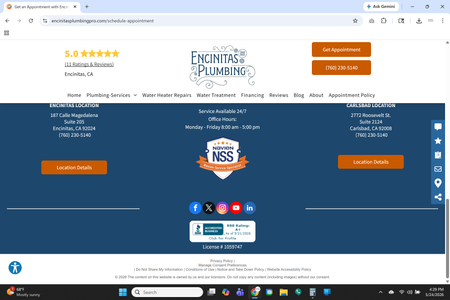
We’re trying to determine whether other Jobber users are experiencing similar behavior with request forms and estimate attachments. We’ve noticed that after a customer submits our request form, the page appears to load near the footer instead of clearly displaying the confirmation message near the top of the page. Over time, we’ve had multiple customers contact us asking whether their submission went through because they were unsure if the form had successfully submitted. We also noticed that the “custom confirmation page” option appears in settings, but we haven’t been able to get it functioning properly on our end. Separately, we’re experiencing an issue on iPhone and iPad where PDF attachments (specifically our Terms & Conditions PDF) fail to upload when attaching documents to estimates through the mobile app, even though this previously worked for us. Has anyone else experienced either of these behaviors or found a workaround? I’ve attached screenshots showing the post-submission page positioning issue for reference. What customers see after redirect. If they scroll up they can see the confirmation message, but they have to know to do this. Attachment screen error as displayed on all mobile devices.163Views1like1Comment