Sharing Processing Fees
I love Jobber. It has helped transform the front-end of our business by streamlining the calls - requests - estimate - job conversion - invoicing process. Our receivable time has reduced drastically due to the ease of Jobber payments (credit/debit/ACH) and financing options. The record keeping of client communications is very helpful and all of the data reports are helpful with job costing and showing us where and how we can become more efficient. I have been holding my breath, hoping that Jobber will soon have an easy option in the payment areas to either apply the full or split by percentage, the processing fee. It is reasonable at the current rate, but it certainly adds up at the end of each month and year. Just like inputting a percentage of required deposit, I would love to see a percentage I could apply towards the fee for the customer that is customizable and transparent for them. This may change their ultimate decision on the method they seek to use, but it would also allow me to reinvest the savings elsewhere. I have tried adding a line item in the quote for the processing fee, but it can add a lot of manual effort to reconfigure if there are certain change orders or adjustments throughout the job. I'd like to hear other people's experience with it, if possible. Any ideas are helpful, insight, or plans for the future regarding Jobber payments. Thank you!420Views6likes3Comments
How to Calculate Your True Hourly Rate?
Hi all, just wanted to mention that we realized in our first year scraping by that we weren't covering our costs of doing business. Even though we run our business out of our home, we jave insurance and licensing, vehicle expenses etc. That are part of our overhead. Finally we took all those expenses and added them up, divided by the normal number of business hours per month and made sure to build that into our hourly charge. Now we are able to set aside the money we need to come up with every 6 mo ths or annually and don't have to woory about spreading ourselves too thin when the expenses arrive. What are some shifts you made to build a sustainable business?291Views5likes5CommentsWhen should businesses increase prices to keep up with rising payroll costs?
When's the last time you updated your pricing model to match your payroll reality? For example, our direct payroll (before tax) is 38% while our indirect payroll is 10%. As of January 2, we increased rates for all recurring clients by 4% to offload the indirect percentage. Going forward, we increased all first-time services by 5%. Thoughts?319Views3likes3CommentsHow to price a job that is outside your normal working area?
I have made myself a set price list for work within the 35KM where I like to work, but often get calls outside that area. I have been going and doing the work at the same price I quote for calls within my area and wonder if that is hurting me? The idea was to have people discuss what price I gave them with family and friends in different locations and recommend me, but at what point does that price become unprofitable? Should I raise all my prices so customers feel I am not adding a travel surcharge? Should I be upfront and let them know my location and if they want me to come, I will have to add a travel charge? Should I refuse work outside my area? Refuse is such a bad word right!177Views3likes1CommentHow Much Should You Really Be Charging?
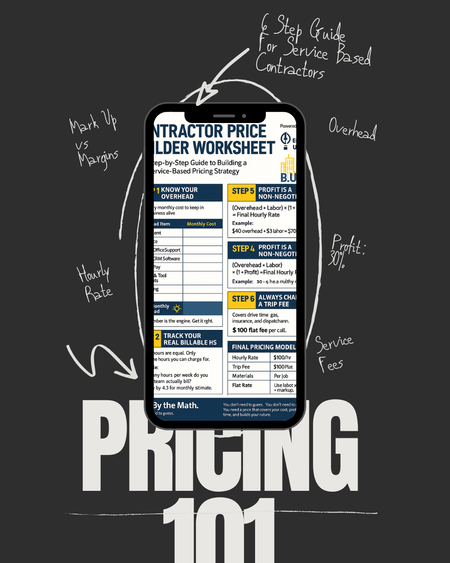
The number one question I receive is tied directly to the fact, most contractors are still guessing when it comes to pricing. Overhead. Profit. Labor rate. Trip fees. They think just because they throw a number they hear their competitors use, thats all that they need. It may work, but how and what do you divide these funds is just as important for your business health. If you don’t know how to do the math, you’re not building a business. You’re surviving check to check and think you need more work, when you do not. So here’s the plan: This Tuesday & Thursday on IG, I’m walking you through our Contractor Price Builder Worksheet FREE on instagram live. We will cover: - How to calculate your real hourly rate - The difference between markup and margin - Why profit is a non-negotiable - And how to price with confidence Join the session. Bring your numbers.1.7KViews3likes23Comments
💡FEATURE REQUEST: Price Increases in Products & Services List
Do you increase prices for ongoing customers? Do you know how long it takes me to increase my prices for 700 ongoing clients in my cleaning business? Whether you increase your prices on an annual basis or just as needed in these unpredictable times, it would be easier to make these changes en masse in the Products and Services tab! How would it work? When editing a product or service line item in the Products & Services List, there should be an option to carry that modification over to any existing Jobs that have that line item on it. Currently, this would only update for new jobs created, but I'd love to see a little pop-up that says, "Would you like to change the price for existing Jobs with this line item? Yes/No" Use Case Example: Because I am in the cleaning industry, it will be my primary use case. Let's say you have a minimum price that every client's rate will be at or above. When you create a new job for a recurring customer, you add a line item titled "Minimum Rate + current year," like for 2020: "Minimum Rate 2020," which is $150. You also add another line item based on how your pricing model is set up - in this case, I will use a simple one: "Small House" for $10 "Medium House" for $30 "Large House" for $50 When it's time for your prices to increase, consider the following options: you could decide to raise prices only for people with large houses and keep your minimum rate the same, or you may want to increase the cost for clients who have been with you for more than 5 years. Instead of making this change one client at a time and trying to sort through who the change applies to, I could go to the Products and Services List and find the specific line item I want to modify. Then, I could edit the price in there! Ta Da! You've raised your prices! Why should Jobber care? This would be huge for any business industry that has recurring clients. ServiceTitan, Housecall Pro, and other competitors already have this feature. I have found other threads that mention something like this or frustrations with how to go about raising prices. This would allow businesses that only see customers once or twice a year to set up their customers as recurring with one Job, saving them a lot of time and effort as well. You'd have at least one very loyal customer in me! I've spoken to two support agents who thought this was a simple but fantastic idea! My next price increase is in June, and I'd love you guys if you saved me weeks worth of work in a single click 🤞🙏 QUESTIONS, COMMENTS, FEEDBACK, AND MORE USE CASES WELCOME!!918Views2likes12CommentsHow do you scale past $1 Million in revenue? What are some common bottle necks to avoid?
Scaling past $1 Million has been one of the biggest challenges for me as a business owner. I'm curious what steps did you take to get over that hump and what advice do you have to get there?986Views2likes16CommentsShould service businesses use debt to grow and scale, or stay debt-free?
How do you view using credit lines, vendor lines of credit, credit cards, and loans to grow your business? If you prefer to grow debt free what is your strategy? What do you think are the pros and cons of each?485Views2likes6CommentsThose who charge for inspections, do you have a flat rate or does it depend on the property?
I recently got a request for a rodent assessment for a house that is about 10,000 sqft, an absolute monster of a house with 6 levels, a 4 car garage (buddy has a McLaren 750S, Porsche 917, Ford GT and a Range Rover!!!), vehicle lifts, elevator, separate chef kitchen, indoor pool...the works! I told the homeowner my standard fee for a more modest sized house, and that I would have to triple that to be able to spend the time at their home and not feel rushed. They did agree and made no issue out of it but it did make me wonder how other people approach this. Then I found the issue areas and they were about 3-4 times as many as a regular house and the cost reflected that. More doors, vents, cracks, holes, utility lines...it was insane. Should I have kept the inspection charge the same knowing I would find many many more holes or was it smart to up the inspection charge?96Views2likes2Comments