Business Phone Number - Who's Should You Use and How Should You Use it?
When it comes to phone numbers, I treat the Jobber phone number as an “automation line,” not my primary business number. I use it for all the built-in Jobber automations—invoice/receipt texts, appointment reminders, “on my way” notifications, and anything else Jobber sends out automatically. It’s great for consistent system messaging and keeping those operational texts separate from my real day-to-day communication. The reason I don’t use the Jobber number as my main public-facing number (website, trucks, yard signs, etc.) is ownership and portability. The Jobber number can’t be ported out, so if you ever switch systems or change your setup, you don’t truly “own” that number long-term. I’ve made the mistake of putting a non-portable number on marketing before, and it’s a headache when you realize it can’t follow you. Instead, I recommend your primary business number be something you control and can port—either from a carrier, Google Voice (depending on your needs), or another platform where portability is confirmed. Then use tools like Chiirp (and I haven’t personally explored GoHighLevel/Hatch deeply, but they’re in the same category) for your primary communication + higher-level automation, because those platforms typically offer much more robust automation like out-of-office replies, drip campaigns, and automated texting workflows. So my personal setup philosophy is: Jobber number = system/operations messaging only; your “real” business number = portable, owned by you, and used everywhere customer-facing. Then if you need advanced automations like out-of-office replies, I’d build those in a dedicated communication/marketing platform that’s designed for it—not inside the Jobber number.1.1KViews9likes18CommentsCrew Insight | New KPI Dashboard in Jobber app marketplace
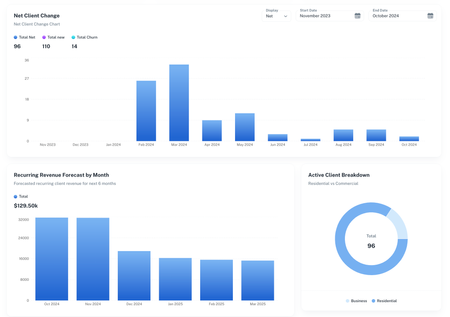
Hi All! I run a lawn care and gardening business and have struggled with getting all the KPIs I need from Jobber. I've had to spend many hours each month crunching numbers on spreadsheets that could have been spent growing my business. To solve this, I created a software platform that would pull in data from Jobber automatically and give me the numbers I need. Seems like KPI tracking is a common pain point amongst community members so I thought I’d create a post to start the conversation. What KPI’s are you obsessed with? What KPI’s feel hard to track? What metrics are you struggling to improve? If anyone is interested in the software, its called Crew Insight and we recently got it published to the Jobber marketplace so you can find it there or, at crew-insight.com.866Views5likes7Comments
Weather Widget 🌞🌧️❄️🔥
Is it possible to integrate Jobber with a weather app? On the dashboard, we were thinking a 7-day forecast could be visible. Also, I thought a small temperature reading on the monthly calendar would be visible. We also thought the weather for the day could be captured and saved as an internal note for the job.Solved477Views5likes9Comments
Thoughts with OpenPhone?
Hi! We currently using Ooma as our soft phone as it's integrated with Jobber. Unfortunately, only almost 2 months in and we're experiencing a lot of issues including missing voicemail and poor syncing of call logs. We recently notified about new softphone VOIP integration with Open Phone. Does anyone already using it? What's your experience so far? Your response is much appreciated!217Views4likes1Comment
What are you using to capture field data?
Hi Everyone, I am a new Jobber user, the first at my company. I am trying to learn the system myself before onboarding my team. We are a custom home building company using Jobber to provide a premium home maintenance subscription to our former customers and their neighbours who might be interested. I am struggling a bit to figure out a solid way to record field data consistently. I know Jobber has the ability to create Job Forms, but I feel it might be a bit too simple for my needs. Currently, we need to be able to create a rather large Comprehensive Home Systems Inventory. This would include everything from capturing info on their electrical panels, HVAC systems (furnaces, boilers, HRVs), appliances, hydronics, to finishes like paint colors, tiles, flooring etc. The idea would be that we would store this information to be to create reports for our customers, and give our team the ability to reference and know what filters are needed for what units, when they were last serviced, where the FAQs or codes for various appliances could be found, etc. Right now, I am defaulting to just taking in paper copies, because we are very early on trying to prove this business, and I don't have a big budget. This catalogue would likely have hundreds of entries in it for each home. Just curious what people have been using to collect data like this in the field that is affordable and doesn't cost too much? Thanks!184Views3likes1Comment
Xero Integration - custom feilds, job descriptions and invoices 2-way sync
Hey team Jobber! Id love some feedback/advice on the best way to transfer the information from Jobber to Xero. Primarily the custom fields for job references/POs, longer descriptions and 2-way sync for invoices.150Views2likes2Comments
Gmail, Outlook Add-on and GetJobber Integration proposal
Dear Community, I am in the process of identifying integration work for Jobber and I have identified my first. Let me know if the following proposal sounds valuable for your business. Do field service professionals spend significant time communicating with clients via email? Getjobber currently lacks native Gmail and Outlook integration, unlike other CRM competitors who are moving toward email integration CRMs like HubSpot, Salesforce, and Zoho have proven the value of Gmail integration Proposed Potential Features Customer Context Panel: Display Getjobber customer info in the Gmail sidebar when viewing client emails Job Creation: Create jobs directly from client emails with one click Email-to-Job Logging: Automatically record important emails to job history Scheduling: Add appointments to the Getjobber calendar from email conversations Business Value Time Savings: Field service businesses could save 5-10 hours weekly by eliminating context-switching Improved Response Time: Faster client communication with contextual information readily available Data Accuracy: Reduced manual data entry between email and Getjobber Customer Experience: More professional, coordinated communication with clients277Views2likes2Comments
Phone integration
I love that jobber has it's own phone number I just wish we had the ability to integrate with a business VOIP system so we can call clients from the Jobber app and it calls from our ringcentral business number instead of our cell phone numbers. Right now we have to type it directly into our ringcentral app which can be annoying trying to remember the number or switching between apps to get the number. I do not want customers having everyone's cell phone number. It would be amazing to click on the customers phone number and it asks which app or automatically uses the intergrated voip app.163Views1like1Comment