How can Jobber support time-and-materials businesses as they scale?
I have been considering Jobber for a few years, along with other systems. I have only pulled the trigger with QuickBooks, which I hate every day. But I digress. I am diving in this year with the goal of finding out the best way to use Jobber, as a time and material business that relies on creating customer trust prior to signing a customer for the first time. I cannot just rely on a system whereby my customer says, i have a broken pipe and I need someone asap. As a handyman, my customers have many jobs of all sorts from day one. Most people are used to estimates, but are amenable to time and material. How can Jobber, and possibly other tools in connection too (suggestions welcome), help me with my goal of going from a soloprenuer to a multi-city organization that is run in this manner?Solved108Views2likes5CommentsAdvice adding the credit card service fee to invoices
Hello Jobber Community! I'm an operations contractor for a Denver-based tree care company, and I'm hoping to crowdsource some insight... Does anyone have advice on how to best navigate charging clients for credit card processing fees? I actually just discovered today that it is not illegal in the state of Colorado (as well as many other states) to add that 2ish% credit card service fee to invoices, and I’m hoping to hear your experiences or strategies. Currently, Jobber doesn’t have a feature to automatically apply a designated service fee when clients choose to pay with a credit card through the digital invoices we send. This creates a few challenges: We’d need to ask the client ahead of time how they plan to pay so we can manually add the service fee to their invoice. Totally fine.. except... If they tell us they want to pay by credit, but decide to pay by debit after they've been invoiced, it creates an administrative mess—we’d have to issue a refund, send a new invoice, reverse transactions in QuickBooks, and add weeks to securing that revenue once and for all. Woof. How do you all manage this in your business? Do you: Absorb the cost of credit card fees as a business expense and increase the cost of your services? Offer a “cash discount” instead of a service fee? Use another tool or workaround to handle these situations? My goal is to make sure we're being as transparent as possible with our clients, continue offering competitive bids, protect our revenue, and keep our administrative overhead as lean as possible. Any advice or insights would be super helpful! Thanks in advance for sharing your thoughts!1.7KViews4likes35CommentsWhy does Jobber prompt me to add my email when sending invoices from my phone?
If I am sending an invoice or a job form via email on my phone, and I get to the screen that shows me the preview of the email, a prompt pops up that is asking me to add my email. Does anyone else see this message? I don't need to send that email to myself as all that information is saved in Jobber already. Do I have a setting turned on that maybe I need to change?36Views0likes1CommentNew Google Search Features: Online Estimates Filter and “Have AI Check Prices” — what does this mean for service pros?
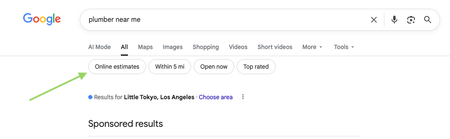
Google has recently started rolling out new pricing-related features in local home service search, and they could impact how service businesses get discovered. Two early changes we’re seeing: “Online estimates” filter Google is beginning to surface an Online estimates filter in some home service searches. Early signs suggest businesses that provide clear, machine-readable pricing or instant estimates may be favored over generic contact forms. “Have AI check prices” or “Ask AI for Pricing” feature Google is also testing an AI feature that gathers pricing on a homeowner’s behalf by using AI to call businesses and collect price quotes. https://www.youtube.com/watch?v=illIa8LSfY0 These features are still new and evolving, but they raise big questions about pricing transparency, estimates, and local search visibility. We’re curious: Have you noticed either of these features in your area yet? Do you currently show pricing or estimate ranges online? Do changes like this make you rethink how you approach pricing and Google visibility? Would love to hear what service pros are seeing so far 👇744Views0likes14CommentsHow do you deliver a great customer experience?
What’s something you do that always wows customers? Speedy communication? Easy scheduling? Share your tactics below. In this episode of Masters of Home Service, KellyGuerrero shares: Why "luxury" service is really about removing friction Simple, low-cost habits that create wow moments How to make luxury customer service consistent across every job Want to put these tips into action? Download our free customer experience playbook (includes checklists and scripts). Never miss an episode of Masters of Home Service. Subscribe on Apple, Spotify, or wherever you get your podcasts. 31Views0likes0Comments
What’s your go-to move when a customer doesn’t pay on time?
Do you send a reminder, make a call, wait it out, or have a process you stick to every time? In this episode of Masters of Home Service, Wilson Betances (EnergizeUs) talks about: Why unpaid invoices are a major cash flow problem What happens when invoicing and follow-ups aren’t taken seriously Simple systems and habits that businesses can actually maintain Never miss an episode of Masters of Home Service. Subscribe on Apple, Spotify, or wherever you get your podcasts. 122Views1like7Comments
Switching from Spreadsheets to Fleet Management Software: What Changed for You?
If you have moved from spreadsheets or whiteboards to a fleet management tool, what changed the most for you day to day? Did it save time, reduce mistakes, or improve visibility across your vehicles? Is the switch actually worth it? I personally used to keep my schedule in Excel until one day I missed an appointment. This is where Jobber came in for me, but what is your story?39Views0likes0Comments
Xero intergration
When integrating with xero, does the customer recieve the invoice from xero or jobber? I currently invoice via xero, I want to smoothen my work flow and integrate but thought I'd ask here first, how was the process? (Don't want to mess my books up and create extra work for myself) TIA 👌164Views2likes4Comments
Jobber jobs to QBO projects integration
Has anyone tried to extend the QBO Jobber integration to link a Jobber Job with a QBO project? We are an electrical contractor and have numerous suppliers and many components we use. All of them are entered into QBO. Our field team uses Jobber. I want to use the QBO projects to track project profitability. Which means three enhancements are needed: 1 - Jobber Job creation triggers a QBO project for the same customer. 2 - Time sheets from Jobber need to be updated to tag the customer and Job in QBO 3 - invoices would need to also be linked to from project to job. The job numbers in jobber could be used in QBO to create the linkage e.g. they can be used in the project name.143Views3likes5CommentsDid you know you can adjust the due date for an invoice?
Most of you may already know this, but I am here for those who don't! In the Jobber settings you can adjust the date that your invoice is due. Mine was set to NET 30 (30 Days) which is a really long time for a service. I adjusted it to NET 10 to give some time and not seem overly needed to my customers. What do other companies have their due date set at? Does anyone have their due date set to the same day? Has anyone set theirs longer?36Views1like0Comments