Supplementary Intake Systems To Jobber
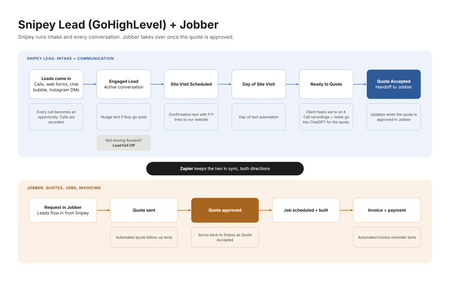
I was reading a post on here the other day about how you can’t really make or receive calls from your Jobber number, and how when you call or text it always looks like it’s coming from some separate number. It got me thinking about how we have ours set up, because I ran into a lot of the same stuff and that’s kind of what pushed me into running two systems. Here’s where I landed. Customer intake is its own beast. It’s a totally different job than running the work once someone says yes. You’ve got calls coming in, texts, Instagram DMs, website forms, chat bubble leads, and somebody has to answer all of it fast and keep it all in one place. I really think that part needs a system that’s built around that specific experience. For us that’s Snipey Lead, which is basically a GoHighLevel mod. And to be fair to Jobber, it has a sales pipeline and it’s a good one. You can do some automations in there too. Where it came up short for us was the calling side. In Snipey we call people right from the system, the calls get recorded, and we can download those recordings. Then when it’s time to build the quote, I upload the call recording into ChatGPT along with everything else we have for the quote. That way the quote takes into account everything the client told us, including the little stuff they mentioned on the phone that normally gets lost between the call and the estimate. Honestly that alone made our quotes a lot better. So the way I think about it, Snipey is the funnel. Every type of communication comes through there, whether it’s Instagram, the website, phone calls, or any of the lead forms, and it all integrates into Jobber. Our pipeline in Snipey goes like this. Engaged Lead, which means we’re actively talking to them. Then Site Visit Scheduled. Then Day of Site Visit. Then Ready to Quote. Then Quote Accepted. And if somebody goes quiet or goes another direction, they go to Lead Fell Off. The cool part is that each of those stages has its own little automations. When someone moves to Site Visit Scheduled, they get a message with some links to our website, kind of an FYI so they know who we are and what to expect before we show up. Day of Site Visit has its own message too. Ready to Quote lets the client know we’ve got what we need and we’re working on their quote, so they’re not sitting there wondering if we forgot about them. Once the quote is accepted, that’s where Jobber takes over. Scheduling, the job itself, invoicing, getting paid. Jobber handles a lot of the automated texts on that side too, like quote follow-ups and invoice reminders. Those used to be the things that slipped through the cracks when we got busy. Zapier is what connects the two, so when a client approves the quote in Jobber, it shows up in Snipey as Quote Accepted. I put together a quick graphic of the flow below if that helps anyone picture it. So that’s the setup. Two systems, but each one is doing the thing it’s actually good at, and together they cover the whole thing from the first phone call to the final invoice. For what it’s worth, I’m not affiliated with Snipey or anything, I just wanted to show how the two can work together. Curious how everyone else is handling intake. Are you running it all in Jobber, or do you have something sitting in front of it like we do?3Views0likes0CommentsHow to Present Home Service Agreements Seemlessly
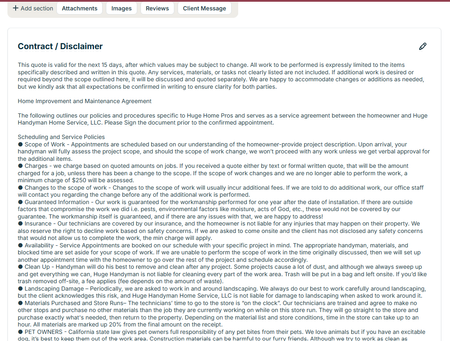
So we are in California and Home Service Agreements are a part of life. But did you know there is a place to put this in your contract so it covers your butt and your clients? At the bottom of your quotes there is a contract/ disclaimer section to put yours in easily. Do you have different types of jobs that require different disclaimers? Great - AnthonySalazar just did a post about templates. You can make a different contract for each one. One thing to consider - not everyone reads this. Kind of understandable. These are the not fun things about a job. One idea is to make a fun video about what's in it and send it to them when they accept a quote. Don't judge, we made this video a couple years ago but it's a good illustration of what you can do. Honestly you can make it on your phone Our Video on You Tube Another Idea is to have it as an attachment that you send out every time. This is less ideal because I like getting their signature on the document itself. Either way - make sure you are putting this in your quotes. If someone comes back to you about something that's in your contract you are covered!51Views2likes4CommentsAre You Pricing Jobs for Profit or Just to Win the Job?
Quoting can be one of the toughest parts of running a small business. It’s easy to lower your price to beat the competition, but that doesn’t always lead to a healthy business. A good quote should cover your time, materials, expenses, and the value you provide. The goal isn’t to get every job, it’s to get the right jobs that allow your business to grow. What’s one thing that helped you improve your quoting process?Solved468Views2likes7Comments
Duplicate address deleted in Jobber, along with Quote. What are my options?
Hi all, In March a customer approved a Quote for work. While in her client file, I noticed that there were three addresses for the customer -- all the same address. Well one of those addresses, "Orchard St" instead of "Orchard Street", was deleted and with it went the Quote (baby and bathwater). Support has just informed me this is how the system works, and there is no way to revive/retrieve the Quote which was approved the day prior. Has anyone had this experience and if so, were you able to remedy this In a system with so many screens, fields and silos, it's disturbing that work can be deleted with no discernable way to recovered it. Does anyone download every quote/invoice etc. to keep a duplicate copy? Anyone run into this and somehow was able to recover the Quote?45Views0likes0Comments
How do general contractors create detailed quotes for full remodel projects?
Are there any general contractors/remodelers using Jobber? My plumber and electrician use it but it's a lot simpler for them to produce a quote then me. Just curious how easy and or productive it is to produce a detailed quote for a complete remodel for instance including electrical, plumbing, HVAC, drywall, and paint plus my materials and labor for framing and finish etc.242Views2likes2CommentsRemodelers - Do you have a price book?
One issue I keep having with my sales system is spending so much time on quotes because all my jobs are so different. I'd love to be able to produce a quote within 10 minutes, while I'm still onsite. Then I could meet objections on the spot and try and get the sale then and there. For those of you that have varying projects, do you have price books? What strategies do you have to price things out when you technically repair so many things? Or Should I not worry about it? haha79Views0likes0Comments
How to change the quantity of optional line items in a Jobber quote?
On the optional line items is there any way to make them so that the customer can change quantity. So for instance we are a electrical contractor and as an option they could add dimmers but that is something they would pick the quantity to so like I would put qty. as 1 and they could change it.277Views0likes2Comments
Quotes can be the wrong tool. Estimates avoid disputes, protect margins, and elevate professionalism
Quotes and Estimates are fundamentally different, and not having both options is genuinely problematic for us. Fudging it by adding exception language to a document labeled as a Quote communicates that we aren’t committed to the quote, that we can’t accurately assess or execute our own services, and that we don't have the basic ability to simply send the correct type of sales form. Every workaround risks the sale and our professional image. How do you protect yourselves when a job clearly requires an Estimate instead of a Quote? Would having the option to create either a Quote or an Estimate, so you can send the correct sales document for each job, help you run your business more effectively? I believe some people are employing entirely different software for quotes and estimates. Considering that the ability to send an Estimate is a critical and basic business requirement, would it make sense for Jobber to add the simple option of changing the word "Quote" to "Estimate" when needed? They could still fall under the heading of "Quotes" in the UI, because only the word on the form being sent to the client, and the word used in the related message, needs to change. That's simply front-end work to implement and not a major feature update. The beauty of web-based applications is that it is programmatically easy to add simple functionality to expand the capabilities of basic features that affect nearly all users, requiring only a willingness to spend a little time improving the product's core functionality: helping us grow and manage our businesses.310Views3likes2Comments
New to Jobber, Quotes including pictures worth it?
Hey guys, I wanted to hear your thoughts on jobber quotes not including pictures for estimates in the core package? We are a full service property maintenance & Landscaping company. Anybody switch from core to grow because of it? We have a small team but growing. Last crm did have this feature on their middle plan and our clients loved it. It was extempore helpful to us as well. Was wondering if this is something we should switch to that would make a huge difference?295Views0likes2Comments