Sleeper features
I am always so guilty when it comes to technology for only using it for it's basic functions. Luckily with Jobber, the basic functions are literally all you need to run a high performing business. I am wondering however, if anyone uses any features, tools or add-ons that have made a huge impact on their processes?Customer Q: Can you add a button to manually send clients a review link?
A: At the moment, review requests are sent automatically after an invoice is paid. Very soon, you'll be able to choose between the following triggers for when your review request is automatically sent: A specific visit is completed Job is marked as complete Invoice is paid Thanks for your feedback about providing an option to manually send a review––we will share that feedback with the product team!139Views3likes2CommentsCustomer Q: How can I link my Jobber reviews to show up on our Google account?
A: If you are using Jobber Reviews and have connected your Google Business Profile, any reviews your customers leave will automatically be posted to Google. Be sure to complete this set-up so that Jobber can send review requests and collect those 5-star reviews for you! 🌟 If you are referring to the internal feedback that customers leave you through the job follow-ups feature, this feedback is internal and cannot be made public. A good way to remember the difference between the two is that Reviews is for Google reviews (public) and job follow-ups are for internal feedback (private).262Views2likes2CommentsCustomer Q: Can we disable the "ask for a review" feature on the mobile app, too?
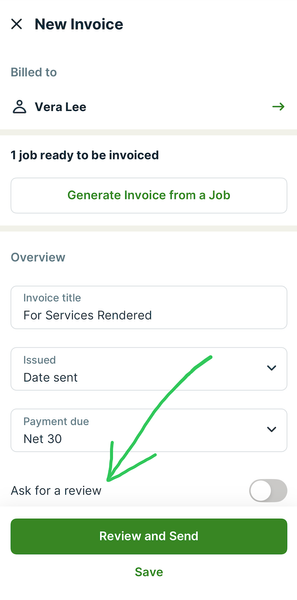
A: Yes! When creating the invoice for the customer, you'll see the "Ask for review" toggle, which you can toggle on/off. Jobber will also remember your preference for that customer for any future invoices.141Views2likes0CommentsCustomer Q: Can Reviews ask for a review through Google or another platform?...
Customer Q: Can Reviews ask for a review through Google or another platform instead? Or as well as on jobber? A: At the moment, Google is the only supported platform because it's where the vast majority of customers are searching for your business and reading your reviews. As for the difference between Jobber Reviews and internal feedback left through the job follow-up feature, check out this answer.26Views2likes0CommentsCustomer Q: Does Reviews link to our Google reviews or are they just internal to Jobber?
A: Sounds like you're asking the difference between Reviews and job follow-ups––let me clear that up for you... Reviews enables you to automatically send a Google review request to your customers. This email/text will include a URL that links directly to your Google Business Profile to make it easy for the customer to leave you a review on Google! The job follow-up feature asks for internal feedback so any feedback left through job follow-ups stays within Jobber for you to reference. These cannot be made public. If you are using Jobber Reviews, we recommend turning off job follow-ups so that your customers can focus on leaving you that 5-star review on Google! 🌟51Views2likes0CommentsCustomer Q: Can we set up review requests to be triggered when the job is completed?...
Customer Q: Currently the Jobber review option is triggered when the job is paid. Can we set up Reviews to be triggered when the job is completed or closed so that they do not get a link to review when they prepay and the work hasn't been completed yet? A: Very soon you'll be able to do that––that was one of the announcements made today! 🙌🏼 You'll be able to choose between the following triggers for when your review request is automatically sent: A specific visit is completed Job is marked as complete Invoice is paid23Views2likes0Comments