Client Communications
I would like to see space to log our own client communications - not in notes! For example, when we chase quote, we sometimes email but other times we call the client. Unfortunately there is no where to log that they were called including date and time unless i put it in the notes on the quote. Or the notes on client page, which then does not include the items sent via Jobber. It would be handy to have a communications area that we could add communications too that also included the quote number to so we could search and see only communications related to that particular quote. This feature would be particularly handy when dealing with property managers who have 10 sites in quote stage.301Views2likes5Comments
How do you manage quotes that never get accepted?
Hey everyone! I'm curious how you handle quotes that customers never respond to. Does Jobber's built-in follow-up automation do enough to bring those customers back, or do you still have to manually track unanswered quotes and chase leads? What part of the process do you find most frustrating? I'd be interested to hear what's working for you and what could be improved.101Views3likes8Comments
Australian customers: full subscription prices, fewer features. When will this change?
As an Australian business owner using Jobber, it increasingly feels like Australia has been abandoned when it comes to access to the full platform. We continue paying substantial subscription fees, yet important features available in other markets remain unavailable here: Two-way text messaging. Jobber’s Google review tools connected to our Google Business Profile. Access to the full Marketing Suite. Jobber Payments. These features directly affect how we communicate with clients, market our businesses, build our reputation and get paid. What makes this particularly frustrating is seeing smaller Australian CRM startups, including new “vibe-coded” platforms, offering two-way texting. If they can make it work, why are Australian Jobber customers still waiting? Homeworks explicitly supports two-way texting in Australia and offers email marketing, automation and online payment tools. That makes it difficult to understand why these gaps persist with Jobber. If there are technical, regulatory or commercial barriers, explain them clearly. From a customer’s perspective, I haven’t received an explanation that makes sense of the difference. There is also a fundamental question of value: why are Australian customers expected to pay standard subscription prices while receiving a materially smaller feature package? I recognise that some features are paid add-ons. The frustration is that we cannot even access those options here. I’ve raised these concerns with Jobber support repeatedly. In my experience, the responses have been generic acknowledgements without a meaningful explanation, clear commitment or useful timeframe. Whatever the intention, the message I’m left with is that Australian customers simply aren’t a priority. I’d like Jobber to publicly address three questions: What specifically is preventing these features from being available in Australia? Is there a committed Australian rollout plan, and what are the expected timeframes? Will Jobber offer pricing that reflects the reduced functionality available to Australian customers? I’m posting this because I want the issue acknowledged and addressed. Australian businesses invest real money and time into building their operations around Jobber. We deserve transparency about what we’re paying for and whether these gaps will actually be closed. Are other Australian users feeling the same way, and has anyone received a concrete answer beyond their feedback being passed along?Supplementary Intake Systems To Jobber
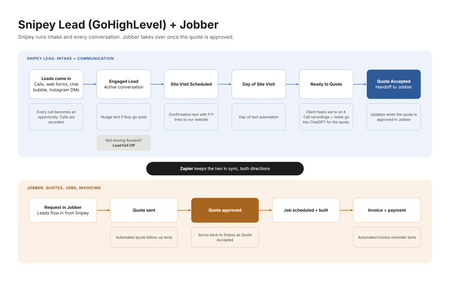
I was reading a post on here the other day about how you can’t really make or receive calls from your Jobber number, and how when you call or text it always looks like it’s coming from some separate number. It got me thinking about how we have ours set up, because I ran into a lot of the same stuff and that’s kind of what pushed me into running two systems. Here’s where I landed. Customer intake is its own beast. It’s a totally different job than running the work once someone says yes. You’ve got calls coming in, texts, Instagram DMs, website forms, chat bubble leads, and somebody has to answer all of it fast and keep it all in one place. I really think that part needs a system that’s built around that specific experience. For us that’s Snipey Lead, which is basically a GoHighLevel mod. And to be fair to Jobber, it has a sales pipeline and it’s a good one. You can do some automations in there too. Where it came up short for us was the calling side. In Snipey we call people right from the system, the calls get recorded, and we can download those recordings. Then when it’s time to build the quote, I upload the call recording into ChatGPT along with everything else we have for the quote. That way the quote takes into account everything the client told us, including the little stuff they mentioned on the phone that normally gets lost between the call and the estimate. Honestly that alone made our quotes a lot better. So the way I think about it, Snipey is the funnel. Every type of communication comes through there, whether it’s Instagram, the website, phone calls, or any of the lead forms, and it all integrates into Jobber. Our pipeline in Snipey goes like this. Engaged Lead, which means we’re actively talking to them. Then Site Visit Scheduled. Then Day of Site Visit. Then Ready to Quote. Then Quote Accepted. And if somebody goes quiet or goes another direction, they go to Lead Fell Off. The cool part is that each of those stages has its own little automations. When someone moves to Site Visit Scheduled, they get a message with some links to our website, kind of an FYI so they know who we are and what to expect before we show up. Day of Site Visit has its own message too. Ready to Quote lets the client know we’ve got what we need and we’re working on their quote, so they’re not sitting there wondering if we forgot about them. Once the quote is accepted, that’s where Jobber takes over. Scheduling, the job itself, invoicing, getting paid. Jobber handles a lot of the automated texts on that side too, like quote follow-ups and invoice reminders. Those used to be the things that slipped through the cracks when we got busy. Zapier is what connects the two, so when a client approves the quote in Jobber, it shows up in Snipey as Quote Accepted. I put together a quick graphic of the flow below if that helps anyone picture it. So that’s the setup. Two systems, but each one is doing the thing it’s actually good at, and together they cover the whole thing from the first phone call to the final invoice. For what it’s worth, I’m not affiliated with Snipey or anything, I just wanted to show how the two can work together. Curious how everyone else is handling intake. Are you running it all in Jobber, or do you have something sitting in front of it like we do?4Views0likes0Comments