Forum Widgets
Recent Discussions
Equipment / asset history per unit: how are you handling it today?
I've seen a few threads asking for equipment tracking in Jobber (model, serial, install date, warranty, and service history per unit). I'm curious how people are working around it today: - Custom fields on the property? - Nameplate photos attached to visits? - A separate spreadsheet or app? - Or does it mostly live in your techs' heads? And a second question: what would matter more to you (a) giving the customer a history report for their unit, or (b) getting a list of who's due for maintenance, whose warranty is ending, or whose 12+ year-old unit is ready for a replacement quote, so you can book the work? Transparency: I'm a founder building an add-on in this area, and I want to build what you'd actually use, not what I assume. Not linking anything here. If you'd be up for a quick 15-minute chat about how your shop handles this, just reply here and I'll reach out. Thanks!23Views1like2Comments
Text notifications for requests wanted
I am glad jobber emails me as soon as a request comes in but I’m not on email all day. Is there a way to get a text when a request comes in? If so, how is it set up? if not, can Jobber put it in the next release? I feel that quick response to requests helps get things off on the right foot.geoffhazel1 day agoContributor 2244Views0likes2CommentsAdding Custom Job Status Labels in Jobber to Filter and Track Jobs by Stage
We do appliance repair during the day we go out to the diagnosis and in the evenings write the estimates in office, if it wasn’t able to be fixed would there. Our old software had a system where we could attach customized labels to every job, such as need estimate written, need to invoice, two main job, needs parts ordered or follow up And in the office, you could go through and filter the jobs by these labels then you know none got missed. The tech could add the labels from the app and office staff could from the desktop. Has anybody found a way on Jobber to do something similar or an integration that would work?Mbtullos3 days agoContributor 3280Views2likes13CommentsHow Do I Assign Jobs to a Whole Crew at Once in Jobber?
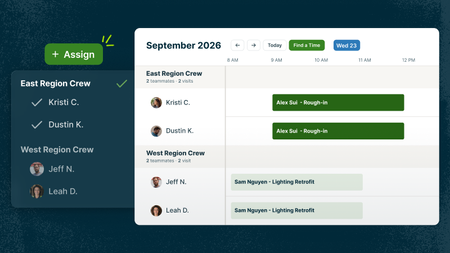
If you regularly send groups of field workers out on jobs, keeping track of who’s working together can get messy fast. Maybe you’re assigning people one by one, keeping crew lineups on a whiteboard or spreadsheet, or relying on notes and memory to know who should be where. Crew Scheduling fixes that. You set up your crews once, then assign the whole crew to a job in one shot. Here's how it works in real life: Set crews up however you actually run them. Lead tech + apprentice, a north-side and south-side crew, a mowing crew and a hardscape crew. Whatever your setup is.. One click puts the whole crew on the job. Way faster when you're building out a packed day. Filter the calendar to one crew. See exactly what that crew's day looks like without scrolling through everybody else. Coming soon: Plans change? Adjust your crews. Update already-scheduled visits to reflect the new crew, or change the crew roster so the new lineup is used for future visits assigned to that crew. Getting set up only takes a couple minutes: Go to your Schedule, click More > Manage Crews Create a crew, give it a name, add your people Next time you schedule a job, pick the crew instead of each person Crew Scheduling is available on the Plus plan 👥 Set up your crews 📖 Learn more 🎥 Watch it in the Jobber Now announcement If you run your operations by crews, how do you group them: by skill, by area, or something else?Cam9 days agoJobber Product Team52Views2likes1CommentHow To Manage Big, Multi-Stage Jobs in Jobber
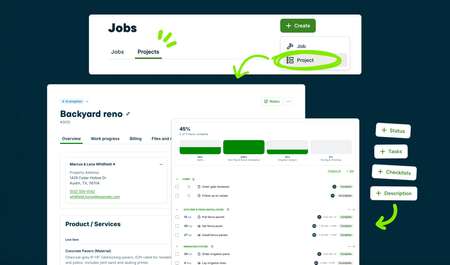
Big projects can get complicated fast. Between phases, visits, tasks, and everything else that needs to happen along the way, it’s easy for the plan to end up spread across a few different places. Projects are designed to bring more of that work together in Jobber, so you can see what’s happening now, what’s coming next, and keep the job moving. It’s currently in Jobber Labs for Plus and Unlimited plans. If you manage larger or multi-stage work, opt in, give it a try, and let us know what works and what you’d like to see next. Your feedback will help shape where Projects goes from here. Here's what you can do right now: Turn a quote into a project. Line items carry over, so there's no retyping. Break it into milestones, tasks and visits. Assign each piece to the right crew and location. Add checklists to visits. Your crew knows exactly what to finish every time they're on site. See what's moving and what's stuck. Track status on every task, visit and the project overall. And there’s more to come. We’ll continue building on Projects as we learn from your feedback, so give it a try and tell us what would make managing your bigger jobs easier. To get started: Opt in to Projects through Jobber Labs Open an approved quote and convert it into a project, or create a new project from scratch Set up your milestones, then add the tasks and visits under each one Assign your crews and add checklists to visits 🎥 Watch it in the Jobber Now announcement What’s the hardest part of keeping a big, complex project on track?Cam12 days agoJobber Product Team76Views0likes2CommentsHow do your customers respond to AI Receptionist?
We are a firewood company and thinking about using AI receptionist Some of our rural customers really dislike AI, some use it, some just want to save time and have all virtual interactions. How have your customers responded?SibiFirewood20 days agoContributor 2115Views2likes1CommentIs there a "No Charge" option on Jobber?
Does anyone know if there is an option to make a booking no charge? I have made it just a task before, but then I can't add a checklist. I have made the booking $0 but then have to click the "remind me to invoice" button off. The worst is if you forget to do that, then you have to delete things. Is there an actual way to make a call $0 and no charge? No invoice, no reminders, no "late" or "overdue" notices.PestFreeCanada1 month agoVerified Community Coach69Views1like1Comment
How can I create a dynamic appointment cancellation list in Jobber?
Hey all, I am looking to keep and maintain a dynamic list of visits for customers who want to be contacted if we can get them in sooner than their sheduled visit. So, if they service vist on the calendar and would like to be notified if we have a cancellation/open space (e.g., the emergency service block is not filled for a particular day) to move up their visit. I have set up a custom field on the job level, and to access this information, I have to run a forward-looking report (with "custom dates" or "this month" for options) and then it cannot sort by a custom field. For example, I can uncheck all sorts of columns with information and add a custom field to a report, but then you can't sort by that column. You would need to export to excel and then get the information you want. (Confirmed this with Jobber support.) This is not something you can do on the App for obvious reasons. It is critical to have this information for the field techs since they are the ones who find extra time on their hands and could very easily call a customer ("hey, I see you have an appointment next week for xyx, we are/will be around the corner and have time to do it today.") if the list was maintained dynamically and available on the app. Going to reports, customizing columns, exporting to excel and then going back to Jobber is, well, clunky and inefficient. Anyone have success with another way to manage a cancel list?JondyL1 month agoContributor 2167Views0likes1Comment
One off multi visit jobs
Ok so i have 2 services that work like this. Basically its 2 seperate visits. We are not doing the same thing each visit, they are all a part of the job. (aeration and overseeding followed by a 6 week follow up...christmas light install and takedown.) For both of these, the majority (~90% of the price) is in the 1st visit. I have been billing everything out after the 1st visit. Then create the next visit. Not sure if im explaining this right, but basically i want to create the 2 visit for the one off job, but bill the total amount for the 1st visit. Is that possible? And im probably just missing it and its right there, but have about 60 of the aerations and over 150 of the christmas lights coming up and trying to get this figured outBlueSkies1 month agoContributor 4124Views2likes3Comments




If you have a specific question about your Jobber account, reach out to our Success Team directly:
➡️ [email protected]
➡️ 1-888-721-1115
➡️ via chat in your Jobber account
Tags
- scheduling45 Topics
- work smarter27 Topics
- calendar19 Topics
- software19 Topics
- route optimization15 Topics
- job forms & checklists13 Topics
- job follow-ups12 Topics
- lawn care11 Topics
- cleaning9 Topics
- quoting9 Topics