New Google Search Features: Online Estimates Filter and “Have AI Check Prices” — what does this mean for service pros?
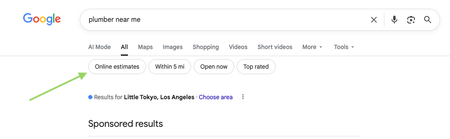
Google has recently started rolling out new pricing-related features in local home service search, and they could impact how service businesses get discovered. Two early changes we’re seeing: “Online estimates” filter Google is beginning to surface an Online estimates filter in some home service searches. Early signs suggest businesses that provide clear, machine-readable pricing or instant estimates may be favored over generic contact forms. “Have AI check prices” or “Ask AI for Pricing” feature Google is also testing an AI feature that gathers pricing on a homeowner’s behalf by using AI to call businesses and collect price quotes. https://www.youtube.com/watch?v=illIa8LSfY0 These features are still new and evolving, but they raise big questions about pricing transparency, estimates, and local search visibility. We’re curious: Have you noticed either of these features in your area yet? Do you currently show pricing or estimate ranges online? Do changes like this make you rethink how you approach pricing and Google visibility? Would love to hear what service pros are seeing so far 👇2.2KViews0likes14CommentsDo you utilize battery-powered tools?
Handheld battery-powered tools have come a long way from their first iterations, especially over the past few years. I've started making the switch away from gas-powered equipment throughout the last few seasons for my business and have found the switch to be positive for my workflow and bottom line. This is a trend I believe will continue as batteries become more powerful and long-lasting. Are you utilizing any battery-powered equipment and, if so, do you have any favorites you'd like to share??1.7KViews4likes14CommentsMilwaukee vs DeWalt Tools, which one?
We’re Lock Nerds Locksmith, a Buffalo, NY-based company that’s always relied on Milwaukee tools. But we’re curious—what tools do other pros trust? We're looking for honest pros and cons between Milwaukee and DeWalt to see if it's time for us to reconsider our setup.1.1KViews6likes21CommentsHow do you utilize reports in your business?
I am curious to hear which reports you consider most valuable in your business and what actions are taken based on those reports if anyone is willing to share. Are there reports that you use regularly in Jobber or reports that you wish were part of Jobber? If so how do you utilize the information that the reports provide? Are changes made based on the reports? Is the data used to create the reports monitored internally for consistency? Thanks for sharing all input is helpful!900Views5likes15Comments
💡FEATURE REQUEST: Price Increases in Products & Services List
Do you increase prices for ongoing customers? Do you know how long it takes me to increase my prices for 700 ongoing clients in my cleaning business? Whether you increase your prices on an annual basis or just as needed in these unpredictable times, it would be easier to make these changes en masse in the Products and Services tab! How would it work? When editing a product or service line item in the Products & Services List, there should be an option to carry that modification over to any existing Jobs that have that line item on it. Currently, this would only update for new jobs created, but I'd love to see a little pop-up that says, "Would you like to change the price for existing Jobs with this line item? Yes/No" Use Case Example: Because I am in the cleaning industry, it will be my primary use case. Let's say you have a minimum price that every client's rate will be at or above. When you create a new job for a recurring customer, you add a line item titled "Minimum Rate + current year," like for 2020: "Minimum Rate 2020," which is $150. You also add another line item based on how your pricing model is set up - in this case, I will use a simple one: "Small House" for $10 "Medium House" for $30 "Large House" for $50 When it's time for your prices to increase, consider the following options: you could decide to raise prices only for people with large houses and keep your minimum rate the same, or you may want to increase the cost for clients who have been with you for more than 5 years. Instead of making this change one client at a time and trying to sort through who the change applies to, I could go to the Products and Services List and find the specific line item I want to modify. Then, I could edit the price in there! Ta Da! You've raised your prices! Why should Jobber care? This would be huge for any business industry that has recurring clients. ServiceTitan, Housecall Pro, and other competitors already have this feature. I have found other threads that mention something like this or frustrations with how to go about raising prices. This would allow businesses that only see customers once or twice a year to set up their customers as recurring with one Job, saving them a lot of time and effort as well. You'd have at least one very loyal customer in me! I've spoken to two support agents who thought this was a simple but fantastic idea! My next price increase is in June, and I'd love you guys if you saved me weeks worth of work in a single click 🤞🙏 QUESTIONS, COMMENTS, FEEDBACK, AND MORE USE CASES WELCOME!!800Views2likes12Comments
LANDSCAPERS: Let's unite on best practices...
Calling all landscape home service companies! We are a full-service landscaping company doing everything from irrigation, fertilizer and lawn maintenance programs to large projects. We've used Jobber for about 6 years and 'figure it out' as we go but tend to have to do a lot of manual work and workarounds. Wondering how others in the biz are best using Jobber and what kind of administrative help you employ to help manage it. For us... we have 3-4 people dedicated in the office at all times. We have 2 people dedicated to scheduling services and customer service for existing clients. We have another dedicated to billing daily, and another for administrative support to strictly field new requests and ensure people are being responded to. We use Trello to help manage all the tasks and customer status. It's a lot to manage. There's a lot of room for error. Setting up jobs is very manual. Scheduling can be pretty manual despite knowing there are ways to mass schedule in Jobber. Tags get super messy and are only so reliable. There isn't a great way to enforce good notes from techs in the field. Job Forms are only really for customer leave behinds and don't help with billing so the open notes field is really the only way to gather info from the field for invoicing... Interested in whatever others have to share that are really working for them!800Views4likes8CommentsRoll call! Meet & introduce yourself to other Green & Exterior Service pros
If you’ve ever thought, “How are other businesses like mine handling this?” you’re in the right place! This space is for Green & Exterior Service pros to connect, compare notes, and talk shop with others who understand the day-to-day realities of running your type of business. 👋 Introduce Yourself Drop a comment and tell us: Your name Business name Industry Years in business Location (City/State/Province) Let us know if you’re joining us for LIVE networking on March 17 (more details below) The more context you share, the better connections you’ll make. 🙌 Pro tip: Search your city or state in the forum to easily find other pros in your area. 📅 Want to connect LIVE? We’re running a pilot to host virtual weekly LIVE Industry Networking starting on March 17, running until April 7. If you’d be interested in joining for the first or following sessions (don’t need to commit to all but you're welcome to join!), make sure to let us know in the comments. 🤝 Culture of this space Think of this forum board like a room full of peers who understand your world. Share what’s working. Ask real questions. Talk through challenges. The goal is to power your success and raise the standard of home service industries together. 💬 Looking for conversation starters? This space works best when conversations are industry-specific and experience-based. You might jump in with something like: “How are other [industry] pros pricing this service right now?” “Is anyone else seeing this shift in their market?” “What’s been working for you when it comes to ____?" 🤔 Why are industries grouped together? We’ve intentionally clustered similar industries to keep conversations active and relevant. These groupings reflect shared business models, operational challenges, and pricing conversations so you can learn from peers who “get it,” even if they’re not in your exact trade. If your question applies to all home service businesses, feel free to post in our broader forum boards. Pro tip: Check out the industry tags to get even more specific Looking forward to seeing this space come to life. 🚀798Views4likes35Comments