Best Jobber Automations
I just wanted to get a post going for these. They can be super powerful in your business and I feel like they don't get talked about enough sometimes. What are your best Jobber automations you have set up?? I really enjoy dashboards myself that give more custom information about my business. I like to use Airtable / Asana / Zapier. Cheers !22KViews21likes135CommentsRoll call! Meet & introduce yourself to other Service-based Skilled Trade pros
If you’ve ever thought, “How are other businesses like mine handling this?” you’re in the right place! This space is for Service-Based Skilled Trades pros to connect, compare notes, and talk shop with others who understand the day-to-day realities of running your type of business. 👋 Introduce Yourself Drop a comment and tell us: Your name Business name Industry Years in business Location (City/State/Province) Let us know if you’re joining us for LIVE networking on March 17 (more details below) The more context you share, the better connections you’ll make. 🙌 Pro tip: Search your city or state in the forum to easily find other pros in your area. 📅 Want to connect LIVE? We’re running a pilot to host virtual weekly LIVE Industry Networking starting on March 17, running until April 7. If you’d be interested in joining for the first or following sessions (don’t need to commit to all but you're welcome to join!), make sure to let us know in the comments. 🤝 Culture of this space Think of this forum board like a room full of peers who understand your world. Share what’s working. Ask real questions. Talk through challenges. The goal is to power your success and raise the standard of home service industries together. 💬 Looking for conversation starters? This space works best when conversations are industry-specific and experience-based. You might jump in with something like: “How are other [your industry] pros pricing this service right now?” “Is anyone else seeing this shift in their market?” “What’s been working for you when it comes to ____?” 🤔 Why are industries grouped together? We’ve intentionally clustered similar industries to keep conversations active and relevant. These groupings reflect shared business models, operational challenges, and pricing conversations so you can learn from peers who “get it,” even if they’re not in your exact trade. If your question applies to all home service businesses, feel free to post in our broader forum boards. Pro tip: Check out the industry tags to get even more specific Looking forward to seeing this space come to life. 🚀1.5KViews8likes42CommentsHas anyone here ever built a community partnership from the ground up?
Has anyone here ever built a community partnership from the ground up? im not just curious about the end result. i want to know how it actually came together. What ìt was, and how did you approach people to get them on board, and keep it going? what were the mistakes, and what would you do different next time I’m trying to learn what makes a partnership actually work long term because just like my llc i want it to lastSolved263Views6likes6CommentsHow Do Contractors Structure Their Quotes to Get More Large Jobs Approved?
Hi everyone, I’m Deroy Waite, owner of Protastic Plumbing Services Inc., and I’d really appreciate some insight from fellow plumbers or contractors. We’ve been in business for 2 years, backed by over 20 years of plumbing experience, and we’re currently focused on improving our quote approval rate, especially on larger jobs. For those landing bigger projects consistently, how are you structuring or presenting your quotes to get them approved? Are there specific things you’ve found make a big difference? Any tips or lessons learned would be greatly appreciated. Thank you384Views6likes12CommentsElectrical SOP's Built into Jobber Forms?
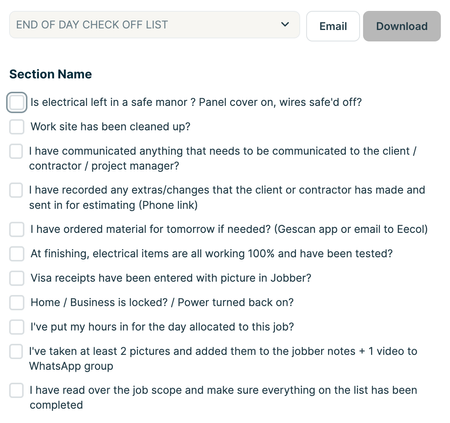
Hey guys, here is our "end of the day check list" we also have a few SOP's built into job forms. 1 for EV chargers and one for hot tub installs including common rules and inspection fails. What are you guys doing? Anything similar or something I haven't thought of?1.4KViews6likes12Comments
Jobber jobs to QBO projects integration
Has anyone tried to extend the QBO Jobber integration to link a Jobber Job with a QBO project? We are an electrical contractor and have numerous suppliers and many components we use. All of them are entered into QBO. Our field team uses Jobber. I want to use the QBO projects to track project profitability. Which means three enhancements are needed: 1 - Jobber Job creation triggers a QBO project for the same customer. 2 - Time sheets from Jobber need to be updated to tag the customer and Job in QBO 3 - invoices would need to also be linked to from project to job. The job numbers in jobber could be used in QBO to create the linkage e.g. they can be used in the project name.589Views5likes8Comments
Requests, 6 months in
Hey everyone, we've been on the Jobber train about 6 months now so I though it might be high time to share our requests for the platform thus far, as it relates to our business (Electrical services, primarily project work) Add a dedicated feature requests category to this forum. It would be great to have people upvote on the features they want to see most, also allows other users to see what common pain points there are. Timesheets Add ability to view time by job AND custom date range. For large jobs we need to pull monthly hours for billing. Would also like to see general hours vs project hours by month to generate a labour efficiency KPI. Add option to make time billable/non-billable, push directly into invoicing. Add vacation/time off/breaks Add overtime and Stat rules (currently I dump the raw CSV data into a google sheet and it figures out the overtime for me before I run payroll). Change Management Add ability to create an estimate within an approved job with an additional approval mechanism for the purposes of change orders. This is VERY clunky to manage right now. HousecallPro has a "sub-job" feature, where you can add additional jobs to a project with dependencies on the "core" job. Manual triggers for reminders I'd like to be able to rip through my overdue invoices and 1-button hit them with a reminder. I know some people don't need reminders, and some do, some I may have already spoken with on the phone. The automations and templates are built, just give me a button to trigger them manually right from the invoices page. Visits Ability to batch add "x" amount of visits to the job. Unscheduled is fine, I can drag and drop them from schedule view later. Ability to add visits directly from the schedule view, just like new job, new task, new event, etc. I want a "New Visit" and then I just choose the job from a dropdown. Ability to attach time required to visits instead of start/end time. Good for drag and drop. Payments I'm just about ready to turn this off. I need to hide payments completely from the client hub. I have "allow payments" turned off, but clients can still add a card on file, and thus I don't have an opportunity to stickhandle the additional fees. Other PRICEBOOKS: Multiple/categorized pricebooks, customizable permissions depending on role/department. TASK LISTS: Job or visit level task/checklists. We currently have to use companycam for this. We need the ability to walk the job with the production crew and create a daily/visit/job based checklist for the daily tasks. These are the main pain points for now in an otherwise wonderful tool. Jobber has really helped me offload some of the mental loading required to run multiple staff/crews. I'm intrigued by the upcoming Jobber Now event, as well as the earlier surveys that were sent out (relevant to many of my requests). Thanks!198Views5likes1CommentHow do you utilize reports in your business?
I am curious to hear which reports you consider most valuable in your business and what actions are taken based on those reports if anyone is willing to share. Are there reports that you use regularly in Jobber or reports that you wish were part of Jobber? If so how do you utilize the information that the reports provide? Are changes made based on the reports? Is the data used to create the reports monitored internally for consistency? Thanks for sharing all input is helpful!1KViews5likes15Comments