Advice adding the credit card service fee to invoices
Hello Jobber Community! I'm an operations contractor for a Denver-based tree care company, and I'm hoping to crowdsource some insight... Does anyone have advice on how to best navigate charging clients for credit card processing fees? I actually just discovered today that it is not illegal in the state of Colorado (as well as many other states) to add that 2ish% credit card service fee to invoices, and I’m hoping to hear your experiences or strategies. Currently, Jobber doesn’t have a feature to automatically apply a designated service fee when clients choose to pay with a credit card through the digital invoices we send. This creates a few challenges: We’d need to ask the client ahead of time how they plan to pay so we can manually add the service fee to their invoice. Totally fine.. except... If they tell us they want to pay by credit, but decide to pay by debit after they've been invoiced, it creates an administrative mess—we’d have to issue a refund, send a new invoice, reverse transactions in QuickBooks, and add weeks to securing that revenue once and for all. Woof. How do you all manage this in your business? Do you: Absorb the cost of credit card fees as a business expense and increase the cost of your services? Offer a “cash discount” instead of a service fee? Use another tool or workaround to handle these situations? My goal is to make sure we're being as transparent as possible with our clients, continue offering competitive bids, protect our revenue, and keep our administrative overhead as lean as possible. Any advice or insights would be super helpful! Thanks in advance for sharing your thoughts!4.2KViews4likes37CommentsNew Google Search Features: Online Estimates Filter and “Have AI Check Prices” — what does this mean for service pros?
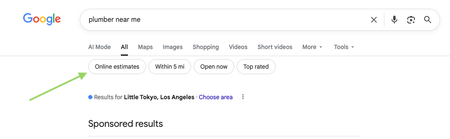
Google has recently started rolling out new pricing-related features in local home service search, and they could impact how service businesses get discovered. Two early changes we’re seeing: “Online estimates” filter Google is beginning to surface an Online estimates filter in some home service searches. Early signs suggest businesses that provide clear, machine-readable pricing or instant estimates may be favored over generic contact forms. “Have AI check prices” or “Ask AI for Pricing” feature Google is also testing an AI feature that gathers pricing on a homeowner’s behalf by using AI to call businesses and collect price quotes. https://www.youtube.com/watch?v=illIa8LSfY0 These features are still new and evolving, but they raise big questions about pricing transparency, estimates, and local search visibility. We’re curious: Have you noticed either of these features in your area yet? Do you currently show pricing or estimate ranges online? Do changes like this make you rethink how you approach pricing and Google visibility? Would love to hear what service pros are seeing so far 👇2.2KViews0likes14CommentsEasily add processing fees to jobs...
I was browsing around here and found a post asking about adding credit card fees to jobs and what is the best way to do it. I was suprised that no one mentioned the way I do it so I commented on the thread. I wanted to make a new one incase others would find it helpful. I provide admin services to Jobber users and I have a client that had this problem a while back. Once we put this in place it was super easy and quick to add any kind of fee by a percentage amount. Go to your tax settings and create a TAX RATE. Name it whatever you want to call your added fee (convience fee, processing fee, whatever but remember customer's will see this name) and put in the percentage. Then go back to tax settings and create a TAX GROUP. Now you can link together your regular tax and the convience fee by putting them in a group. Whatever you name this tax group will not be visible to customers. Now when you are editing the quote/job/invoice you can chose what tax you want added to the subtotal by clicking on the tax name. So you can easily and quickly add CC fees or choose your regular tax fee if they are paying with cash or check. All tax rates and tax groups from your tax settings will be listed here. As you can see, it automatically adds the appropiate percentage to the total so you can charge that through Jobber Pay. I hope this helps! You can make as many groups as you need depending on your situation. This is also how you would charge both state and county tax for those areas that might have that although I'm sure you already figured that out.931Views5likes4Comments
🚨FEATURE REQUEST: Tiered Pricing on Products & Services 🚨
Hey Jobber Team and Fellow Pros, Let’s talk about a feature that could seriously boost close rates and make Jobber even more competitive for all of us who quote services, manage inventory, and work in price-sensitive markets. What we need: Tiered Pricing on Products and Services — customizable pricing where the unit cost automatically adjusts based on quantity ordered. Why this matters: We already price materials like mulch, sod, and stone this way in real life. It would speed up quoting, improve estimate accuracy, and help us win more jobs. It mirrors how customers expect to see pricing — more they buy, less they pay per unit. How it would work: Let users define pricing tiers for any product/service: 1–10 units = $10/unit 11–50 units = $8/unit 51+ units = $6/unit These price breaks should auto-calculate during estimate creation and carry through to invoicing. Why Jobber Should Care: Makes Jobber more competitive vs. other platforms offering advanced pricing features. Helps your users convert more jobs = more usage and more loyalty to Jobber. Reflects real-world pricing logic we already use outside the app. If you'd use this — drop a comment or like to help get this in front of Jobber’s dev team. Let’s get this done together!738Views7likes8Comments
Customer Credit Balance
Am I the only one having issues with credit balances? Every time one of our customers ends up with a credit on their file it becomes an issue. The credit doesn't automatically apply to their next invoice, and there doesn't seem to be any way to apply it. I always end up having customer service walk me through some clunky workaround that involves deleting payments, reopening invoices, and clicking through several screens. It always makes a mess in QBO that needs to be cleaned up too. Each time I've talked to support they've given me the impression that it's abnormal for customers to credit like this. I don't get it. My company has credit with one of our suppliers right now. Examples: Customer accidentally overpays Customer wants to pre-pay Customer returns something and wants a credit rather than a refund I want just want to give them a credit for whatever reason to make them happy etc This seems like a pretty normal thing to me. Every payment processor I've used prior to Jobber will just automatically apply credits to subsequent invoices. It would be nice if, while creating the invoice, you could click "add deposit" and select something like "account credit". Since support has always given me the impression that I'm doing something wrong by allowing customers to have credit on their file in the first place (as if it's somehow completely avoidable), I don't suspect they have any plans of implementing an actual fix. Is anyone else having this issue? If so, how are you handling it?Solved647Views0likes4Comments
Jobber jobs to QBO projects integration
Has anyone tried to extend the QBO Jobber integration to link a Jobber Job with a QBO project? We are an electrical contractor and have numerous suppliers and many components we use. All of them are entered into QBO. Our field team uses Jobber. I want to use the QBO projects to track project profitability. Which means three enhancements are needed: 1 - Jobber Job creation triggers a QBO project for the same customer. 2 - Time sheets from Jobber need to be updated to tag the customer and Job in QBO 3 - invoices would need to also be linked to from project to job. The job numbers in jobber could be used in QBO to create the linkage e.g. they can be used in the project name.517Views5likes8CommentsAI for Contractors: How Home Service Pros Are Using AI in 2026
We just surveyed over 1,000 home service business owners across the U.S. and gathered real-time stats about how they're using AI in their day-to-day operations. The gap between businesses using AI and those that aren’t is starting to show: 88% of businesses who are fully-booked use AI vs 27% of businesses who are still filling their calendars Here's what 52% of the 1,050 home service business owners surveyed say they use AI for: 54% for quoting 52% for invoicing 51% for writing emails and proposals Younger owners are adopting it fastest --> 64% of business owners under 30 already use AI. Curious how this compares to what you're seeing in your own business. Are you currently using AI for quoting, scheduling, or customer communication? Or is it something you're still exploring?514Views2likes10CommentsJobber Payments w/ Accounting Tools
Hello Community! I just enabled Jobber Payments hoping to centralize everything invoicing inside the tool however, I am stumped with the deposits. For example just using simple numbers. I invoice for $100 and my deposit is < fees. In QuickBooks, my deposit doesn’t match the total of the invoice paid. Before Jobber, I was using QuickBooks’ payment processing and I would charge the same $100 and get the deposit of $100 and have an expense fee deducted from my account. This allows you to match your deposits to invoices and keeps IMO your accounting clean. I cannot be the only one with this issue. Thoughts from the Community?500Views4likes7Comments
CASH-BASED Companies: Handling "Bad Debt"
I have a question for other companies set up with cash-based accounting, regarding how to handle old unpaid invoices. Since we cannot write off bad debt as accrual-based companies can, how do you process it? I want to clear these unpaid balances out of our Jobber & Quickbooks open invoice reports (since they are so old and were sent to collections), but I still want to be able to see if a previous customer did not pay his/her bill. If I use the "Bad Debt" line item (that I think was a default in Jobber) it shows up as an expense on our P&L, which is not correct.431Views4likes6Comments