How We Define “Done Right” With Job Forms
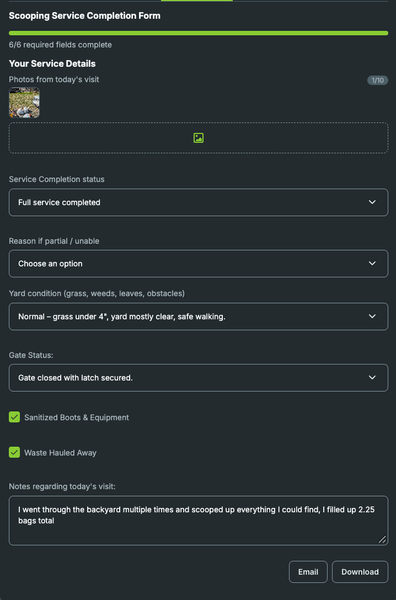
As we added technicians, I realized “do a good job” is way too vague. What does that actually mean? For us, it means things like checking the gate, following the right yard pattern, documenting anything unusual, making sure the area was actually completed, and leaving the property secure. The more of that we can put into Job Forms, the less we have to rely on someone remembering every detail from training. That matters even more when someone is new, covering another route, or just having an off day. I still think training and judgment matter. A checklist can’t replace a good technician. But it can protect the standard. The goal is that “done right” looks the same no matter who is on the route that day. What are the non-negotiables you’ve built into your Job Forms?9Views0likes0Comments
Easy Solutions for Jobber to implement
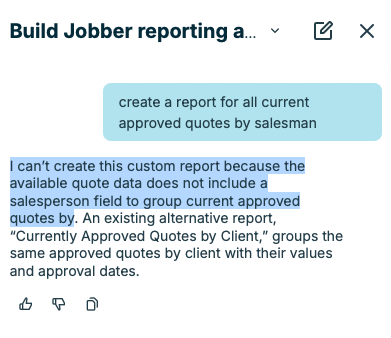
There are several quick items in jobber that can be changed by the programmers to make our lives a bit easier. Case in point - Under "JOBS" , why can the programmer add a drop down to filter for "SALESMAN" , just like in the "QUOTES" Section. I even tired to pull this under the custom reports and it responded with "I can’t create this custom report because the available quote data does not include a salesperson field to group current approved quotes by" Please use this thread to add any items you may think jobber can help out with.12Views0likes0CommentsHow do I connect Jobber to ChatGPT or Claude?
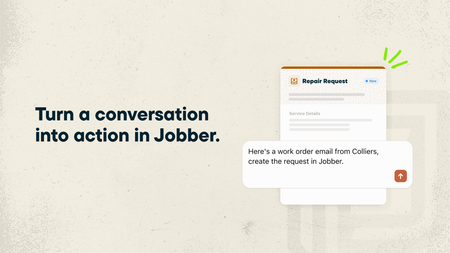
If you regularly use ChatGPT or Claude to help run your business, you can now make those conversations even more useful by connecting your Jobber account. With the ChatGPT Plugin and Claude Connector, powered by Model Context Protocol (MCP), ChatGPT and Claude can use information from your Jobber account alongside your other connected business tools. That means you can ask questions about your business, get answers based on your actual data, and even get things done in Jobber without jumping between apps. What you can do by connecting Jobber to ChatGPT and Claude: Get a head start on your day. Ask “What’s my schedule looking like today?” and get a rundown of your upcoming jobs and visits. See who’s behind on payments. Ask “Which invoices are still outstanding?” to quickly see what’s overdue and needs your attention. Keep quotes moving. Ask “Which quotes need a follow-up?” to find quotes that are still waiting for a response. Turn emails into requests. Got a new customer inquiry sitting in your inbox? Ask ChatGPT or Claude to create a client and request in Jobber using the details from that email. Spend less time building quotes. Ask ChatGPT or Claude to draft a quote from an existing request or for a new job. It’ll prepare the quote in Jobber for you to review before sending it to your customer. And you’re not limited to asking about Jobber! Since ChatGPT and Claude can connect to other business tools, you can bring information from across your business into one conversation.You don’t need to know anything about coding or AI to get started. Just ask questions the same way you’d ask someone on your team. Learn more and give it a try: 🔗 Connect Jobber to ChatGPT 🔗 Connect Jobber to Claude We’d love to hear how you’d use this! If you could ask ChatGPT or Claude to take one task off your plate, what would it be?30Views0likes0CommentsHow Would You Handle a Customer Trying To Blame You For Another Person's Work?
So here's the situation - we had a customer we did a handyman punch list for. She previously had some really bad work done at her house and we were fixing their mistakes. Almost 10 month later - She claims that we installed a cooktop using silicone however my guys take very diligent notes and pictures and I have no record of that installation happening. I double checked with the guys and they didn't do it. Something like that would have taken some time and they would have remembered. Honestly I don't mind losing her as a client because she's wasted a lot of my time having my quote jobs she didn't end up doing but how do you tell someone she's mistaken when she is very sure we did it. I thought about sending her screen shots of our time stamped notes but I can't tell if she lying or not. What would you do?53Views1like1CommentAdding Custom Job Status Labels in Jobber to Filter and Track Jobs by Stage
We do appliance repair during the day we go out to the diagnosis and in the evenings write the estimates in office, if it wasn’t able to be fixed would there. Our old software had a system where we could attach customized labels to every job, such as need estimate written, need to invoice, two main job, needs parts ordered or follow up And in the office, you could go through and filter the jobs by these labels then you know none got missed. The tech could add the labels from the app and office staff could from the desktop. Has anybody found a way on Jobber to do something similar or an integration that would work?306Views2likes13Comments
What takes up more of your time than it should?
Hey everyone — I’m Matt. I’m new to the community and wanted to introduce myself. I work in business operations and automation, and I’ve been spending more time learning about the home-service industry and how different companies actually run their day-to-day operations. One thing I’ve found interesting is how differently businesses handle things like incoming leads, scheduling, customer follow-up, office work, and all the systems behind the scenes. For those of you running a home-service business, what’s one part of your day-to-day operation that takes more time or causes more headaches than you think it should? Looking forward to learning from everyone and contributing where I can.176Views2likes6CommentsSyncing Jobber to Google Calendar
Are any of you time blocking people? Well I'm an aspiring time blocking person and I just learned I can have Chat GPT do it for me instead of me slaving away on google trying to get everything dialed. What I realized was my tasks in jobber would have to get synced to google manually and that's super annoying. Wait - turns out Jobber quietly solved this and I didn't realize. I made a video showing yall how to sync you site visits, jobber tasks etc right on your calendar. https://www.loom.com/share/601da88e9b77434c84f7fa17ead4963c Hopefully that's helpful!99Views3likes1CommentBuilt a free way to ask Jobber questions (invoices, schedule, quotes, etc.) to your fav AI tool
We built a free tool that lets you ask your Jobber account questions in plain English Hey everyone. Big fan of Jobber here, it's the backbone of how we build for home service shops. Wanted to share a small add-on we made for it in case it's useful to some of you. Jobber already keeps all your data in one place, which is the hard part. What we wanted to add on top of that is a faster way to get answers out of it. So we built a free tool that connects your Jobber account to an AI assistant like Claude or ChatGPT. You type your question in plain English, like you're texting a friend, and it pulls the real answer straight from your account. It only reads your data. It can't create a job, send an invoice, or change anything. So there's zero risk to your account, it's just a quicker window into the data Jobber's already tracking for you. Some things you could ask it: Which invoices are past due? How much are we owed right now? What's on the schedule this week? Any new job requests I haven't looked at yet? Pull up everything on this one customer How to use it (simple version): You'll need Node installed on your computer (free, quick download) You register a free "app" on Jobber's own developer site, this just gives our tool permission to read your account, approved through Jobber's own login You paste a short bit of text into a config file, or just tell Claude Code to add it for you You type "authenticate with Jobber," log in once, and you're connected It's free and open source, so it stays free. We're not selling access. If it saves you time, all we'd ask is you tell another shop running Jobber, that's how good tools like this get around. Repo's here if you want to poke at it: https://github.com/adeocode/jobber-mcp Happy to answer questions below if anyone gets stuck setting it up.133Views1like2CommentsWhat’s the single biggest software headache driving you crazy right now?
We’ve all been there—you're trying to streamline dispatching, job costing, or customer billing, and the software you rely on either puts essential tools behind a paywall or makes simple setups way harder than they need to be. What’s the number one operational task or software quirk that makes you want to throw your phone across the truck? How are you dealing with it?42Views1like0CommentsHow Do You Track Service Agreement Members and Apply Member Pricing Automatically?
I'm really trying to structure a service agreement and to keep it contained within Jobber for simplicity. Things that I need Once I sell the membership we need to find a way to automatically mark/tag/flag the customer as an active member When that member calls in have a way for me CSR to be able to see that the client as a member When a new quote is created have a line item automatically populate so that the service technician in the field (IOS app) will be able to identify the customer as a member. Secondary pricing for members would be a great bonus. Reporting on members420Views2likes10Comments