Weather Widget 🌞🌧️❄️🔥
Is it possible to integrate Jobber with a weather app? On the dashboard, we were thinking a 7-day forecast could be visible. Also, I thought a small temperature reading on the monthly calendar would be visible. We also thought the weather for the day could be captured and saved as an internal note for the job.Solved531Views5likes11CommentsAdvice adding the credit card service fee to invoices
Hello Jobber Community! I'm an operations contractor for a Denver-based tree care company, and I'm hoping to crowdsource some insight... Does anyone have advice on how to best navigate charging clients for credit card processing fees? I actually just discovered today that it is not illegal in the state of Colorado (as well as many other states) to add that 2ish% credit card service fee to invoices, and I’m hoping to hear your experiences or strategies. Currently, Jobber doesn’t have a feature to automatically apply a designated service fee when clients choose to pay with a credit card through the digital invoices we send. This creates a few challenges: We’d need to ask the client ahead of time how they plan to pay so we can manually add the service fee to their invoice. Totally fine.. except... If they tell us they want to pay by credit, but decide to pay by debit after they've been invoiced, it creates an administrative mess—we’d have to issue a refund, send a new invoice, reverse transactions in QuickBooks, and add weeks to securing that revenue once and for all. Woof. How do you all manage this in your business? Do you: Absorb the cost of credit card fees as a business expense and increase the cost of your services? Offer a “cash discount” instead of a service fee? Use another tool or workaround to handle these situations? My goal is to make sure we're being as transparent as possible with our clients, continue offering competitive bids, protect our revenue, and keep our administrative overhead as lean as possible. Any advice or insights would be super helpful! Thanks in advance for sharing your thoughts!4.5KViews4likes37Comments
Section for Vendors or Subs
Please help develop a functions to add 3rd party vendors/subs that may be used as needed or 1-time. The primary point would be contact and database of vendors with info and docs needed for our team to access if needed as well as would be nice for them to have scheduling, invoicing with pics and job tracking capabilities.114Views2likes1Comment
Referral Credit System Is Very Lacking
This post is feedback, and a place to allow other users to leave feedback, for the Client Referral marketing tool in Jobber. The current client referral system is very lacking for a premium paid feature. We would like to see some deep functionality changes and additions immediately, since this has been around for a while now with no improvements....here is my current thoughts on what could be added or should be changed - Credits need to show in the Clients file (maybe under account balance) Staff needs to know if a credit is available or could apply for sales purposes. Currently its restricted to owners/admins in the marketing section and you can't do anything with that info anyway from there, its pretty useless. Credits need to be usable across the whole system & in the field (mobile invoices), we better for techs in the field ('hey, i see you have credit, would you like to use it on this invoice?') Credits need to be adjustable, we want to be able to add referral credits manually if we see fit. (this is especially ideal for when staff forgets to fill out the referrer entry on a job) which happens all the time. Apply credits anyway we would like (if a client has a $100 in credit, we want to be able to apply that whole amount if they have a huge invoice(s) being paid at once) the current automatic application is not good enough. Credit Amount settings ($ / % amount) should be able to be set based on Client type/tag (if the client is a Builder Partner we want to give them 10%, instead of just the $50 we give to a regular customer per lead) Option to set the Amount of credit ($/%) given based on a range of invoice value (5% for $100-500 invoice amount / 8% for $500-1000 invoice amount / etc) Option to exclude certain Clients from the referral program (we have builder partners that are on a completely different program internally, we do not want there account to also be getting other discounts). Option in Jobber websites to add a Refer A Friend button, so we do not have to rely on the email campaigns that most people don't open. Allow the client to see credits in their portal, and apply them to invoices when making payments.How to back up job photos and files from Jobber?
Hey all, just wondering if this is something others have run into. A few of our clients have been talking about how they handle long-term storage of job photos and documents, especially when staff leave, or when they want to organize files outside of Jobber. Some mentioned wanting to move things to Google Drive or DropBox automatically, but I’m not sure how common that need really is. Just curious, have you or your team thought about this? Is keeping a backup of Jobber media files part of your process, or not really a concern? Appreciate any thoughts! Josh435Views0likes2Comments
PLEASE add a kit function
Even the bottom of the barrel CRM that I'm currently using has a robust kit function. Create products with fully editable costs and quantities, then add those products to a kit (in this case, what a "service" should be). Once a kit is entered into a quote, individual products are hidden from the customer, but fully editable when creating the quote. As it is now, I have no idea what the difference between a "product" and a "service" are. They both have the same info (name, description, cost, etc). You should just be able to group products to form services. If i have a product of "labor" and a product of "receptacle". I should then be able to create a service of "Replace Receptacle". That service would consist of my labor product, and my receptacle product. Both with quantities and costs that I could edit when creating a quote. Since not all receptacles are the same, and my customer doesnt care whether its a duplex or a decor, being able to edit the cost of that receptacle, straight from the kit during quote creation, would be amazing.Solved514Views3likes8Comments🚗Fleet Sharp and Schedule (alpha) Split Screen
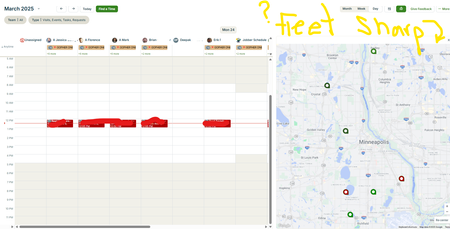
Hello, Our Fleet Sharp trackers do Not populate on the schedule (Alpha) split screen. We heard about Force Fleet at the spring feature announcement, and we have seen screenshots of Force Fleet trackers visible on the schedule split screen. We are wondering (hoping 🙏) if Jobber will update the split screen to show both Force Fleet AND Fleet Sharp trackers. We are wondering if anyone has heard or knows info regarding this topic. Thank you234Views1like2CommentsHow do you utilize reports in your business?
I am curious to hear which reports you consider most valuable in your business and what actions are taken based on those reports if anyone is willing to share. Are there reports that you use regularly in Jobber or reports that you wish were part of Jobber? If so how do you utilize the information that the reports provide? Are changes made based on the reports? Is the data used to create the reports monitored internally for consistency? Thanks for sharing all input is helpful!994Views5likes15Comments
Team Tasks
Does anyone have any good tips for assigning Team compliance tasks like having to carry out equipment checks or risk assessments when on site. I've built the checklists etc in Job Forms but struggling with how to assign this as a task (Job) without attaching to a client.370Views4likes3Comments