How to Present Home Service Agreements Seemlessly
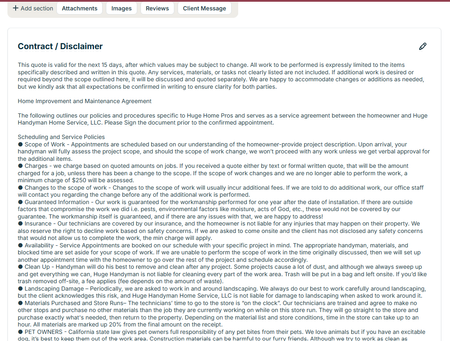
So we are in California and Home Service Agreements are a part of life. But did you know there is a place to put this in your contract so it covers your butt and your clients? At the bottom of your quotes there is a contract/ disclaimer section to put yours in easily. Do you have different types of jobs that require different disclaimers? Great - AnthonySalazar just did a post about templates. You can make a different contract for each one. One thing to consider - not everyone reads this. Kind of understandable. These are the not fun things about a job. One idea is to make a fun video about what's in it and send it to them when they accept a quote. Don't judge, we made this video a couple years ago but it's a good illustration of what you can do. Honestly you can make it on your phone Our Video on You Tube Another Idea is to have it as an attachment that you send out every time. This is less ideal because I like getting their signature on the document itself. Either way - make sure you are putting this in your quotes. If someone comes back to you about something that's in your contract you are covered!12Views1like1CommentRoll Call! Meet & introduce yourself to other Cleaning and Property Maintenance pros
If you’ve ever thought, “How are other businesses like mine handling this?” you’re in the right place! This space is for Cleaning and Property Maintenance industry pros to connect, compare notes, and talk shop with others who understand the day-to-day realities of running your type of business. 👋 Introduce Yourself Drop a comment and tell us: Your name Business name Industry Years in business Location (City/State/Province) Let us know if you’re joining us for LIVE networking on March 17 (more details below) The more context you share, the better connections you’ll make. 🙌 Pro tip: Search your city or state in the forum to easily find other pros in your area. 📅 Want to connect LIVE? We’re running a pilot to host virtual weekly LIVE Industry Networking starting on March 17, running until April 7. If you’d be interested in joining for the first or following sessions (don’t need to commit to all but you're welcome to join!), make sure to let us know in the comments. 🤝 Culture of this space Think of this forum board like a room full of peers who understand your world. Share what’s working. Ask real questions. Talk through challenges. The goal is to power your success and raise the standard of home service industries together. 💬 Looking for conversation starters? This space works best when conversations are industry-specific and experience-based. You might jump in with something like: “How are other [industry] pros pricing this service right now?” “Is anyone else seeing this shift in their market?” “What’s been working for you when it comes to ____?" 🤔 Why are industries grouped together? We’ve intentionally clustered similar industries to keep conversations active and relevant. These groupings reflect shared business models, operational challenges, and pricing conversations so you can learn from peers who “get it,” even if they’re not in your exact trade. If your question applies to all home service businesses, feel free to post in our broader forum boards. Pro tip: Check out the industry tags to get even more specific Looking forward to seeing this space come to life. 🚀1.8KViews4likes46CommentsHow Fast Do You Pick Up a Phone Call or Call Someone Back After a Missed Call?
Curious how everyone here handles this, because a new Jobber survey of recent homebuyers turned up a stat that stuck with me: 15% had to follow up repeatedly just to get a response from a contractor 9% never heard back at all Losing potential business due to something that is not a pricing problem or a skill problem should be a wake up call. In a world where 75% of new homeowners hire a pro within their first two years of buying, being the one who calls back first might be the easiest job you win all week! So, what's your business standard? Do you answer within a certain time frame or let it go to voicemail and call back same day? Are there systems set up so nothing slips through the cracks? 👉 Recent Homebuyer Report: It's got homeowner quotes on what made them trust (or ditch) a contractor, plus a breakdown of how each generation actually finds a pro.349Views2likes6CommentsWhat Should Home Service Businesses Automate First to Save Time?
Small manual tasks start stacking up, catching up on follow-ups, re-adjusting scheduling, invoicing, review requests, the list goes on and on. Sound familiar? What’s one task you’re still doing manually that you know could be automated? What’s stopping you from setting it up?514Views0likes8CommentsAre You Pricing Jobs for Profit or Just to Win the Job?
Quoting can be one of the toughest parts of running a small business. It’s easy to lower your price to beat the competition, but that doesn’t always lead to a healthy business. A good quote should cover your time, materials, expenses, and the value you provide. The goal isn’t to get every job, it’s to get the right jobs that allow your business to grow. What’s one thing that helped you improve your quoting process?Solved439Views2likes7CommentsAre You Building a Business or Just Creating Yourself Another Job?
It’s easy as a small business owner to get caught up doing everything yourself. At what point do you start delegating, hiring, or putting systems in place so the business can operate without you being involved in every job? I’d love to hear how other owners are making that transition while still keeping quality and customer service high.223Views1like5Comments
💡FEATURE REQUEST: Price Increases in Products & Services List
Do you increase prices for ongoing customers? Do you know how long it takes me to increase my prices for 700 ongoing clients in my cleaning business? Whether you increase your prices on an annual basis or just as needed in these unpredictable times, it would be easier to make these changes en masse in the Products and Services tab! How would it work? When editing a product or service line item in the Products & Services List, there should be an option to carry that modification over to any existing Jobs that have that line item on it. Currently, this would only update for new jobs created, but I'd love to see a little pop-up that says, "Would you like to change the price for existing Jobs with this line item? Yes/No" Use Case Example: Because I am in the cleaning industry, it will be my primary use case. Let's say you have a minimum price that every client's rate will be at or above. When you create a new job for a recurring customer, you add a line item titled "Minimum Rate + current year," like for 2020: "Minimum Rate 2020," which is $150. You also add another line item based on how your pricing model is set up - in this case, I will use a simple one: "Small House" for $10 "Medium House" for $30 "Large House" for $50 When it's time for your prices to increase, consider the following options: you could decide to raise prices only for people with large houses and keep your minimum rate the same, or you may want to increase the cost for clients who have been with you for more than 5 years. Instead of making this change one client at a time and trying to sort through who the change applies to, I could go to the Products and Services List and find the specific line item I want to modify. Then, I could edit the price in there! Ta Da! You've raised your prices! Why should Jobber care? This would be huge for any business industry that has recurring clients. ServiceTitan, Housecall Pro, and other competitors already have this feature. I have found other threads that mention something like this or frustrations with how to go about raising prices. This would allow businesses that only see customers once or twice a year to set up their customers as recurring with one Job, saving them a lot of time and effort as well. You'd have at least one very loyal customer in me! I've spoken to two support agents who thought this was a simple but fantastic idea! My next price increase is in June, and I'd love you guys if you saved me weeks worth of work in a single click 🤞🙏 QUESTIONS, COMMENTS, FEEDBACK, AND MORE USE CASES WELCOME!!977Views2likes12Comments