Weather Widget 🌞🌧️❄️🔥
Is it possible to integrate Jobber with a weather app? On the dashboard, we were thinking a 7-day forecast could be visible. Also, I thought a small temperature reading on the monthly calendar would be visible. We also thought the weather for the day could be captured and saved as an internal note for the job.Solved544Views5likes11CommentsAre You Pricing Jobs for Profit or Just to Win the Job?
Quoting can be one of the toughest parts of running a small business. It’s easy to lower your price to beat the competition, but that doesn’t always lead to a healthy business. A good quote should cover your time, materials, expenses, and the value you provide. The goal isn’t to get every job, it’s to get the right jobs that allow your business to grow. What’s one thing that helped you improve your quoting process?Solved399Views2likes7Comments
Challenges Getting Accurate & Competitive Quotes — Anyone Else?
Hey everyone. Wanted to start a conversation around something I think a lot of us deal with daily. Getting quotes right is hard. Too high and you lose the job. Too low and you regret winning it. A few challenges I keep running into: Translating plans and site conditions into accurate material and labor costs Material prices changing between quote and job start Knowing what the market will bear in your area Finding customers who care about quality, not just the cheapest bid I've been using Jobber to streamline the quoting side. Building out templates, tracking job history to compare estimated vs. actual costs, and following up on open quotes automatically. It's helped, but the estimating accuracy piece still takes real discipline. Would love to hear from the community: What's your quoting process start to finish? How do you handle rising material costs in your pricing? Where are you finding your best customers? Any Jobber features that have helped you quote faster or more accurately? Drop your experience below — whether you've got it figured out or you're still grinding through it like the rest of us. 👇230Views8likes6CommentsHome Depot Pro Referral Integration ?
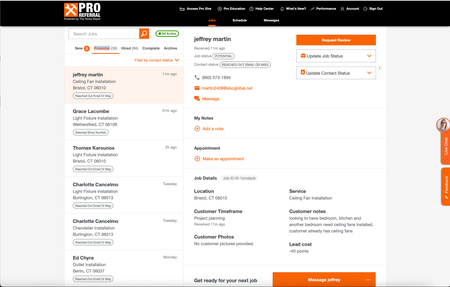
Good afternoon, I know a lot of contractors are listed for Home Depot Pro Referral - and I was wondering if Jobber has had the ability to directly integrate with them. Since using jobber, I have had my office manager transfer every contact over, one by one, because it didnt allow us to track stats/communication within home depots crm. So I was wondering what do you all use ? Or is it all manual for you too? If you want to check it out - here is the link Try Home Depot Pro327Views1like5CommentsWhat marketing tool has given you the best return on investment?
Hi everyone! 👋 As a newer business owner, I'm trying to be intentional about where I invest my time and money. There are so many marketing tools available—from social media and Google Business Profile to vehicle wraps, yard signs, email marketing, referrals, and automation—that it can be hard to know what really works. If you could recommend just one marketing tool or strategy that has brought in the most customers for your business, what would it be and why? I'd love to hear what has worked for you and what you would recommend to someone just getting started. Thanks in advance for sharing your experience!285Views1like8Comments
Are Business 2 business corporate models welcome here?
The business I'm trying to get into isn't exactly marketed to homeowners. while indeed my job would take me right up and to the easement in your yard, my clients are the ISPs and their prime subcontractors not the public. Which is to say, Joe citizen would not be interested in hiring me under the scope of my services offered through my inc. With that in mind, am I in the wrong place? I try to find my industry under the categories given and telecoms ain't up there. Closest I see is IT SERVICESSolved149Views1like4CommentsWhat Automated Follow-Up Campaigns Should Home Service Contractors Set Up to Get More Repeat Business?
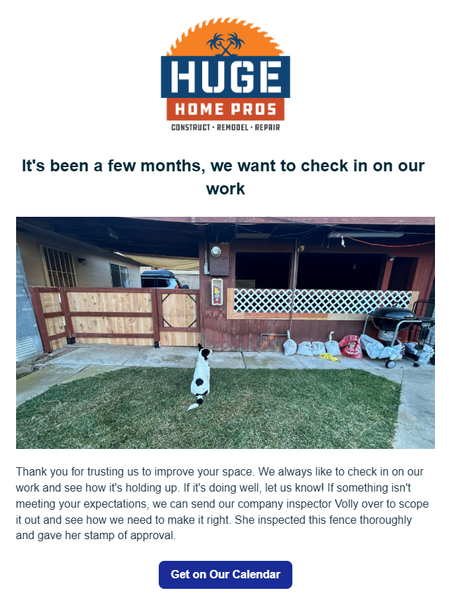
Hey guys! For those of you that have access to the marketing suite - there's a few things you can set up today, that will pay off as long you have it active. 1st - Check in on your work 2-3 months after it's done. This timeline is what I'm using for our type of projects so yours could be sooner. A lot of contractors will do a project then never reach out to the home owner again. I can't tell you how many jobs we've received just because we had this automation set up. In the settings you just set it up for XX amount of months after the invoice is paid. 2nd - Ask them for a referral. This isn't asking for a review. That's a given. But you want to be asking home owners if they have any friends that could use your services. Jobber actually has a referral tracking system integrated in it as well. I will say that people are a lot more motivation to refer when there's a benefit to them. Personally, I don't think it's valuable to just offer $$ off your own services. I think you need to give them something they can use anywhere. Just my opinion. Set this up for 1 week after your job is finished/ invoice paid. 3rd - Set up a 1-2 year sequence of emails. You could set one up for one a week. 2 a month. The main thing is you want to show up in their inbox every week. You know those brands that you are too lazy to unsubscribe to so you see them in your email? Ya, be more like them. This can take some time but start out by giving them a monthly email, then start to add to it. It can be the same nurture sequence for anyone that gets added. How do you not be annoying? Make it more about education than selling them a service. Have AI come up with something for your industry and just make some time every week to chip away at it. Over time this will pay off. And i's a set it and forget it type thing that can have a massive long term impact in your business.56Views2likes1Comment