Invoice update via API
Jobber does not allow invoices to be updated and closed/marked as paid from externally. We use Xero as our main accounting system as it hooks into or bank. Every time we mark an invoice as paid in Xero, we need to manually close the corresponding invoice in Jobber. I have raised this multiple times with Jobber but it is not on their roadmap. Hoping there are more people out there with the same requirement to help boost this post so that Jobber can do something about it. Unless someone has found another way to do it. This will save at 30+ hours a month of man hour to change every invoice.2.3KViews4likes21Comments
Non billable hour tracking in Jobber (time clock workarounds)
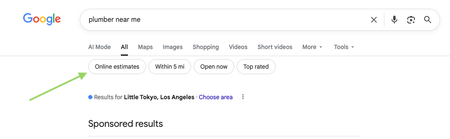
I use Jobber and am finding the Time Clock feature too limited for my needs. While I don’t plan on switching from Jobber any time soon, I wanted to reach out to the community to see what others have done in this situation. I can’t imagine I’m the only one facing this issue. My main concern is that the "General" time clock category hides too much information. Having only the options for clocking "Job Time" or "General" time leaves a lot of room for error, in my opinion. For example, when a team member has a slow day and completes various "overhead" or "non-billable" tasks, it all gets lumped under "General" time. For our company, these tasks include picking up chemicals from a supplier, fixing a headlight on a truck, delivering door hangers, etc. Relying on team members to make their own notes after the fact or expecting an admin to remember these details later feels unsustainable. If we see that a team member has clocked 5 hours on a job and 3 hours under "General" time, it could easily be mistaken for them simply forgetting to clock out for the day. My team is small, but I imagine this issue is even more pronounced in larger teams. Can anyone suggest workarounds or solutions they’ve found? Maybe I need to put more focus on verifying these manual adjustments, but that feels quite labor-intensive. Thanks!Solved2.3KViews6likes28CommentsNew Google Search Features: Online Estimates Filter and “Have AI Check Prices” — what does this mean for service pros?
Google has recently started rolling out new pricing-related features in local home service search, and they could impact how service businesses get discovered. Two early changes we’re seeing: “Online estimates” filter Google is beginning to surface an Online estimates filter in some home service searches. Early signs suggest businesses that provide clear, machine-readable pricing or instant estimates may be favored over generic contact forms. “Have AI check prices” or “Ask AI for Pricing” feature Google is also testing an AI feature that gathers pricing on a homeowner’s behalf by using AI to call businesses and collect price quotes. https://www.youtube.com/watch?v=illIa8LSfY0 These features are still new and evolving, but they raise big questions about pricing transparency, estimates, and local search visibility. We’re curious: Have you noticed either of these features in your area yet? Do you currently show pricing or estimate ranges online? Do changes like this make you rethink how you approach pricing and Google visibility? Would love to hear what service pros are seeing so far 👇2.3KViews0likes14CommentsNetworking - Residential Cleaning
Any cleaning business owners here interested in connecting to share best practices? We're in Indianapolis, IN and run a boutique residential cleaning service. We're women-owned, have been in business for 5+ years and have 13 employees for reference.2.3KViews11likes16Comments
Improving Jobber's Online Booking for a Cleaning Business
Hey everyone, I love using Jobber for my cleaning business, but I’m finding the online booking functionality a bit lacking. We’re losing potential clients and wasting ad spend because customers can't book instantly online. While we always respond quickly to inquiries, the inability to offer instant booking is really hurting us. We provide a range of services—End of Lease, General Home Cleaning, Airbnb Cleaning (based on the number of rooms, bathrooms, etc.)—and have optional extras like oven cleaning and linen hire. Setting all this up in Jobber's online booking system has been a nightmare! I know some of our competitors use platforms like Booking Koala or Launch27, but I really don’t want to switch. Has anyone found a good workaround within Jobber or a solution that works for similar businesses? Any advice would be greatly appreciated!2.1KViews6likes32CommentsDo you utilize battery-powered tools?
Handheld battery-powered tools have come a long way from their first iterations, especially over the past few years. I've started making the switch away from gas-powered equipment throughout the last few seasons for my business and have found the switch to be positive for my workflow and bottom line. This is a trend I believe will continue as batteries become more powerful and long-lasting. Are you utilizing any battery-powered equipment and, if so, do you have any favorites you'd like to share??1.9KViews4likes14CommentsRoll Call! Meet & introduce yourself to other Cleaning and Property Maintenance pros
If you’ve ever thought, “How are other businesses like mine handling this?” you’re in the right place! This space is for Cleaning and Property Maintenance industry pros to connect, compare notes, and talk shop with others who understand the day-to-day realities of running your type of business. 👋 Introduce Yourself Drop a comment and tell us: Your name Business name Industry Years in business Location (City/State/Province) Let us know if you’re joining us for LIVE networking on March 17 (more details below) The more context you share, the better connections you’ll make. 🙌 Pro tip: Search your city or state in the forum to easily find other pros in your area. 📅 Want to connect LIVE? We’re running a pilot to host virtual weekly LIVE Industry Networking starting on March 17, running until April 7. If you’d be interested in joining for the first or following sessions (don’t need to commit to all but you're welcome to join!), make sure to let us know in the comments. 🤝 Culture of this space Think of this forum board like a room full of peers who understand your world. Share what’s working. Ask real questions. Talk through challenges. The goal is to power your success and raise the standard of home service industries together. 💬 Looking for conversation starters? This space works best when conversations are industry-specific and experience-based. You might jump in with something like: “How are other [industry] pros pricing this service right now?” “Is anyone else seeing this shift in their market?” “What’s been working for you when it comes to ____?" 🤔 Why are industries grouped together? We’ve intentionally clustered similar industries to keep conversations active and relevant. These groupings reflect shared business models, operational challenges, and pricing conversations so you can learn from peers who “get it,” even if they’re not in your exact trade. If your question applies to all home service businesses, feel free to post in our broader forum boards. Pro tip: Check out the industry tags to get even more specific Looking forward to seeing this space come to life. 🚀1.9KViews4likes46Comments