Roll Call! Meet & introduce yourself to other Construction and Home Improvement pros
If you’ve ever thought, “How are other businesses like mine handling this?” you’re in the right place! This space is for Construction and Home Improvement pros to connect, compare notes, and talk shop with others who understand the day-to-day realities of running your type of business. 👋 Introduce Yourself Drop a comment and tell us: Your name Business name Industry Years in business Location (City/State/Province) Let us know if you’re joining us for LIVE networking on March 17 (more details below) The more context you share, the better connections you’ll make. 🙌 Pro tip: Search your city or state in the forum to easily find other pros in your area. 📅 Want to connect LIVE? We’re running a pilot to host virtual weekly LIVE Industry Networking starting on March 17, running until April 7. If you’d be interested in joining for the first or following sessions (don’t need to commit to all but you're welcome to join!), make sure to let us know in the comments. 🤝 Culture of this space Think of this forum board like a room full of peers who understand your world. Share what’s working. Ask real questions. Talk through challenges. The goal is to power your success and raise the standard of home service industries together. 💬 Looking for conversation starters? This space works best when conversations are industry-specific and experience-based. You might jump in with something like: “How are other [industry] pros pricing this service right now?” “Is anyone else seeing this shift in their market?” “What’s been working for you when it comes to ____?" 🤔 Why are industries grouped together? We’ve intentionally clustered similar industries to keep conversations active and relevant. These groupings reflect shared business models, operational challenges, and pricing conversations so you can learn from peers who “get it,” even if they’re not in your exact trade. If your question applies to all home service businesses, feel free to post in our broader forum boards. Pro tip: Check out the industry tags to get even more specific Looking forward to seeing this space come to life. 🚀2.5KViews6likes71CommentsNew Google Search Features: Online Estimates Filter and “Have AI Check Prices” — what does this mean for service pros?
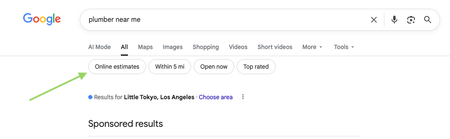
Google has recently started rolling out new pricing-related features in local home service search, and they could impact how service businesses get discovered. Two early changes we’re seeing: “Online estimates” filter Google is beginning to surface an Online estimates filter in some home service searches. Early signs suggest businesses that provide clear, machine-readable pricing or instant estimates may be favored over generic contact forms. “Have AI check prices” or “Ask AI for Pricing” feature Google is also testing an AI feature that gathers pricing on a homeowner’s behalf by using AI to call businesses and collect price quotes. https://www.youtube.com/watch?v=illIa8LSfY0 These features are still new and evolving, but they raise big questions about pricing transparency, estimates, and local search visibility. We’re curious: Have you noticed either of these features in your area yet? Do you currently show pricing or estimate ranges online? Do changes like this make you rethink how you approach pricing and Google visibility? Would love to hear what service pros are seeing so far 👇2.3KViews0likes14Comments
Best way to handle inbound calls to company line?
Curious yalls thoughts. Looking to not just grow, looking to scale and improve / continue to implement systems. Currently have myself, 1 outside sales rep, and field labor crew (fence install company) current process: customer calls into company # (my cell phone). I try to answer as if it were an office line to answer asap. From that, I confirm I can Text them, I then send a request form via jobber that has basic info / few questions to answer. If / when they fill it out, I add to the schedule for a confirmed day / time to quote on site. etc…… I feel this part is a lot of back and forth, and until I have an in house admin office worker that can answer these calls the first ring - I won’t be able to truly grow / stay efficient. (If I’m tied up, I don’t like calling them back 2 hours later, etc) but also - I love having them fill out the form bc the way I have questions on it, it turns it from a warm lead, to a warmer lead. Any way to streamline this, get more efficient, improve this current process? ANY thoughts or advice - real thankful.2KViews5likes17CommentsHow Much Should You Really Be Charging?
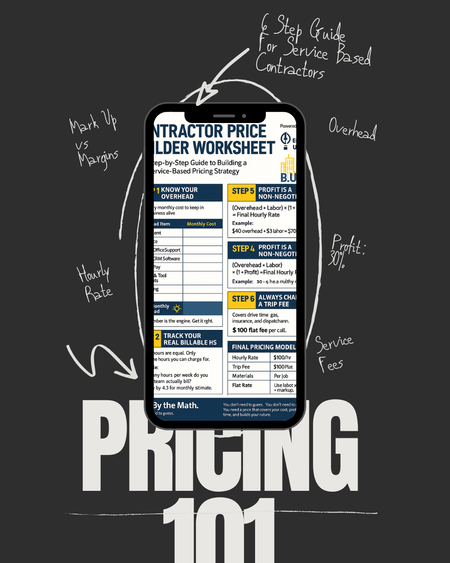
The number one question I receive is tied directly to the fact, most contractors are still guessing when it comes to pricing. Overhead. Profit. Labor rate. Trip fees. They think just because they throw a number they hear their competitors use, thats all that they need. It may work, but how and what do you divide these funds is just as important for your business health. If you don’t know how to do the math, you’re not building a business. You’re surviving check to check and think you need more work, when you do not. So here’s the plan: This Tuesday & Thursday on IG, I’m walking you through our Contractor Price Builder Worksheet FREE on instagram live. We will cover: - How to calculate your real hourly rate - The difference between markup and margin - Why profit is a non-negotiable - And how to price with confidence Join the session. Bring your numbers.1.7KViews3likes23CommentsMilwaukee vs DeWalt Tools, which one?
We’re Lock Nerds Locksmith, a Buffalo, NY-based company that’s always relied on Milwaukee tools. But we’re curious—what tools do other pros trust? We're looking for honest pros and cons between Milwaukee and DeWalt to see if it's time for us to reconsider our setup.1.2KViews6likes21CommentsHow do you utilize reports in your business?
I am curious to hear which reports you consider most valuable in your business and what actions are taken based on those reports if anyone is willing to share. Are there reports that you use regularly in Jobber or reports that you wish were part of Jobber? If so how do you utilize the information that the reports provide? Are changes made based on the reports? Is the data used to create the reports monitored internally for consistency? Thanks for sharing all input is helpful!1KViews5likes15Comments
Sales Marketing
Need More Leads & a Website That Works as Hard as You Do?If you're a contractor offering services like remodeling, roofing, painting, or renovations, having a strong online presence isn’t optional anymore it’s essential. I specialize in building professional, mobile friendly websites that help contractors: Book more jobs Show off past work with photo galleries & testimonials Get found on Google with local SEO Look legit and stand out from the competition Whether you're just starting out or ready to take your business to the next level, I offer free consultations to see how we can upgrade your online presence and bring in more clients.600Views2likes4CommentsIndustry virtual networking starting March 17
Update: Our 4-week networking pilot has wrapped. Thank you to everyone who joined! We brought pros together across industries for weekly 30-minute sessions focused on real business challenges, and the conversations delivered. There was strong participation, valuable idea-sharing, and great feedback from those who joined. 👉 The goal was simple: bring a challenge and get ideas from other pros, and that’s exactly what happened. We’re now taking what we learned and determining next steps, with plans to likely bring these back in the future. If you found these valuable, or are interested in joining future sessions, let us know in the comments and we’ll keep you posted on what’s next. Really appreciate everyone who took the time to be part of this!500Views9likes10Comments