Free Social Media Audit: Is Your Profile and Content Actually Growing Your Business?
Your social media might look great! But is it actually bringing in leads? Hey 👋 We're Jacqueline and Tanner Hurst, owners of JT Junk Solutions. We've built our own social media presence from the ground up as home service business owners, and we know what it actually takes to turn followers into customers. Check out our pages: IG, FB, YT. From June 10-16, we're reviewing your IG and FB profiles and providing practical feedback from a business growth perspective. 👉 Drop a link to your IG or FB profile and/or a post you've recently shared! We'll give you feedback on: 🌟 Whether your profile is making the right first impression 🌟 If your content is actually speaking to your ideal customer 🌟 What small changes could help you win more work 💡 We'll focus on IG and FB only - drop your link to get started! 🔻 Submissions after 5:00 PM MST will not be reviewed. Please submit your link before then!1.6KViews17likes87Comments
How can Jobber help me grow my business?
I am a fairly new business and I am still finishing the detail of my operations. I have been using the basic plan from Jobber for my bookings but I did not find myself using the Marketing suite very much when I first purchased a plan. I believe it is because I was still figuring out how to run my business operations. My question is, what is the best marketing move for me to do as a relatively new business owner using Jobber with limited resources like funds and a small client base.307Views7likes9Comments
How To Get Customers Without Relying on Thumbtack or Lead Generation Apps?
Hey yall. Im Simon 35 based in Brooklyn NYC and im a Mobile Welder. My jobs comes from Thumbtack however that platform along with others like it are beginning to get saturated with low ballers. Any advice you guys can offer for marketing and customer reach? Im open to all suggestions and guidance.307Views5likes9Comments
Do handwritten thank you notes still make a difference?
Random thought: Have handwritten thank you notes become a thing of the past? In a world of emails, texts, and automated follow ups, I wonder if a simple handwritten note stands out more today than it did 20 years ago. Do any of you send them to customers, employees, referral partners, or vendors? If so, have you seen an impact? Curious to hear what others are doing and whether personal touches like this still move the needle.298Views5likes12CommentsWhat's one sales habit that helped you win more jobs?
Maybe it's asking better questions, listening more, or changing the way you showcase your pricing. What's made the biggest difference for you? In this Masters of Home Service episode, Kevin Valle (Pink's Windows) shares how focusing on serving instead of selling helped grow his business from roughly $3,000 a month to more than $80,000 a month. He explains why listening builds trust, how to make pricing conversations feel natural, and how to train a team to sell without relying on scripts. Never miss an episode of Masters of Home Service. Subscribe on Apple, Spotify, or wherever you get your podcasts. 89Views4likes3Comments
What are some ways to remarket your business that are effective?
I am basically starting all over from scratch other than the five or so clients that I currently have. I've been a solo cleaner since 2022 and have been able to keep my business afloat without any debt and making sure everything is in order in my office. From 2023 to the end of 2024 I had a very successful cleaning business because of a apartment complex I was cleaning for on a regular basis, I no longer have that client or situation. I am coming to a portion of trying to get clients again and I'm not sure if I need to lower my rates at this point, but I don't know if my marketing game is on point right now. So my question is what are you doing to market your business to bring in more clientele? How are you advertising? Thank you! - Teig119Views4likes3Comments
Quotes can be the wrong tool. Estimates avoid disputes, protect margins, and elevate professionalism
Quotes and Estimates are fundamentally different, and not having both options is genuinely problematic for us. Fudging it by adding exception language to a document labeled as a Quote communicates that we aren’t committed to the quote, that we can’t accurately assess or execute our own services, and that we don't have the basic ability to simply send the correct type of sales form. Every workaround risks the sale and our professional image. How do you protect yourselves when a job clearly requires an Estimate instead of a Quote? Would having the option to create either a Quote or an Estimate, so you can send the correct sales document for each job, help you run your business more effectively? I believe some people are employing entirely different software for quotes and estimates. Considering that the ability to send an Estimate is a critical and basic business requirement, would it make sense for Jobber to add the simple option of changing the word "Quote" to "Estimate" when needed? They could still fall under the heading of "Quotes" in the UI, because only the word on the form being sent to the client, and the word used in the related message, needs to change. That's simply front-end work to implement and not a major feature update. The beauty of web-based applications is that it is programmatically easy to add simple functionality to expand the capabilities of basic features that affect nearly all users, requiring only a willingness to spend a little time improving the product's core functionality: helping us grow and manage our businesses.257Views3likes2CommentsWhat is your favorite feature in Jobber? Why?
I'll go first. My favorite feature in Jobber is probably the new quote templates. This makes our selling process so much easier. It's also easier to train new sales people because we don't have to teach them how to write an entire quote. We can just teach them which template is best for the job, they are bidding.286Views3likes3CommentsHow I Create a Landscape Design, 2D Plan, and 3D Rendering Before Leaving the Client's Driveway
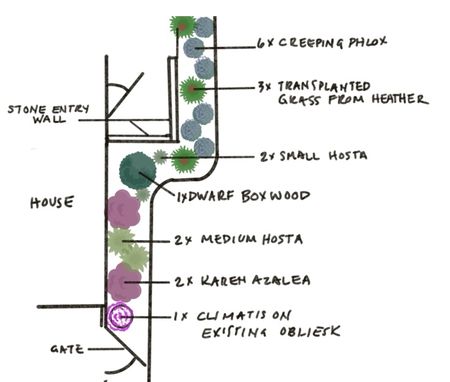
To close premium landscape deals on the spot, I use a fast, mobile-and-AI workflow that visualizes the final project before leaving the client's yard. Here's my method, and links to the programs I click on. Map I walk the property with Cam to Plan to instantly generate an accurate 2D layout using augmented reality. Sketch I drop that map into Procreate on my iPad with my Apple Pencil and start listening and observing. As the client shares their vision and seatbacks, I sketch design layers and notes directly over the map layout to build instant trust. This part is where you really design. You're listening to the client and creating solutions based on your breadth of knowlege and your uncanny talent to see the past, present, and future by looking at a plot of dirt. That part is 100% you. It’s about this point that I go sit in the client's driveway for 10 minutes and hash out my design, and when I’m getting close, I turn to AI. Polish I run that rough sketch through my own app that I spent months developing (not a developer) called PlotTwist: GrowingShade, created with Opal. It instantly transforms hand-drawn sketch into a clean 2D landscape plan with legible text, improved symbols, and architectural shading. It’s my design, but presentation ready. I use these glow ups in website and social media posts. Close PlotTwist 3D, another of my Opal apps overlays that finished 2D plan directly onto the original photos of the client's yard. Seeing a realistic 3D concept of their future space layered onto their actual home creates an immediate emotional connection that closes the deal. You do want to emphasize that it is conceptual, because this app isn't as accurate at the previous. Now you know all my secrets! Comment below on the programs and apps that you use! -La MadrinaSolved130Views3likes3Comments