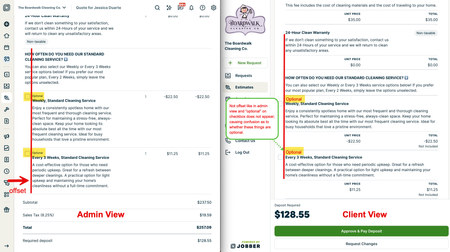
Recent DiscussionsMost RecentMost ViewedWho has Jobber dialed in using Automation I don't think I am utilizing all Jobber features and would like to learn more on how to do that, it would be great to find another contractor who has their Jobber really dialed in and utilizing all their features with Automation and even the integration's as well. Love to connect with any Contractor that has theirs set up and showing great results. Please feel free to reach out, gary@moreheatmorecool.com or 937-794-5060, I would be open to paying someone to help me set mine up as well. Thanks, Gary Duplicates merge Hi guys. Its been a while we been asking for a possibility to merge contacts. Simple as any other crm has. Hope to get more likes on this post and it will be implemented soon. Thanks Naz (Using jobber since 215) Automatically upload files and text to clients profiles? Hello, I are curious if anyone has successfully found a way to automatically upload files / text notes onto a client's profile within internal notes on Jobber. Vision - voicemail audio files are uploaded to a clients profile inside of the internal notes section; by matching the phone number to an existing client within jobber. If the number cannot be matched to an existing client, the automation stops. At the time of writing this, Zapier + Jobber allow for notes / files to be uploaded to a request but not to a client profile. Bulk Messaging Hey everyone! I know jobber has a client communications feature with one of the paid plans, but does that feature include bulk email and text messaging to clients? I find myself often using MailChimp to send out emails but I would rather have Jobber create a feature where I can email and text clients all at once or based off of their tag. For example, when it snows we do snow removal. I would like to send out a bulk message to all our snow removal clients what time we plan to dispatch. Or another example, when it rains, I would like to send out a message to our clients that we will be rescheduling due to the weather. Does anyone have any feedback? Thanks! SolvedHow to prevent or merge duplicate client records when syncing with QuickBooks? I've been asking about this for a while and am hoping that someone has found a solution. At least once a week, when syncing with quickbooks, I get an error message saying that it can't sync CLIENT NAME because CLIENT NAME already exists. There are essentially two causes of the problem: An existing customer uses the on-line request form. The most common thing I'm seeing is that they type their address as "NJ." When we enter new clients, we use the autofill feature with the address that always fills with "New Jersey." We usually catch the error AFTER the technician has gone out and done a job, entered job notes, created and invoice and collected payment. Now we have two records in jobber, each with incomplete information, The second cause of the problem is if I or my office manager are talking to someone and create a new customer account. I can't blame anyone but myself, but it would be a nice feature for jobber to catch that. If I change a password on my bank account and I used that password a year ago, the bank notices it. If I try to open a google account and use my name when I already have a google account, google catches it. So does just about every other on-line service. So my first question is how come Quickbooks, TDBank and Google can figure it out and Jobber can't? My second question is with all the investment in artificial intelligence, how come jobber can't see that it has two records with the same name, phone number, email address and street address? This could be resolved in one of two ways: Either have jobber check if the name/address/phone number or another unique identifier is being use when a new client is entered. Have jobber allow me to merge the two client records into one. Right now, it takes half an hour for me to cut and paste between the two records to make one. The real pain in the neck is the photos we take for our customers projects. They can't be cut and pasted between two jobber accounts. They need to be downloaded from the extra client record to my PC, then uploaded to the other client record. Sorry for my venting - but this is getting to be a real time killer for me. I invested in computer hardware and software to make up for my shortcomings - not to create problems that I have to use my evenings to fix. Anyone else care about this, or am I the only one with the problem? Am I crazy? Need help. Hey guys, wondering is anyone has any insight or ideas. Very frustrated and Jobber support is not helping. I am trying to remove 2 factor authentication for a few reasons: 1) to get into Jobber as I have virtual assistants that need to get into the account at different times that live in different countries. I can't be sitting by my phone at all times waiting for codes. I called Jobber support to ask for a solution. Their response was to have all different authorized users have their own profile. So I have to pay an extra $60/month to make sure everybody can authenticate from their own phone #. What if I was a big business and I had 20 assistants in and out of the software. We would have to have an entire department for 2FA code support.. crazy. Apparently it's impossible to remove 2FA. 2) I am a team trying to set up automations for a highlevel form to transfer the info and book the job into jobber using API's and all types of fancy stuff. However the 2FA might make this impossible for reasons I am not smart enough to explain. This seems like a normal thing that growing businesses in 2024 would be implementing to make less manual work. Not looking to just complain, wondering if anyone knows any higher ups in Jobber or a way to figure this out? Surely there is other people with these problems. I am sure not every person that uses jobber is a 1 man show business.. Client Tags We love using client tags! We use them mainly for our recurring maintenance customers. We tag our customers with "Weekly Maintenance" as well as with their tech name and service day to easily keep track. The office also utilizes a specific tag to "Red Flag" accounts, so we remember to not take on these "problematic customers" whether they canceled service on bad terms, or their service was canceled due to non-payment, or they were just a headache etc. I am curious how other companies utilize their Tags. Who has a client maintenance plan set up? Who has a client maintenance plan that is set up in Jobber for annual or monthly reoccurring fees? Love to connect with someone in efforts to help me get mine set up. Thanks, Gary SolvedFix Quote UI Can you all fix the Client Quote View? It would cause less confusion if optional line items were marked as "optional" as seen in the admin view and if those options were also offset to the right, as seen in the admin view. Not having these two simple things makes those items not seem "optional". Hold Harmless Agreement Is there a way to add or incorporate a Hold Harmless Agreement onto a job and have the customer sign it prior to beginning the job? I thought I might be able to make a job form that attaches to each job, but I cannot seem to figure out how to accomplish this task. Thank you!
If you have a specific question about your Jobber account, reach out to our Success Team directly: ➡️ support@getjobber.com➡️ 1-888-721-1115➡️ via chat in your Jobber account
Tagsclient manager11 Topicsclient hub6 Topicswork smarter6 Topicstwo-way text messaging5 Topicsintegrations4 Topicstext & email templates3 Topicswin jobs2 Topicslead management1 Topicboost profits1 Topiclocksmith1 Topic