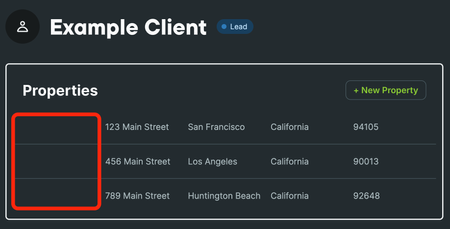
Recent DiscussionsMost RecentMost ViewedClient email responses and communication histories Does Jobber support email reply threading or auto logging of client email responses into communication histories? We primarily communicate with clients by sending emails or text messages through the platform. However, I've noticed that while outgoing messages are logged under each client's profile, their responses are not. Client replies are being sent to an external email address instead of being recorded in Jobber, which means I can't view the full conversation thread within the client's page. This makes it difficult to track communication history, especially when multiple team members are involved. Is there a way to have client responses logged or viewable directly within Jobber? SolvedHow to manage and optimize leads before they become paying customers? I am looking to optimize leads, plan routes for the sales departments and optimize so staff is not zigzagging all over town. These are not visits as no jobs are created yet, these are leads. I want staff to hand out flyers, business cards, etc. Is there a way to manage and optimize routes from the client list, specifically for clients who have not converted from a lead to an actual yet? How are others managing this? My prospects are typically other businesses as we are a B2B operation. Needed Feature: Add Before & After Photos for Individual Visits One of the most valuable ways to showcase our work is through before-and-after photos tied to individual visits. This feature is standard in other platforms like CoPilotCRM and LMN, but Jobber currently doesn’t provide a way to easily attach both sets of photos directly to a visit record. Having this ability would: Give clients a clear visual of the value we deliver. Help build trust and professionalism by keeping photos organized within the client’s visit history. Support communication with clients who don’t live at their property full-time and rely on visuals to see what’s being done while they’re away in real time, not just adding photos to invoices. An important note: the appropriate fix should NOT be integrating yet another third-party software that will just increase your overhead. We need great core features within Jobber itself so businesses can keep everything streamlined and professional. This seems like a basic yet powerful feature that would benefit many service-based businesses using Jobber. It would also reduce the need to manage photos manually outside the platform. Would love to see Jobber consider adding this to the roadmap if it’s not already. SolvedBulk Messaging Hey everyone! I know jobber has a client communications feature with one of the paid plans, but does that feature include bulk email and text messaging to clients? I find myself often using MailChimp to send out emails but I would rather have Jobber create a feature where I can email and text clients all at once or based off of their tag. For example, when it snows we do snow removal. I would like to send out a bulk message to all our snow removal clients what time we plan to dispatch. Or another example, when it rains, I would like to send out a message to our clients that we will be rescheduling due to the weather. Does anyone have any feedback? Thanks! SolvedHow to prevent or merge duplicate client records when syncing with QuickBooks? I've been asking about this for a while and am hoping that someone has found a solution. At least once a week, when syncing with quickbooks, I get an error message saying that it can't sync CLIENT NAME because CLIENT NAME already exists. There are essentially two causes of the problem: An existing customer uses the on-line request form. The most common thing I'm seeing is that they type their address as "NJ." When we enter new clients, we use the autofill feature with the address that always fills with "New Jersey." We usually catch the error AFTER the technician has gone out and done a job, entered job notes, created and invoice and collected payment. Now we have two records in jobber, each with incomplete information, The second cause of the problem is if I or my office manager are talking to someone and create a new customer account. I can't blame anyone but myself, but it would be a nice feature for jobber to catch that. If I change a password on my bank account and I used that password a year ago, the bank notices it. If I try to open a google account and use my name when I already have a google account, google catches it. So does just about every other on-line service. So my first question is how come Quickbooks, TDBank and Google can figure it out and Jobber can't? My second question is with all the investment in artificial intelligence, how come jobber can't see that it has two records with the same name, phone number, email address and street address? This could be resolved in one of two ways: Either have jobber check if the name/address/phone number or another unique identifier is being use when a new client is entered. Have jobber allow me to merge the two client records into one. Right now, it takes half an hour for me to cut and paste between the two records to make one. The real pain in the neck is the photos we take for our customers projects. They can't be cut and pasted between two jobber accounts. They need to be downloaded from the extra client record to my PC, then uploaded to the other client record. Sorry for my venting - but this is getting to be a real time killer for me. I invested in computer hardware and software to make up for my shortcomings - not to create problems that I have to use my evenings to fix. Anyone else care about this, or am I the only one with the problem? 💡FEATURE REQUEST: Schedule Send Communications When I’m ready to send an estimate or invoice, Jobber makes it easy to send directly to the customer. The issue is timing. I often finish admin work outside normal business hours because I’m in the field during the day. When I send estimates/invoices late at night, it can feel unprofessional (or at minimum, it triggers customer replies at weird times). Current workaround: I send the estimate/invoice to myself, then schedule send it to the customer later during business hours. Phones make this easy. It works, but it’s extra steps. Feature request: Add a “Schedule Send” option when sending estimates and invoices, similar to email scheduling. Ideal behavior: At send time, give options: Send now / Schedule send For schedule: choose date + time (and time zone handling) Queue it and show status like Scheduled / Sent / Failed Allow cancel/edit of scheduled sends This would save time, reduce mistakes, and keep customer communications going out at appropriate times without requiring a workaround. Question for Jobber Team: Why Are Filter and Sort Settings Not Persisted? Across every core page, Jobber relies on sortable and filterable lists. Filter and sort settings are not persisted, not across sessions, not across navigation, and not even within the same page during a session. This forces users to: Reapply filters Re-sort columns Rebuild the same view they just set up moments ago Workflow comes to a full stop every time this happens. Unless users only use the default list views, it is impossible to work efficiently when moving between pages. This is not a “feature request.” It is fundamental software behavior that has been solved in applications for decades. Any tool with sortable and filterable lists as a core component must persist these settings. There are multiple well-understood ways to do this, including: Persisting settings in the URL so navigation or session reloads maintain state Storing preferences in session or local storage Saving user-level defaults or remembered views Why does Jobber not implement one of these basic solutions? Jobber positions workflow efficiency as a core value. Why are users who rely on sort and filter options condemned to endless repetitive actions? Instead of working on my business, why do I have to spend that time creating scripts that save sort and filter changes and reapply them every time the page loads? This is a critical UX failure that directly slows daily work for nearly everyone. If this is technical debt, it's too big to keep ignoring at the cost of user experience. When will this be addressed? Why is Property Name missing in add/edit property? (It's visible in client edit view.) When viewing a client's properties on the Client page, I noticed that the left column is oddly empty: Clicking the + New Property button or clicking on an existing property and clicking the Edit button opens a dialog with the following fields: However, clicking on the Edit button for the client, scrolling down to the Property address section, and clicking the Add Another Address button, a dialog opens with an additional field, Property name: Adding a property name displays that info in the left column of the property list on the client's page: This seems like the intended functionality because: Assigning names to properties makes working with multiple properties much easier. The feature is already built into the product and should be fully functional. So, to fix the missing data field in this dialog: Typing ~5 lines of existing syntax 10-15 minutes of testing Minimal time for code review / QA sign-off Deploy in the next scheduled update It seems extremely unlikely I am the first to report this, yet I first raised this issue nearly five months ago and was told the feature was not implemented, even though it is clearly used elsewhere, showing it is intentional and fully functional. I followed up three and a half months ago with the exact code showing how simple the fix is. From my experience across the software production cycle, this is a simple functional omission bug: a UI regression that hides an already implemented feature and disrupts user workflow. The fix is trivial and low-risk. Realistically, from checkout to review, QA sign-off, and deployment, it requires maybe 60-90 minutes of human time. Can you confirm whether this fix is scheduled to be made, and if so, when it will be applied? Thank you. How does Jobber’s texting system handle multiple contacts for one client? Texting System is Lacking It is very hard to know who we are talking to as many of our clients have multiple points of contact (husband/wife), maybe the GC on the project. But our commercial clients can have 2-5 contacts easily, the company plus managers. The text system currently displays the Client or Business Name and the phone number.... but the phone number is often cut-off completely. And there is Zero way for us to see who we are talking too as you can not click into more details per text. What we need at minimum right away - A way to see the full phone number of the texter What we would like to see very soon - The name of the person texting if they are in a client file... if a number can be matched to a file, then you can match it deeper to the actual contact name. What we need ultimately - we need to be able to choose who we text quicker and easier. From the desktop browser we pull up a client file, and under Contacts it lists multiple people, currently you have to copy and paste that phone number into the text box. We need a Text this person option/button by there name/number. That opens a the text chain in the text pane, showing all past conversations with the specific person. The absolutely ideal scenario - all of the above and Contacts Management (and let us link it to our google, apple, whatever contacts) this rolodex of contacts will allow the system to reference it for the name correctly when a random texts us that we know. (ie. If Joe Contractor texts me about a job, but he is not listed anywhere in Jobber, I need to be able to save his number as a general contact, so his name shows up instead of just a number). Referral Credit System Is Very Lacking This post is feedback, and a place to allow other users to leave feedback, for the Client Referral marketing tool in Jobber. The current client referral system is very lacking for a premium paid feature. We would like to see some deep functionality changes and additions immediately, since this has been around for a while now with no improvements....here is my current thoughts on what could be added or should be changed - Credits need to show in the Clients file (maybe under account balance) Staff needs to know if a credit is available or could apply for sales purposes. Currently its restricted to owners/admins in the marketing section and you can't do anything with that info anyway from there, its pretty useless. Credits need to be usable across the whole system & in the field (mobile invoices), we better for techs in the field ('hey, i see you have credit, would you like to use it on this invoice?') Credits need to be adjustable, we want to be able to add referral credits manually if we see fit. (this is especially ideal for when staff forgets to fill out the referrer entry on a job) which happens all the time. Apply credits anyway we would like (if a client has a $100 in credit, we want to be able to apply that whole amount if they have a huge invoice(s) being paid at once) the current automatic application is not good enough. Credit Amount settings ($ / % amount) should be able to be set based on Client type/tag (if the client is a Builder Partner we want to give them 10%, instead of just the $50 we give to a regular customer per lead) Option to set the Amount of credit ($/%) given based on a range of invoice value (5% for $100-500 invoice amount / 8% for $500-1000 invoice amount / etc) Option to exclude certain Clients from the referral program (we have builder partners that are on a completely different program internally, we do not want there account to also be getting other discounts). Option in Jobber websites to add a Refer A Friend button, so we do not have to rely on the email campaigns that most people don't open. Allow the client to see credits in their portal, and apply them to invoices when making payments.
If you have a specific question about your Jobber account, reach out to our Success Team directly: ➡️ support@getjobber.com➡️ 1-888-721-1115➡️ via chat in your Jobber account
Tagsclient manager11 Topicsclient hub6 Topicswork smarter6 Topicstwo-way text messaging5 Topicsintegrations4 Topicstext & email templates3 Topicswin jobs2 Topicslead management1 Topicboost profits1 Topiclocksmith1 Topic