Multiple Invoices.
Has anyone found a way, or heard of Jobber implementing a way, to add multiple invoices and quotes to one Job. For example, our company does appliance repair. We schedule the diagnosis appointment and collect the service fee, or send a tech out to diagnose and they collect the service fee. Then we write a quote for the repair. Either with parts on the van, local parts, parts to order or an appliance to order and install. Sometimes we write two quotes, a repair quote and a quote to buy and install a new unit. Then the customer can weigh the pros and cons of fixing vs replacing. Then the homeowner accepts a quote and it converts to an invoice and we perform the repair. As of right now we make a job, go out, diagnose, invoice the service call. Then create a quote or two, they are approved, then converted to another job. For every job, we have two jobs. It would be nice if multiple invoices and quotes could attach to the same job, with all the information in one place.How Do I Tag a Group in Jobber and Know Who’s Seen the Note?
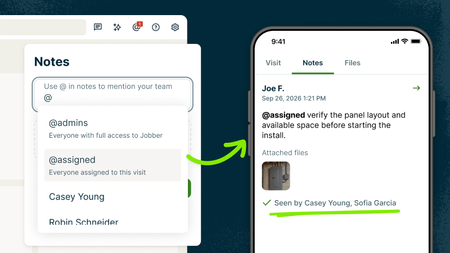
The gate code changed and everyone assigned to the job needs to know. Or maybe a client has a billing question that one of your admins needs to handle. Instead of tagging people one at a time (or playing phone tag), use group @mentions to notify the right people at once. @assigned notifies everyone assigned to that visit. Example: “@assigned Gate code changed to 4821. Use the side entrance.” @admins notifies every admin on your account. Example: “@admins Client wants to push their invoice due date. Can someone handle it?” You can use group @mentions in notes on clients, requests, quotes, jobs, visits, and invoices. Everyone in the group gets notified, and read receipts show you exactly who’s seen the note, so you know the update got through. 📖 Learn more 🎥 Watch it in the Jobber Now announcement Team @mentions is available on the Plus plan How does your team pass along updates today—notes, group texts, phone calls, something else?85Views0likes1CommentHow to Present Home Service Agreements Seemlessly
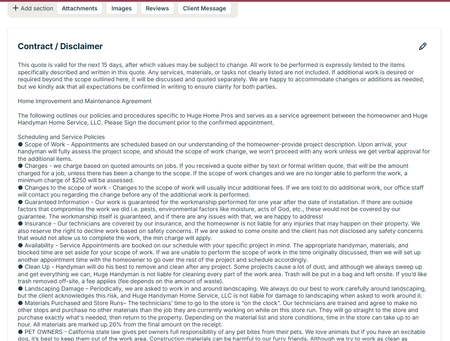
So we are in California and Home Service Agreements are a part of life. But did you know there is a place to put this in your contract so it covers your butt and your clients? At the bottom of your quotes there is a contract/ disclaimer section to put yours in easily. Do you have different types of jobs that require different disclaimers? Great - AnthonySalazar just did a post about templates. You can make a different contract for each one. One thing to consider - not everyone reads this. Kind of understandable. These are the not fun things about a job. One idea is to make a fun video about what's in it and send it to them when they accept a quote. Don't judge, we made this video a couple years ago but it's a good illustration of what you can do. Honestly you can make it on your phone Our Video on You Tube Another Idea is to have it as an attachment that you send out every time. This is less ideal because I like getting their signature on the document itself. Either way - make sure you are putting this in your quotes. If someone comes back to you about something that's in your contract you are covered!110Views3likes5CommentsHow do I connect Jobber to ChatGPT or Claude?
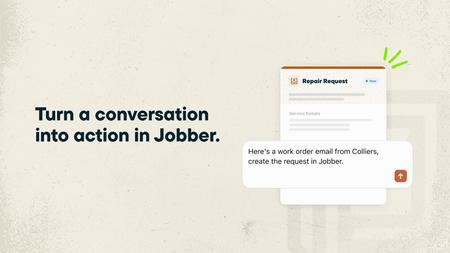
If you regularly use ChatGPT or Claude to help run your business, you can now make those conversations even more useful by connecting your Jobber account. With the ChatGPT Plugin and Claude Connector, powered by Model Context Protocol (MCP), ChatGPT and Claude can use information from your Jobber account alongside your other connected business tools. That means you can ask questions about your business, get answers based on your actual data, and even get things done in Jobber without jumping between apps. What you can do by connecting Jobber to ChatGPT and Claude: Get a head start on your day. Ask “What’s my schedule looking like today?” and get a rundown of your upcoming jobs and visits. See who’s behind on payments. Ask “Which invoices are still outstanding?” to quickly see what’s overdue and needs your attention. Keep quotes moving. Ask “Which quotes need a follow-up?” to find quotes that are still waiting for a response. Turn emails into requests. Got a new customer inquiry sitting in your inbox? Ask ChatGPT or Claude to create a client and request in Jobber using the details from that email. Spend less time building quotes. Ask ChatGPT or Claude to draft a quote from an existing request or for a new job. It’ll prepare the quote in Jobber for you to review before sending it to your customer. And you’re not limited to asking about Jobber! Since ChatGPT and Claude can connect to other business tools, you can bring information from across your business into one conversation.You don’t need to know anything about coding or AI to get started. Just ask questions the same way you’d ask someone on your team. Learn more and give it a try: 🔗 Connect Jobber to ChatGPT 🔗 Connect Jobber to Claude We’d love to hear how you’d use this! If you could ask ChatGPT or Claude to take one task off your plate, what would it be?64Views0likes0Comments
How do you manage quotes that never get accepted?
Hey everyone! I'm curious how you handle quotes that customers never respond to. Does Jobber's built-in follow-up automation do enough to bring those customers back, or do you still have to manually track unanswered quotes and chase leads? What part of the process do you find most frustrating? I'd be interested to hear what's working for you and what could be improved.419Views3likes30Comments
Australian customers: full subscription prices, fewer features. When will this change?
As an Australian business owner using Jobber, it increasingly feels like Australia has been abandoned when it comes to access to the full platform. We continue paying substantial subscription fees, yet important features available in other markets remain unavailable here: Two-way text messaging. Jobber’s Google review tools connected to our Google Business Profile. Access to the full Marketing Suite. Jobber Payments. These features directly affect how we communicate with clients, market our businesses, build our reputation and get paid. What makes this particularly frustrating is seeing smaller Australian CRM startups, including new “vibe-coded” platforms, offering two-way texting. If they can make it work, why are Australian Jobber customers still waiting? Homeworks explicitly supports two-way texting in Australia and offers email marketing, automation and online payment tools. That makes it difficult to understand why these gaps persist with Jobber. If there are technical, regulatory or commercial barriers, explain them clearly. From a customer’s perspective, I haven’t received an explanation that makes sense of the difference. There is also a fundamental question of value: why are Australian customers expected to pay standard subscription prices while receiving a materially smaller feature package? I recognise that some features are paid add-ons. The frustration is that we cannot even access those options here. I’ve raised these concerns with Jobber support repeatedly. In my experience, the responses have been generic acknowledgements without a meaningful explanation, clear commitment or useful timeframe. Whatever the intention, the message I’m left with is that Australian customers simply aren’t a priority. I’d like Jobber to publicly address three questions: What specifically is preventing these features from being available in Australia? Is there a committed Australian rollout plan, and what are the expected timeframes? Will Jobber offer pricing that reflects the reduced functionality available to Australian customers? I’m posting this because I want the issue acknowledged and addressed. Australian businesses invest real money and time into building their operations around Jobber. We deserve transparency about what we’re paying for and whether these gaps will actually be closed. Are other Australian users feeling the same way, and has anyone received a concrete answer beyond their feedback being passed along?How To Manage Big, Multi-Stage Jobs in Jobber
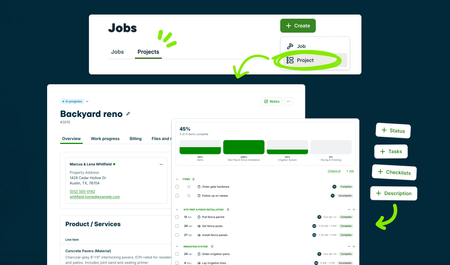
Big projects can get complicated fast. Between phases, visits, tasks, and everything else that needs to happen along the way, it’s easy for the plan to end up spread across a few different places. Projects are designed to bring more of that work together in Jobber, so you can see what’s happening now, what’s coming next, and keep the job moving. It’s currently in Jobber Labs for Plus and Unlimited plans. If you manage larger or multi-stage work, opt in, give it a try, and let us know what works and what you’d like to see next. Your feedback will help shape where Projects goes from here. Here's what you can do right now: Turn a quote into a project. Line items carry over, so there's no retyping. Break it into milestones, tasks and visits. Assign each piece to the right crew and location. Add checklists to visits. Your crew knows exactly what to finish every time they're on site. See what's moving and what's stuck. Track status on every task, visit and the project overall. And there’s more to come. We’ll continue building on Projects as we learn from your feedback, so give it a try and tell us what would make managing your bigger jobs easier. To get started: Opt in to Projects through Jobber Labs Open an approved quote and convert it into a project, or create a new project from scratch Set up your milestones, then add the tasks and visits under each one Assign your crews and add checklists to visits 🎥 Watch it in the Jobber Now announcement What’s the hardest part of keeping a big, complex project on track?158Views0likes2CommentsEffective Tagging - Who Is Doing It And What is Your Strategy?
I feel like tagging within customers might be the most forgotten about thing on our team but probably the lowest hanging fruit to keeping our information organized. Right now we are just tagging people we don't want to work with anymore and people that need to leave us a review. I''m struggling to do it in a way that's super effective. So for you tagging buffs out there, what are you doing to tag clients ad what strategy do you have? jobber - If you guys ever integrated JOB tags that would be amazing. I'm thinking we could tag jobs by category then reference them quicker. Instead of thinking of which clients we did which types of jobs for. Just putting "trim carpentry" or "doors" then seeing all the jobs we tagged with that would be clutch!126Views1like3CommentsHow Do I Build a Custom Report in Jobber Without Hiring Someone or Using Spreadsheets?
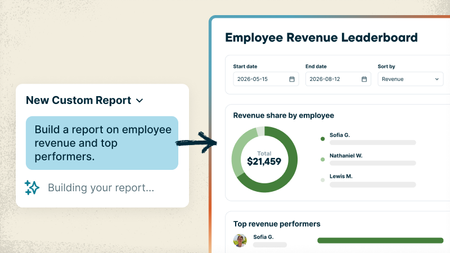
Every service business tracks things a little differently, and sometimes the answer you need is spread across different places in Jobber. Maybe you want to see which customers haven’t booked again this year, which neighborhoods bring in the most recurring revenue, or which jobs ran over their estimated hours. Getting answers that specific usually means exporting reports, digging through spreadsheets, or paying someone to build the report for you. With the new Custom Report Builder, you just type what you want to see and Jobber AI builds the report from your real numbers, with charts included if you want them. And unlike the standard reports, which only look at one area at a time, a custom report can pull data from across Jobber into one place: quotes, jobs, invoices, timesheets and more. What that looks like: Ask it like you'd ask your office manager. Something like "Show me revenue and labor hours by job type for the last 6 months" or "Which clients bring in the most revenue compared to the hours we spend on their jobs?" Need a change? Just say so. "Add a column for profit," "only show the previous 3 months." It updates and saves the report for you. Pulls from everything from across Jobber. Data from quotes, jobs, invoices, timesheets and more can live together in one report, so you can see the bigger picture without jumping from one report to the other. That's something the standard reports can't do. Save it and check back anytime. Reports live on your Custom Reports page and refresh with your latest numbers. Your team's permissions stay the same, so nobody sees what they shouldn't. Custom Reports are available on the Plus plan 🏗️ Build your first custom report 📖 Learn more 🎥 Watch it in the Jobber Now announcement What's the first report you'd build? Post your prompt below. Might give someone else a good idea!164Views0likes2Comments