Are You Pricing Jobs for Profit or Just to Win the Job?
Quoting can be one of the toughest parts of running a small business. It’s easy to lower your price to beat the competition, but that doesn’t always lead to a healthy business. A good quote should cover your time, materials, expenses, and the value you provide. The goal isn’t to get every job, it’s to get the right jobs that allow your business to grow. What’s one thing that helped you improve your quoting process?Solved391Views2likes7Comments
Section for Vendors or Subs
Please help develop a functions to add 3rd party vendors/subs that may be used as needed or 1-time. The primary point would be contact and database of vendors with info and docs needed for our team to access if needed as well as would be nice for them to have scheduling, invoicing with pics and job tracking capabilities.114Views2likes1CommentHow to back up job photos and files from Jobber?
Hey all, just wondering if this is something others have run into. A few of our clients have been talking about how they handle long-term storage of job photos and documents, especially when staff leave, or when they want to organize files outside of Jobber. Some mentioned wanting to move things to Google Drive or DropBox automatically, but I’m not sure how common that need really is. Just curious, have you or your team thought about this? Is keeping a backup of Jobber media files part of your process, or not really a concern? Appreciate any thoughts! Josh436Views0likes2Comments
PLEASE add a kit function
Even the bottom of the barrel CRM that I'm currently using has a robust kit function. Create products with fully editable costs and quantities, then add those products to a kit (in this case, what a "service" should be). Once a kit is entered into a quote, individual products are hidden from the customer, but fully editable when creating the quote. As it is now, I have no idea what the difference between a "product" and a "service" are. They both have the same info (name, description, cost, etc). You should just be able to group products to form services. If i have a product of "labor" and a product of "receptacle". I should then be able to create a service of "Replace Receptacle". That service would consist of my labor product, and my receptacle product. Both with quantities and costs that I could edit when creating a quote. Since not all receptacles are the same, and my customer doesnt care whether its a duplex or a decor, being able to edit the cost of that receptacle, straight from the kit during quote creation, would be amazing.Solved515Views3likes8Comments
Multiple Branches
Hey Team, I couldn't find something similar about this topic so I thought I'd post my own. We recently started a second branch of the same company and want to manage our jobs and data within Jobber but would love to have an easy way to separate the data when looking at the reporting screens. What are some suggestions how the best way to do that within the system without having to have 2 separate subscriptions? Thanks in advance!Solved431Views2likes4Comments
Tiered Line Items/Products
Hey all! I run a fence company and we do mostly residential work. Many jobs are smaller and require a price change to the line item as we cannot do a 5’ job for the same price per foot as a 300’ job. I NEED TIERED PRICING FOR MY LINE ITEMS!! Badly. It is a huge pain to manually change my prices. Are there any plans within Jobber to provide tiered pricing within line items? Doesn’t seem like it would be that difficult to program. If-Then.Solved205Views0likes2Comments
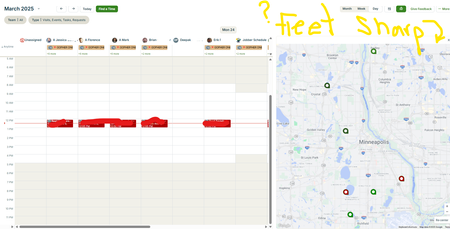
🚗Fleet Sharp and Schedule (alpha) Split Screen
Hello, Our Fleet Sharp trackers do Not populate on the schedule (Alpha) split screen. We heard about Force Fleet at the spring feature announcement, and we have seen screenshots of Force Fleet trackers visible on the schedule split screen. We are wondering (hoping 🙏) if Jobber will update the split screen to show both Force Fleet AND Fleet Sharp trackers. We are wondering if anyone has heard or knows info regarding this topic. Thank you234Views1like2Comments