Weather Widget 🌞🌧️❄️🔥
Is it possible to integrate Jobber with a weather app? On the dashboard, we were thinking a 7-day forecast could be visible. Also, I thought a small temperature reading on the monthly calendar would be visible. We also thought the weather for the day could be captured and saved as an internal note for the job.Solved601Views5likes11CommentsAre You Pricing Jobs for Profit or Just to Win the Job?
Quoting can be one of the toughest parts of running a small business. It’s easy to lower your price to beat the competition, but that doesn’t always lead to a healthy business. A good quote should cover your time, materials, expenses, and the value you provide. The goal isn’t to get every job, it’s to get the right jobs that allow your business to grow. What’s one thing that helped you improve your quoting process?Solved446Views2likes7Comments
Section for Vendors or Subs
Please help develop a functions to add 3rd party vendors/subs that may be used as needed or 1-time. The primary point would be contact and database of vendors with info and docs needed for our team to access if needed as well as would be nice for them to have scheduling, invoicing with pics and job tracking capabilities.137Views2likes1Comment
PLEASE add a kit function
Even the bottom of the barrel CRM that I'm currently using has a robust kit function. Create products with fully editable costs and quantities, then add those products to a kit (in this case, what a "service" should be). Once a kit is entered into a quote, individual products are hidden from the customer, but fully editable when creating the quote. As it is now, I have no idea what the difference between a "product" and a "service" are. They both have the same info (name, description, cost, etc). You should just be able to group products to form services. If i have a product of "labor" and a product of "receptacle". I should then be able to create a service of "Replace Receptacle". That service would consist of my labor product, and my receptacle product. Both with quantities and costs that I could edit when creating a quote. Since not all receptacles are the same, and my customer doesnt care whether its a duplex or a decor, being able to edit the cost of that receptacle, straight from the kit during quote creation, would be amazing.Solved574Views3likes8Comments
Suggestion: Quotes / Invoices Sub Items for Main Line Item
Hello Jobber Team, 🛠️ Why We Use Sub-Items in Our Quotes & Invoices When it comes to handyman and construction work, no two jobs are exactly alike — and we believe your quote should reflect that. That’s why we organize our quotes and invoices with main line items and sub-items, and here’s why that matters: ✅ Customizable Work Scopes Sometimes a project includes optional jobs based on your preferences or budget. For example, your quote might include: • Job 1: Deck Repair - Materials - Labor • Job 2 (Optional): Flooring Install - Materials - Debris Disposal Fee - Labor You can easily see what's included and choose what fits your needs. ✅ Transparency You Can Trust No vague charges or confusing totals. Every part of the job is broken down so you can see exactly what you're getting — from screws and wood planks to disposal and labor. ✅ Smoother Approvals & Communication Want to move forward with just one section of the job for now? No problem. Sub-items make it easy to discuss, approve, or remove parts without reworking the entire quote. ✅ Budget-Friendly Flexibility This system lets us work with you on cost — you can prioritize essential work and schedule optional items for later, all while keeping track of the big picture. At the end of the day, we want your estimate to be as clear, flexible, and tailored as the work we provide. 🧰📋323Views0likes1Comment🚗Fleet Sharp and Schedule (alpha) Split Screen
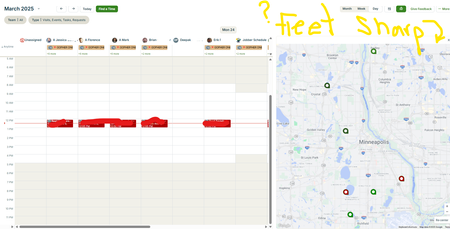
Hello, Our Fleet Sharp trackers do Not populate on the schedule (Alpha) split screen. We heard about Force Fleet at the spring feature announcement, and we have seen screenshots of Force Fleet trackers visible on the schedule split screen. We are wondering (hoping 🙏) if Jobber will update the split screen to show both Force Fleet AND Fleet Sharp trackers. We are wondering if anyone has heard or knows info regarding this topic. Thank you258Views1like2Comments