New Google Search Features: Online Estimates Filter and “Have AI Check Prices” — what does this mean for service pros?
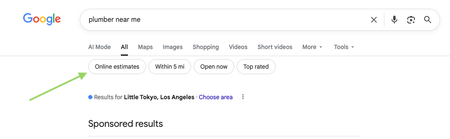
Google has recently started rolling out new pricing-related features in local home service search, and they could impact how service businesses get discovered. Two early changes we’re seeing: “Online estimates” filter Google is beginning to surface an Online estimates filter in some home service searches. Early signs suggest businesses that provide clear, machine-readable pricing or instant estimates may be favored over generic contact forms. “Have AI check prices” or “Ask AI for Pricing” feature Google is also testing an AI feature that gathers pricing on a homeowner’s behalf by using AI to call businesses and collect price quotes. https://www.youtube.com/watch?v=illIa8LSfY0 These features are still new and evolving, but they raise big questions about pricing transparency, estimates, and local search visibility. We’re curious: Have you noticed either of these features in your area yet? Do you currently show pricing or estimate ranges online? Do changes like this make you rethink how you approach pricing and Google visibility? Would love to hear what service pros are seeing so far 👇2.3KViews0likes14CommentsRoll call! Meet & introduce yourself to other Service-based Skilled Trade pros
If you’ve ever thought, “How are other businesses like mine handling this?” you’re in the right place! This space is for Service-Based Skilled Trades pros to connect, compare notes, and talk shop with others who understand the day-to-day realities of running your type of business. 👋 Introduce Yourself Drop a comment and tell us: Your name Business name Industry Years in business Location (City/State/Province) Let us know if you’re joining us for LIVE networking on March 17 (more details below) The more context you share, the better connections you’ll make. 🙌 Pro tip: Search your city or state in the forum to easily find other pros in your area. 📅 Want to connect LIVE? We’re running a pilot to host virtual weekly LIVE Industry Networking starting on March 17, running until April 7. If you’d be interested in joining for the first or following sessions (don’t need to commit to all but you're welcome to join!), make sure to let us know in the comments. 🤝 Culture of this space Think of this forum board like a room full of peers who understand your world. Share what’s working. Ask real questions. Talk through challenges. The goal is to power your success and raise the standard of home service industries together. 💬 Looking for conversation starters? This space works best when conversations are industry-specific and experience-based. You might jump in with something like: “How are other [your industry] pros pricing this service right now?” “Is anyone else seeing this shift in their market?” “What’s been working for you when it comes to ____?” 🤔 Why are industries grouped together? We’ve intentionally clustered similar industries to keep conversations active and relevant. These groupings reflect shared business models, operational challenges, and pricing conversations so you can learn from peers who “get it,” even if they’re not in your exact trade. If your question applies to all home service businesses, feel free to post in our broader forum boards. Pro tip: Check out the industry tags to get even more specific Looking forward to seeing this space come to life. 🚀1.5KViews8likes42CommentsHow do you utilize reports in your business?
I am curious to hear which reports you consider most valuable in your business and what actions are taken based on those reports if anyone is willing to share. Are there reports that you use regularly in Jobber or reports that you wish were part of Jobber? If so how do you utilize the information that the reports provide? Are changes made based on the reports? Is the data used to create the reports monitored internally for consistency? Thanks for sharing all input is helpful!1KViews5likes15Comments
Inventory Management
Hi Everyone, I run a small appliance repair company in Nova Scotia. Our current strain with using jobber is lack of inventory management. We keep essentially inventory in 2 different places, the technicians truck and in the shop. The shop is split into 2 sections. Customer parts that we receive in for specific jobs and just warehouse stock of parts we keep around. We have seriously been considering switching to a different program for lack of features that fit with jobber on this. If anyone has any recommendations that you have personally used I would love to hear about it. In my ideal world a technician would be able to add a line item and enter a part number and it would say "you have this in your truck" so he can select it and it will alert us that he is using it from his truck to reorder. This is a strain on our growing business and I am hoping there is a solution so we do not have to leave jobber. Thanks, Jacob.900Views2likes8Comments
Sales Marketing
Need More Leads & a Website That Works as Hard as You Do?If you're a contractor offering services like remodeling, roofing, painting, or renovations, having a strong online presence isn’t optional anymore it’s essential. I specialize in building professional, mobile friendly websites that help contractors: Book more jobs Show off past work with photo galleries & testimonials Get found on Google with local SEO Look legit and stand out from the competition Whether you're just starting out or ready to take your business to the next level, I offer free consultations to see how we can upgrade your online presence and bring in more clients.600Views2likes4CommentsHow can I automatically send an SMS to customers when their ordered part arrives?
I have been trying to use some automation to help with a workflow related to parts. We are an appliance company, and often need to order parts. What I am looking to do is when parts arrive, we generally put a note in the job saying parts in. I would like to try automation that when we say part is in, we send an SMS to the customer saying the part is in and to go to our booking link to setup a return visit. I have tried using integrations like Zapier to Twilio, but cant seem to get it to work based on notes in the job being updated. Anyone else get a workflow like this working?500Views1like9Comments
PLEASE add a kit function
Even the bottom of the barrel CRM that I'm currently using has a robust kit function. Create products with fully editable costs and quantities, then add those products to a kit (in this case, what a "service" should be). Once a kit is entered into a quote, individual products are hidden from the customer, but fully editable when creating the quote. As it is now, I have no idea what the difference between a "product" and a "service" are. They both have the same info (name, description, cost, etc). You should just be able to group products to form services. If i have a product of "labor" and a product of "receptacle". I should then be able to create a service of "Replace Receptacle". That service would consist of my labor product, and my receptacle product. Both with quantities and costs that I could edit when creating a quote. Since not all receptacles are the same, and my customer doesnt care whether its a duplex or a decor, being able to edit the cost of that receptacle, straight from the kit during quote creation, would be amazing.Solved500Views3likes8Comments