Managing Fill in Jobs
Hi Community! One challenge we face is keeping track of fill in jobs or jobs that need a follow up visit but dont know exactly when it will happen. Having one central location or a way to keep track of all of these for easy reference would be key. We try to use the job status' as much as possible but turns out this does not always work. The work around we have done is creating a new customer named "Fill In" then created a new job titled "Fill In Jobs List". Now techs or **bleep** can add a new line item with scope of work, estimated duration and job number. Each new line item represents a separate fill in job. This puts all our fill ins in one location and we can reference it then direct to the job number in Jobber for scheduling. This works but don't feel its scalable. Curious what others have been doing for this! Thanks, Carson6.2KViews1like5CommentsNew Google Search Features: Online Estimates Filter and “Have AI Check Prices” — what does this mean for service pros?
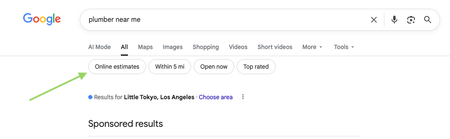
Google has recently started rolling out new pricing-related features in local home service search, and they could impact how service businesses get discovered. Two early changes we’re seeing: “Online estimates” filter Google is beginning to surface an Online estimates filter in some home service searches. Early signs suggest businesses that provide clear, machine-readable pricing or instant estimates may be favored over generic contact forms. “Have AI check prices” or “Ask AI for Pricing” feature Google is also testing an AI feature that gathers pricing on a homeowner’s behalf by using AI to call businesses and collect price quotes. https://www.youtube.com/watch?v=illIa8LSfY0 These features are still new and evolving, but they raise big questions about pricing transparency, estimates, and local search visibility. We’re curious: Have you noticed either of these features in your area yet? Do you currently show pricing or estimate ranges online? Do changes like this make you rethink how you approach pricing and Google visibility? Would love to hear what service pros are seeing so far 👇2.1KViews0likes14CommentsRoll Call! Meet & introduce yourself to other Construction and Home Improvement pros
If you’ve ever thought, “How are other businesses like mine handling this?” you’re in the right place! This space is for Construction and Home Improvement pros to connect, compare notes, and talk shop with others who understand the day-to-day realities of running your type of business. 👋 Introduce Yourself Drop a comment and tell us: Your name Business name Industry Years in business Location (City/State/Province) Let us know if you’re joining us for LIVE networking on March 17 (more details below) The more context you share, the better connections you’ll make. 🙌 Pro tip: Search your city or state in the forum to easily find other pros in your area. 📅 Want to connect LIVE? We’re running a pilot to host virtual weekly LIVE Industry Networking starting on March 17, running until April 7. If you’d be interested in joining for the first or following sessions (don’t need to commit to all but you're welcome to join!), make sure to let us know in the comments. 🤝 Culture of this space Think of this forum board like a room full of peers who understand your world. Share what’s working. Ask real questions. Talk through challenges. The goal is to power your success and raise the standard of home service industries together. 💬 Looking for conversation starters? This space works best when conversations are industry-specific and experience-based. You might jump in with something like: “How are other [industry] pros pricing this service right now?” “Is anyone else seeing this shift in their market?” “What’s been working for you when it comes to ____?" 🤔 Why are industries grouped together? We’ve intentionally clustered similar industries to keep conversations active and relevant. These groupings reflect shared business models, operational challenges, and pricing conversations so you can learn from peers who “get it,” even if they’re not in your exact trade. If your question applies to all home service businesses, feel free to post in our broader forum boards. Pro tip: Check out the industry tags to get even more specific Looking forward to seeing this space come to life. 🚀1.9KViews6likes68Comments
Non billable hour tracking in Jobber (time clock workarounds)
I use Jobber and am finding the Time Clock feature too limited for my needs. While I don’t plan on switching from Jobber any time soon, I wanted to reach out to the community to see what others have done in this situation. I can’t imagine I’m the only one facing this issue. My main concern is that the "General" time clock category hides too much information. Having only the options for clocking "Job Time" or "General" time leaves a lot of room for error, in my opinion. For example, when a team member has a slow day and completes various "overhead" or "non-billable" tasks, it all gets lumped under "General" time. For our company, these tasks include picking up chemicals from a supplier, fixing a headlight on a truck, delivering door hangers, etc. Relying on team members to make their own notes after the fact or expecting an admin to remember these details later feels unsustainable. If we see that a team member has clocked 5 hours on a job and 3 hours under "General" time, it could easily be mistaken for them simply forgetting to clock out for the day. My team is small, but I imagine this issue is even more pronounced in larger teams. Can anyone suggest workarounds or solutions they’ve found? Maybe I need to put more focus on verifying these manual adjustments, but that feels quite labor-intensive. Thanks!Solved1.9KViews6likes28CommentsDo you utilize battery-powered tools?
Handheld battery-powered tools have come a long way from their first iterations, especially over the past few years. I've started making the switch away from gas-powered equipment throughout the last few seasons for my business and have found the switch to be positive for my workflow and bottom line. This is a trend I believe will continue as batteries become more powerful and long-lasting. Are you utilizing any battery-powered equipment and, if so, do you have any favorites you'd like to share??1.7KViews4likes14CommentsHow Much Should You Really Be Charging?
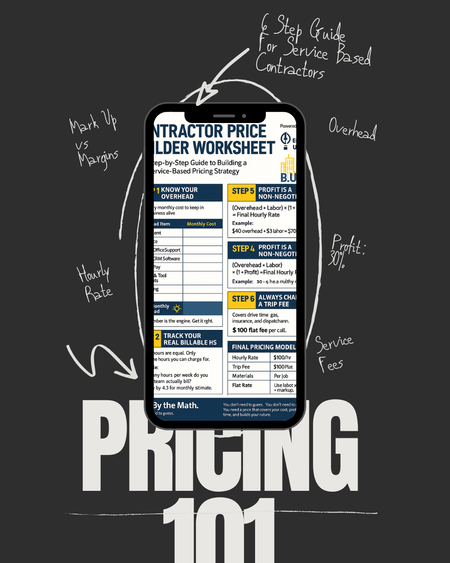
The number one question I receive is tied directly to the fact, most contractors are still guessing when it comes to pricing. Overhead. Profit. Labor rate. Trip fees. They think just because they throw a number they hear their competitors use, thats all that they need. It may work, but how and what do you divide these funds is just as important for your business health. If you don’t know how to do the math, you’re not building a business. You’re surviving check to check and think you need more work, when you do not. So here’s the plan: This Tuesday & Thursday on IG, I’m walking you through our Contractor Price Builder Worksheet FREE on instagram live. We will cover: - How to calculate your real hourly rate - The difference between markup and margin - Why profit is a non-negotiable - And how to price with confidence Join the session. Bring your numbers.1.5KViews3likes23CommentsMilwaukee vs DeWalt Tools, which one?
We’re Lock Nerds Locksmith, a Buffalo, NY-based company that’s always relied on Milwaukee tools. But we’re curious—what tools do other pros trust? We're looking for honest pros and cons between Milwaukee and DeWalt to see if it's time for us to reconsider our setup.1.1KViews6likes21CommentsQuote Disclaimers - General Contracting
What kind of disclaimers, contract language do you include in every quote you send? We are a general contractor so the disclaimers can be vague-ish compared to a roofing company, etc. I just had a situation where I needed to add a dust control disclaimer. I asked ChatGPT for 5 disclaimers and it was super helpful but I'm curious what you always list on your quotes. For reference, this is what ChatGPT recommended: Here are five contract disclaimers for a general contracting business: Unforeseen Conditions: While we strive to accurately assess all project details during the planning phase, unforeseen conditions (such as hidden structural damage, hazardous materials, or utility conflicts) may arise during the project. These conditions could impact the scope, timeline, or cost of the project and will be addressed through a change order. Material Delays: [Your Company Name] is not responsible for delays caused by the unavailability of materials, supplier shortages, or other supply chain issues beyond our control. Any resulting delays may affect the project timeline, and adjustments will be communicated as promptly as possible. Owner-Provided Information: [Your Company Name] relies on the accuracy of information, plans, and documentation provided by the client or their representatives. Errors, omissions, or inaccuracies in this information may result in additional costs or delays, which are the responsibility of the client. Third-Party Contractors: In instances where the client employs third-party contractors or suppliers not under our direct control, [Your Company Name] assumes no liability for their performance, workmanship, or delays. Coordination with these third parties may impact the overall project schedule or quality. Environmental Factors: [Your Company Name] is not responsible for delays, damage, or additional costs caused by weather, natural disasters, or other environmental factors beyond our control. Any necessary adjustments to the project scope or timeline due to such events will be documented and discussed with the client. Each disclaimer ensures clarity in client expectations and protects your business from potential disputes.916Views1like3Comments