What tools are anyone using for team communication?
The internal communication in Jobber is not robust enough for multiple team members, especially when we may be working on the same customer/job at different times. Features needed: - ability to mention/tag other team members so they are notified of the comment or message - keeps the communications "within Jobber" at least in knowing which customer the communication pertains to Is there a 3rd party tool/plug in that anyone has found useful for this need? Or even better, Jobber team, is there any plan to deploy this as part of a standard feature?877Views5likes13Comments
How do you manage quotes that never get accepted?
Hey everyone! I'm curious how you handle quotes that customers never respond to. Does Jobber's built-in follow-up automation do enough to bring those customers back, or do you still have to manually track unanswered quotes and chase leads? What part of the process do you find most frustrating? I'd be interested to hear what's working for you and what could be improved.71Views2likes7CommentsHow to Present Home Service Agreements Seemlessly
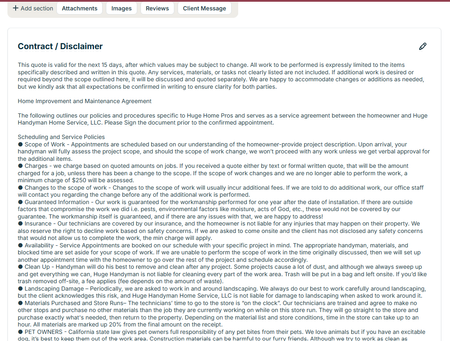
So we are in California and Home Service Agreements are a part of life. But did you know there is a place to put this in your contract so it covers your butt and your clients? At the bottom of your quotes there is a contract/ disclaimer section to put yours in easily. Do you have different types of jobs that require different disclaimers? Great - AnthonySalazar just did a post about templates. You can make a different contract for each one. One thing to consider - not everyone reads this. Kind of understandable. These are the not fun things about a job. One idea is to make a fun video about what's in it and send it to them when they accept a quote. Don't judge, we made this video a couple years ago but it's a good illustration of what you can do. Honestly you can make it on your phone Our Video on You Tube Another Idea is to have it as an attachment that you send out every time. This is less ideal because I like getting their signature on the document itself. Either way - make sure you are putting this in your quotes. If someone comes back to you about something that's in your contract you are covered!13Views1like1CommentAdding Custom Job Status Labels in Jobber to Filter and Track Jobs by Stage
We do appliance repair during the day we go out to the diagnosis and in the evenings write the estimates in office, if it wasn’t able to be fixed would there. Our old software had a system where we could attach customized labels to every job, such as need estimate written, need to invoice, two main job, needs parts ordered or follow up And in the office, you could go through and filter the jobs by these labels then you know none got missed. The tech could add the labels from the app and office staff could from the desktop. Has anybody found a way on Jobber to do something similar or an integration that would work?273Views2likes13CommentsEquipment / asset history per unit: how are you handling it today?
I've seen a few threads asking for equipment tracking in Jobber (model, serial, install date, warranty, and service history per unit). I'm curious how people are working around it today: - Custom fields on the property? - Nameplate photos attached to visits? - A separate spreadsheet or app? - Or does it mostly live in your techs' heads? And a second question: what would matter more to you (a) giving the customer a history report for their unit, or (b) getting a list of who's due for maintenance, whose warranty is ending, or whose 12+ year-old unit is ready for a replacement quote, so you can book the work? Transparency: I'm a founder building an add-on in this area, and I want to build what you'd actually use, not what I assume. Not linking anything here. If you'd be up for a quick 15-minute chat about how your shop handles this, just reply here and I'll reach out. Thanks!12Views0likes0Comments
Australian customers: full subscription prices, fewer features. When will this change?
As an Australian business owner using Jobber, it increasingly feels like Australia has been abandoned when it comes to access to the full platform. We continue paying substantial subscription fees, yet important features available in other markets remain unavailable here: Two-way text messaging. Jobber’s Google review tools connected to our Google Business Profile. Access to the full Marketing Suite. Jobber Payments. These features directly affect how we communicate with clients, market our businesses, build our reputation and get paid. What makes this particularly frustrating is seeing smaller Australian CRM startups, including new “vibe-coded” platforms, offering two-way texting. If they can make it work, why are Australian Jobber customers still waiting? Homeworks explicitly supports two-way texting in Australia and offers email marketing, automation and online payment tools. That makes it difficult to understand why these gaps persist with Jobber. If there are technical, regulatory or commercial barriers, explain them clearly. From a customer’s perspective, I haven’t received an explanation that makes sense of the difference. There is also a fundamental question of value: why are Australian customers expected to pay standard subscription prices while receiving a materially smaller feature package? I recognise that some features are paid add-ons. The frustration is that we cannot even access those options here. I’ve raised these concerns with Jobber support repeatedly. In my experience, the responses have been generic acknowledgements without a meaningful explanation, clear commitment or useful timeframe. Whatever the intention, the message I’m left with is that Australian customers simply aren’t a priority. I’d like Jobber to publicly address three questions: What specifically is preventing these features from being available in Australia? Is there a committed Australian rollout plan, and what are the expected timeframes? Will Jobber offer pricing that reflects the reduced functionality available to Australian customers? I’m posting this because I want the issue acknowledged and addressed. Australian businesses invest real money and time into building their operations around Jobber. We deserve transparency about what we’re paying for and whether these gaps will actually be closed. Are other Australian users feeling the same way, and has anyone received a concrete answer beyond their feedback being passed along?Client Communications
I would like to see space to log our own client communications - not in notes! For example, when we chase quote, we sometimes email but other times we call the client. Unfortunately there is no where to log that they were called including date and time unless i put it in the notes on the quote. Or the notes on client page, which then does not include the items sent via Jobber. It would be handy to have a communications area that we could add communications too that also included the quote number to so we could search and see only communications related to that particular quote. This feature would be particularly handy when dealing with property managers who have 10 sites in quote stage.321Views2likes5CommentsHow Do I Build a Custom Report in Jobber Without Hiring Someone or Using Spreadsheets?
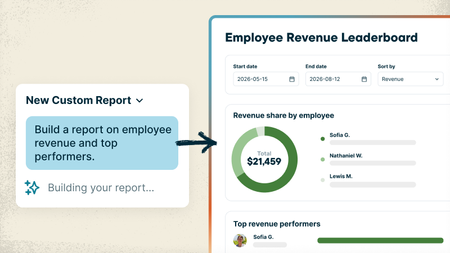
Every service business tracks things a little differently, and sometimes the answer you need is spread across different places in Jobber. Maybe you want to see which customers haven’t booked again this year, which neighborhoods bring in the most recurring revenue, or which jobs ran over their estimated hours. Getting answers that specific usually means exporting reports, digging through spreadsheets, or paying someone to build the report for you. With the new Custom Report Builder, you just type what you want to see and Jobber AI builds the report from your real numbers, with charts included if you want them. And unlike the standard reports, which only look at one area at a time, a custom report can pull data from across Jobber into one place: quotes, jobs, invoices, timesheets and more. What that looks like: Ask it like you'd ask your office manager. Something like "Show me revenue and labor hours by job type for the last 6 months" or "Which clients bring in the most revenue compared to the hours we spend on their jobs?" Need a change? Just say so. "Add a column for profit," "only show the previous 3 months." It updates and saves the report for you. Pulls from everything from across Jobber. Data from quotes, jobs, invoices, timesheets and more can live together in one report, so you can see the bigger picture without jumping from one report to the other. That's something the standard reports can't do. Save it and check back anytime. Reports live on your Custom Reports page and refresh with your latest numbers. Your team's permissions stay the same, so nobody sees what they shouldn't. Custom Reports are available on the Plus plan 🏗️ Build your first custom report 📖 Learn more 🎥 Watch it in the Jobber Now announcement What's the first report you'd build? Post your prompt below. Might give someone else a good idea!85Views0likes2Comments
How to manage duplicate clients, flags, and scheduling visibility in Jobber?
Hello, A few things I'd love to see added to jobber, if not already there and I have the wrong package. Being able to merge clients! When multiple people answer the phone, some do not check for previously entered spelling errors and such, we end up with multiple duplicate clients. Multiple jobs/invoices are scattered within all the duplicate clients. Being able to flag clients, maybe a color coded flag like red for no service at all, yellow, needs payment collected first or allow us to label our flags how we need to. Or give us a drop down box to make selections by color, or a preview box so we see it as soon as the clients name is entered before scheduling and without it being on the profile for invoices and receipts. Color highlight for clients that are on the schedule, like if someone is flexible and can be worked in on a day we have a cancelation or a color if they have to have a solid appointment day. These colors need to be separated from the team colors and be able to be seen on the calendar view so CSR's can see at a glance that someone can be worked in right away if there is a cancelation. That's all I got for now :)Effective Tagging - Who Is Doing It And What is Your Strategy?
I feel like tagging within customers might be the most forgotten about thing on our team but probably the lowest hanging fruit to keeping our information organized. Right now we are just tagging people we don't want to work with anymore and people that need to leave us a review. I''m struggling to do it in a way that's super effective. So for you tagging buffs out there, what are you doing to tag clients ad what strategy do you have? jobber - If you guys ever integrated JOB tags that would be amazing. I'm thinking we could tag jobs by category then reference them quicker. Instead of thinking of which clients we did which types of jobs for. Just putting "trim carpentry" or "doors" then seeing all the jobs we tagged with that would be clutch!60Views1like2Comments